
 How to download?
Video
Music


VideoSaver YouTube Video Downloader makes downloading so easy. It is the best downloader you can rely on.
Save Instagram content smoothly on any Device
There is no denying that millions of people around the globe use Instagram for entertainment, marketing, information, and spending leisure time. VideoSaver makes downloading online content more convenient and reliable.
In just a few clicks, you can download whatever content you want from Instagram. Whether it is a reel worth sharing, a video you want to keep, or a story you want to visit again. VideoSaver seamlessly helps you to download videos, whether you are using Android, iPhone, Windows, or Mac.
Download content in Full HD Quality
Enjoying your downloaded content without compromising on quality is a pleasure. VideoSaver lets
you download videos and reels in 1920p, 4K, and Full HD, keeping the same quality Instagram
holds for the public. Serving its purpose, VideoSaver helps you convert videos and audio to MP4
and M4A quality, respectively.
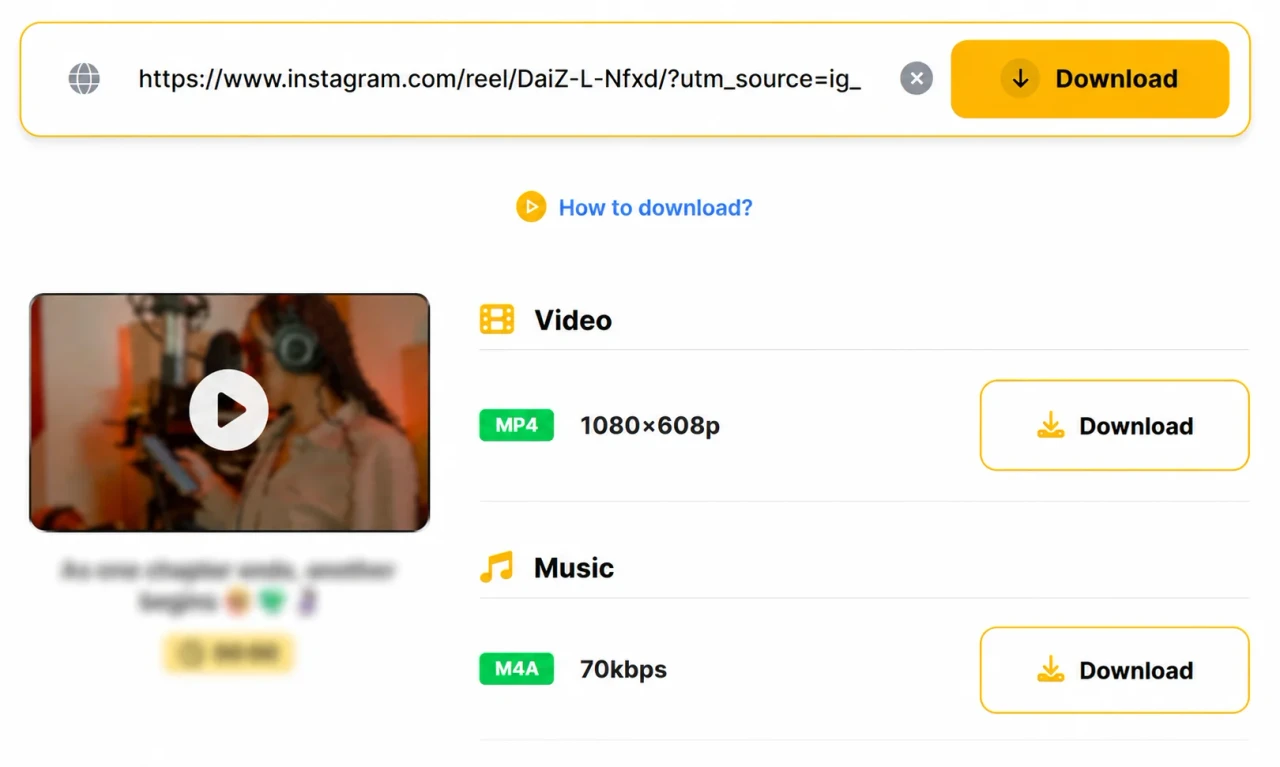
Open the Instagram post, copy the link of the required video, and proceed to the VideoSaver. Insert the copied URL of the video in the search bar. Select MP4 video or MP3 audio. Click the button to initiate the download. Within seconds, your video is downloaded in high-quality resolution.
VideoSaver gives you the feature to download premium quality videos without any watermark.
You are able to download the videos from the private accounts you follow on Instagram.
You are not required to log in to any account to enjoy the free feature of VideoSaver. With simple copy and paste steps, you can download your favourite videos.
VideoSaver Chrome extension, app, and website fetch data automatically after you copy the link of the video.
Using VideoSaver, you can extract your favourite audio in high quality from any video.
Want non-stop entertainment? VideoSaver lets you download unlimited data.
Unlike waiting in long queues. VideoSaver downloads your data in no time.
You can see the video's thumbnail, title, duration, and playback preview before saving it.
The choice is yours - pick a smaller file for quick save or a larger file size for full quality Instagram videos.
VideoSaver offers its users free and premium options. You can plan your package considering video quality, login requirements, download limits, credit usage, and premium benefits through the table given below.
Security is of utmost importance. Considering the need, VideoSaver is designed in a way that your safety and security are not compromised.
VideoSaver Works in more than 12 languages. With no language barrier, you can use it in your desired language.
VideoSaver makes the downloading process very simple and smooth. In three simple steps, you can download your video without complexity.
With no ads, no redirect pages, sign-up forms, and no unnecessary waiting. No matter where you are, whether you have an internet connection or not, your non-stop entertainment is our priority.
Video Saver makes it effortless to download videos, audio, reels, shorts, and photos in just a few clicks. Built for speed, privacy, and a smooth experience, it works seamlessly across both mobile and desktop browsers.

Our server processes the link in seconds. Paste the link, and VideoSaver automatically detects the source.

Our server allows you to use this tool in 12 different languages, including Spanish, Hindi, English, and more.

Select your preferred video quality, from 144p up to 4K, and save videos in the best available resolution.

Supports YouTube, TikTok, Instagram, Facebook, and more.

Download your favorite content on Android, iPhone, Mac, Linux, or PC.

Your privacy matters. VideoSaver operates locally and stores no history or personal information.
Instagram media may be protected by copyright, trademark, privacy rights, or platform terms. A public post or video does not automatically give permission to reuse, repost, edit, or commercialize the file. You are responsible for checking the original source and using media only when you have the right to do so.
VideoSaver is the go-to downloading helper that allows you to download Videos from Instagram to enjoy the content when you do not have an Internet connection.
VideoSaver allows you to download videos in 144p-4k and HD quality, in MP3 and MP4.
Enjoy free video downloads up to 480p quality without logging in to any account.
You can download the videos from the Private accounts you follow on Instagram.
Yes. VideoSaver enables you to directly download videos from Instagram in their original quality, without a watermark.
Simply open the specific slide that holds the video, copy that slide’s link from the share button, and paste it into VideoSaver. Click the download, and your video is saved in seconds.
The downloaded Instagram Videos are stored in the default download folder set by your browser. You can easily change the location in the browser settings to make it easily accessible.
No. There is no limit on the download. You can download and enjoy endless videos.
Open the IG app on your iPhone or iPad and copy the sharing link of the video. Go to the VideoSaver, paste the link into the input field, and hit the button on the right side of the field to download the video.
No. We do not keep the history of your searches and downloads. It is against our policies.
If you want to save a public post for your personal use, it is generally allowed. Copyright always belongs to creators.
Join millions of users who rely on Video Saver for fast, easy, and reliable downloads