Talking about the platform that is widely used for entertainment, then Snapchat holds a prominent spot for that. Its Spotlight feature is full of short viral trends and original creator content. But if you are stuck in a position where you want to save a video on your device, that is the tricky part. Do not worry because we tried all the available options online and discussed every method in this article.
If you want in-depth detail on not only Spotlight but also the whole content download options, then check out our guide How to Download Videos from Snapchat.
What is a Snapchat Spotlight?
Snapchat Spotlight is a short form video discovery feature. It allows users to browse videos from creators and the wider community, scrolling in a vertical feed. It is also available on the web. Spotlight is designed for public discovery, unlike a private Snap or a message that is shared with a friend. However, public availability does not mean that you have permission to repost or edit other people's content.
If you want to save a Spotlight video for the purpose of offline viewing, personal, or another permitted use, then downloading the video can be more convenient than opening Snapchat again and again.
How to save Snapchat Spotlight without a watermark
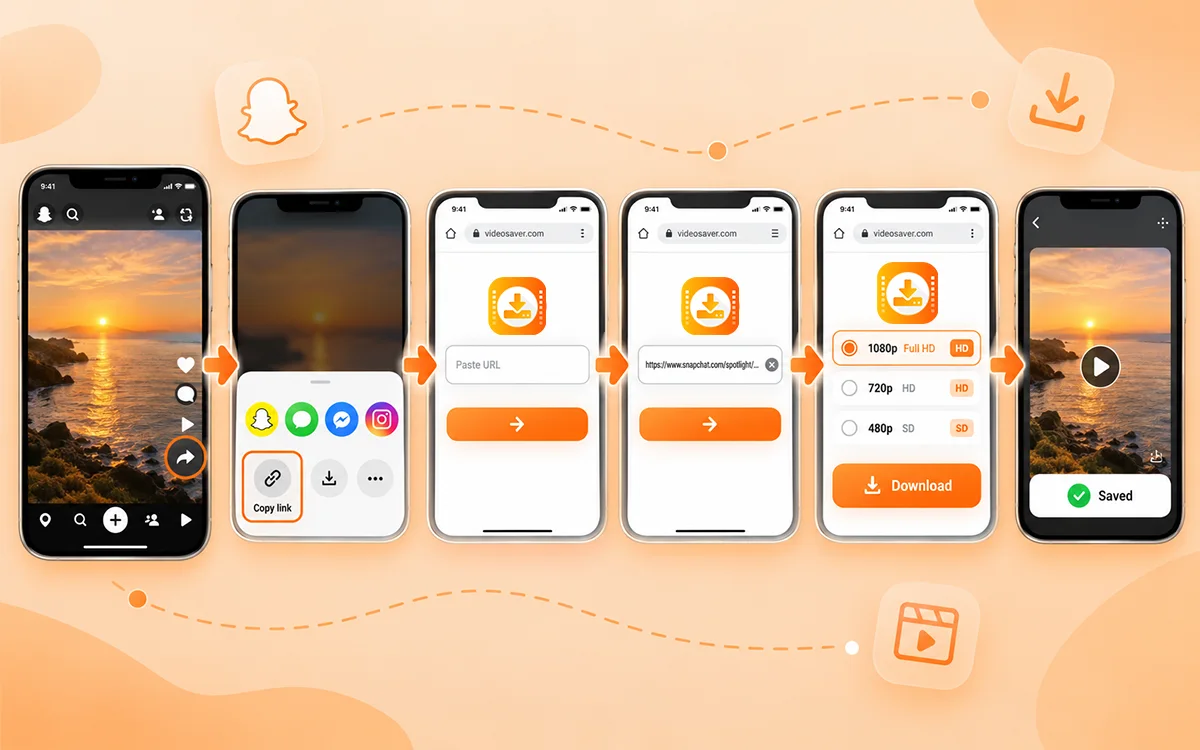
If you are looking for the easiest method, then copying the link and pasting it into the downloader is the best choice.
Open Snapchat
First of all, open Snapchat on your phone or on your web. Enjoy your scroll and find the Spotlight video you want to save on your device.
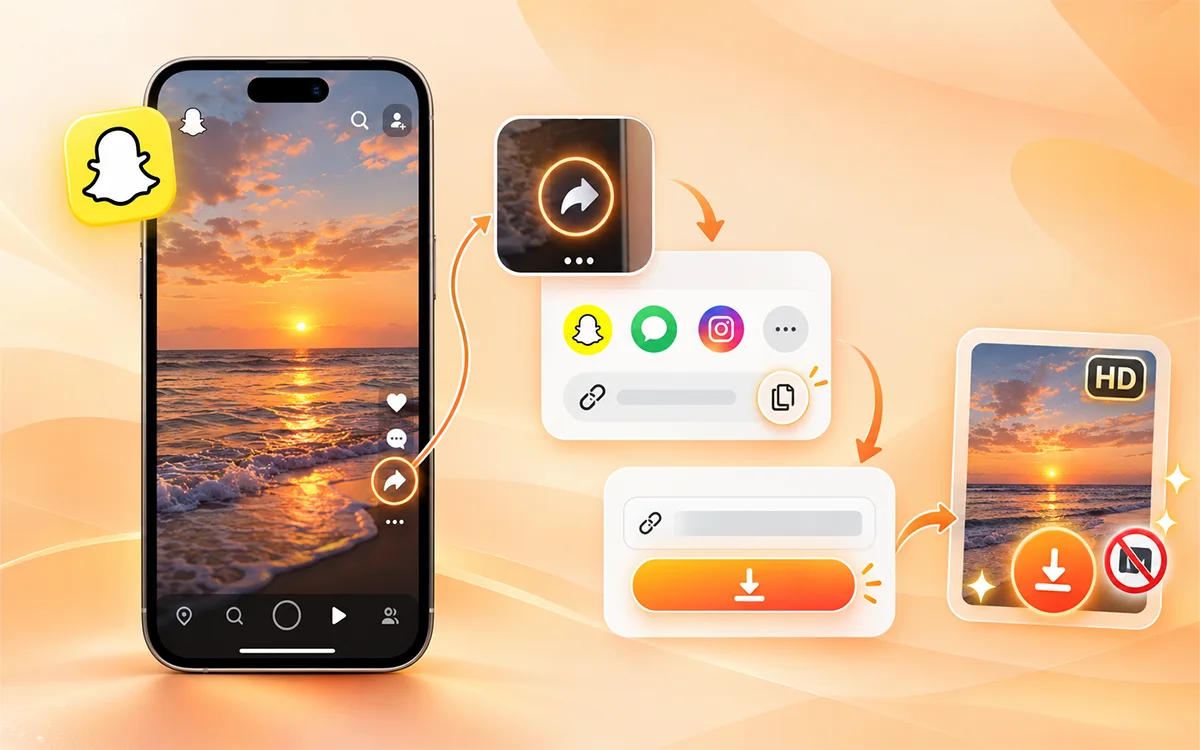
Copy the Spotlight Video link
After you find your favorite file, then tap the Share button. You will see multiple options there, but look for the "Copy the post or video link." Now copy it to your clipboard.
Open VideoSaver
Here is the most reliable and fast tool to save your content online in seconds. Open the VideoSaver Snapchat Video Downloader in your browser. You do not need to install a separate app to use it on your web.
Paste the URL
Once you open the downloader, you will see a box there. Now paste the copied link there into the input field. This tool is developed to detect the supported platform from the URL and process the link.
Select the Available Quality
The quality you see depends on the source and available options.
- 480p SD
- 720p HD
- 1080p Full HD
The maximum quality depends on the original video and what the source makes available. If you choose 1080p, it does not increase the real quality of a video that was uploaded at a lower resolution.
Press the Download Button
After you select the quality, press the Download button next to your preferred quality. The video will be saved to your device. Normally it will be in the Downloads folder of your browser or the location you have selected for downloaded files.
Tip: If you want the best balance between image quality and file size, then 720p or 1080p is a practical choice when those options are available.
How to Download Snapchat Spotlight on Android
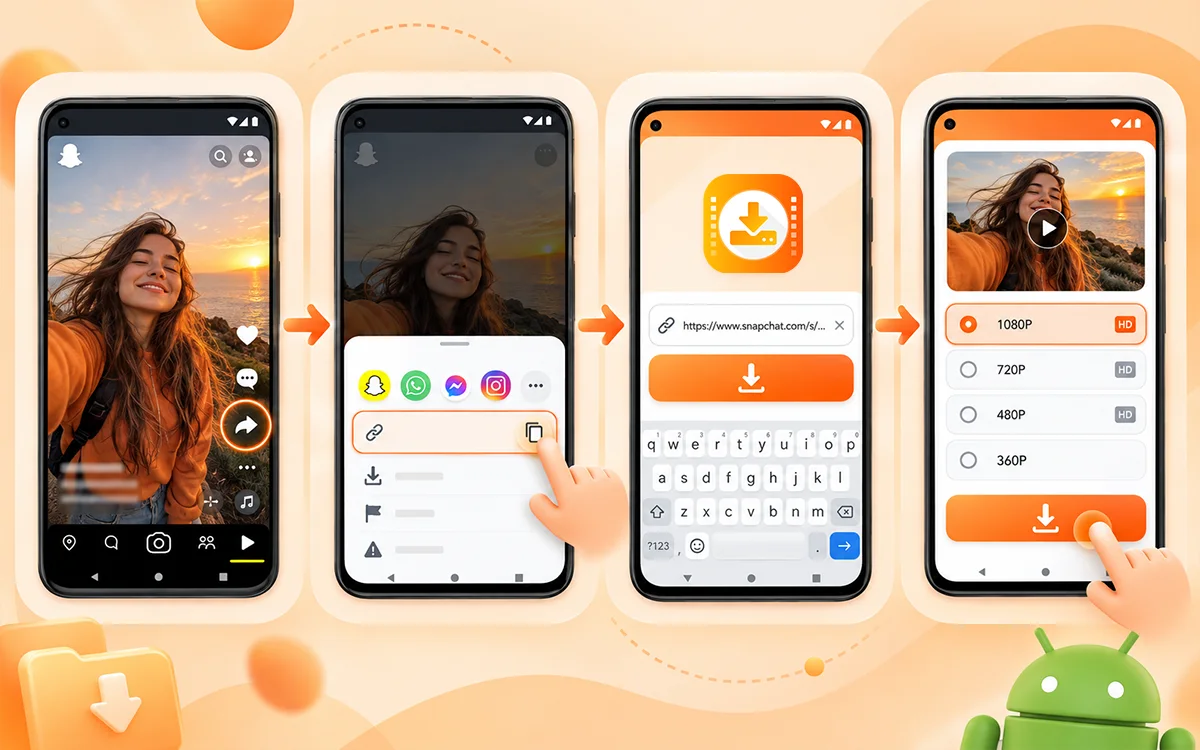
All the Android users can save Spotlight videos with the VideoSaver Android app. This is the fastest way and saves you content in a few steps. All you have to do is install the app from the Play Store and follow these steps.
- Open Snapchat and go to the Spotlight video you want to save.
- Now tap the Share button and copy the link to the file.
- Move to the VideoSaver app and paste the link into the box.
- At last, select from the available quality and press the download icon.
On Mobile Browser
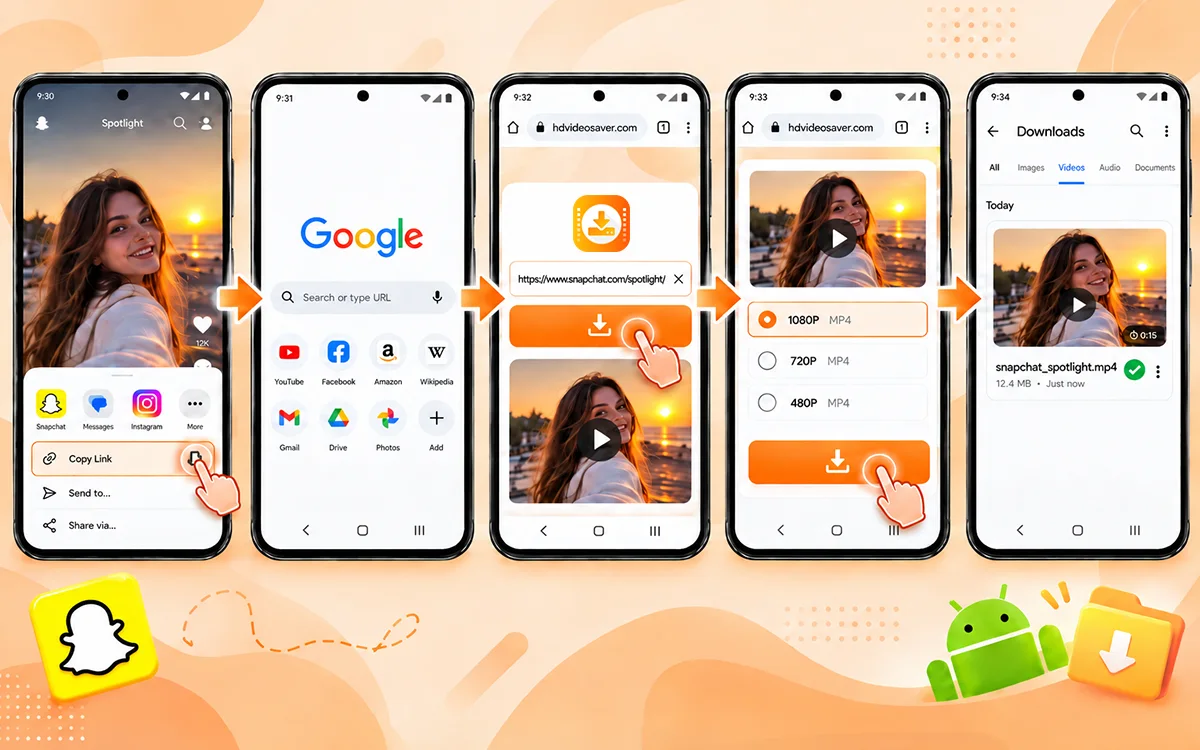
Do you want to install any app? Not a problem. You can use this tool straight on the browser of your phone.
- Open Snapchat and find the Spotlight video.
- Then click Share to see the options and copy the video link.
- Open Chrome or another browser.
- To paste the copied URL, open VideoSaver on your browser.
- Select the available HD quality.
- Now tap the Download button to get the file on your device.
This method is useful for the people who do not save the content on a regular basis.
How to Download Snapchat Spotlight on iPhone
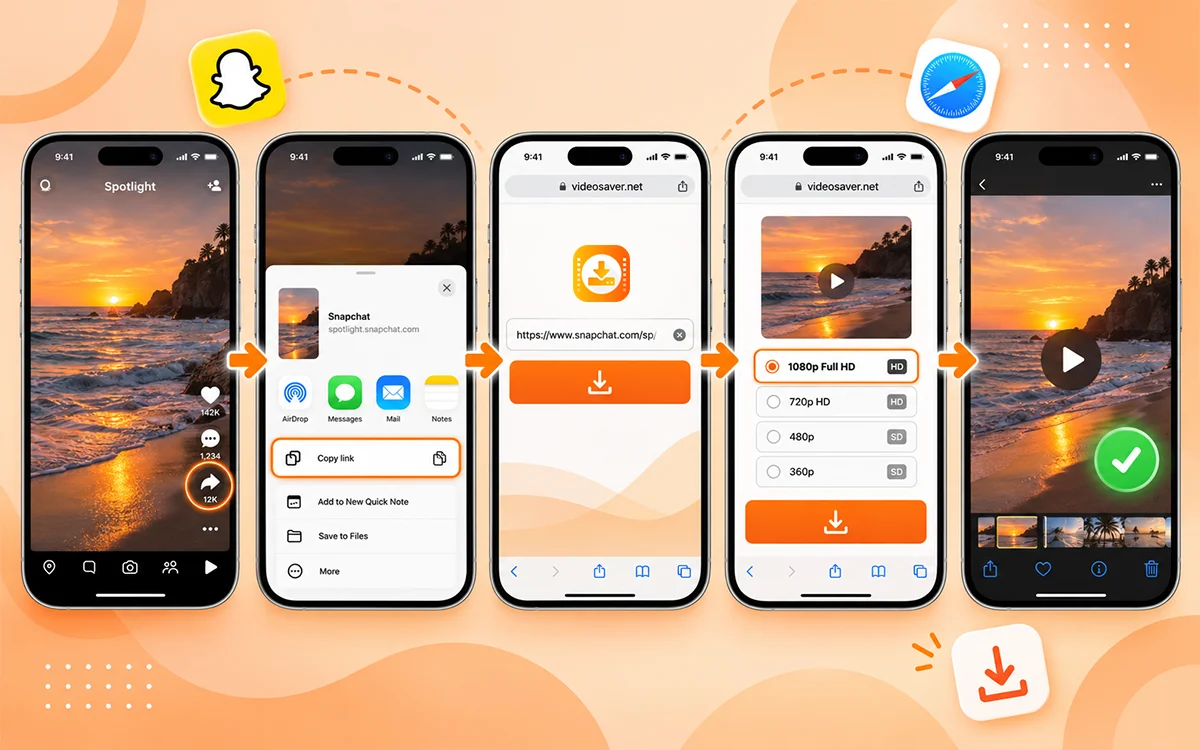
There is nothing to worry about if you are an iPhone because the process is as simple as on other devices.
- Open Snapchat and find the video you wish to save
- Now press the Share option given below the video.
- Copy the video link and go to Safari.
- Visit the Snapchat downloader and put the link into the box.
- Then select the available video quality and start the download.
- Save or open the downloaded file with the options given by iOS.
Record the Screen
On an iPhone, you can also record the screen as a substitute for a downloader. But this method is not really reliable because of some cons that we discussed later.
- To enable this feature, open Settings and make sure screen recording is available in Control Center.
- Now open Snapchat and go to the Spotlight.
- Open Control Center on your iPhone.
- Then tap the Screen Recording button.
- Wait for the countdown and play the video.
- Once you finish the whole video, stop recording.
- Open the recording in the Photos app.
How to Download Snapchat Spotlight on PC or Mac
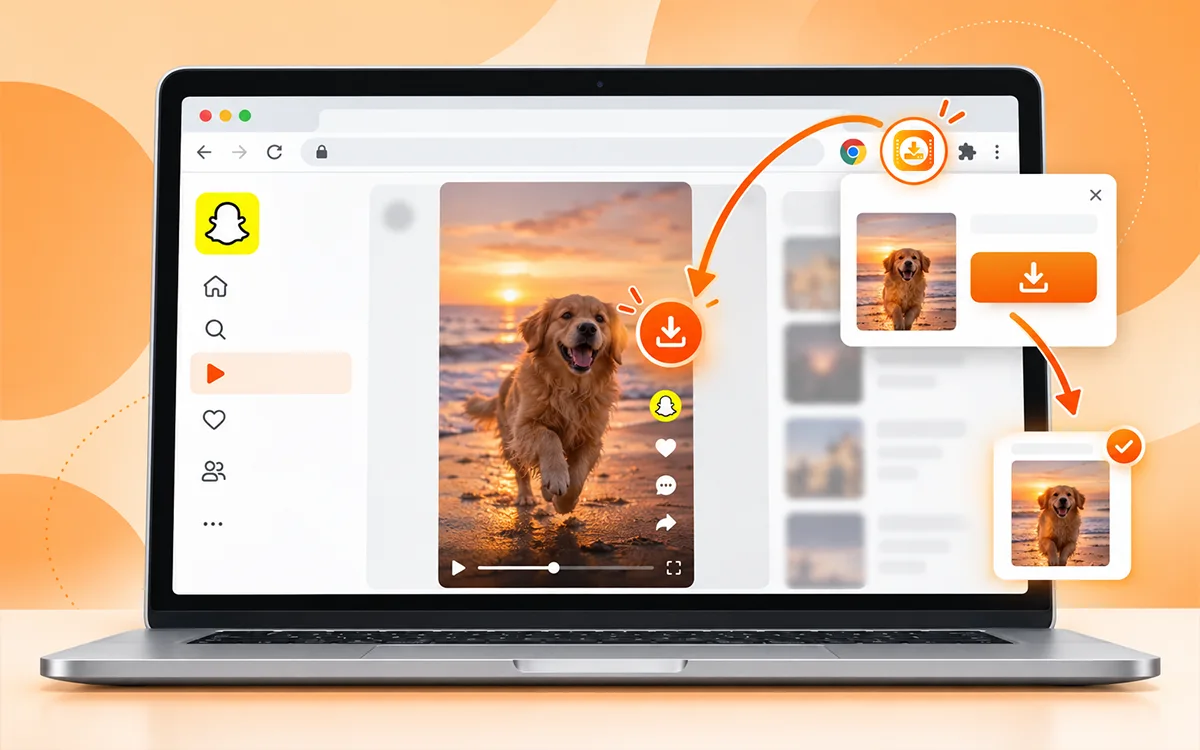
Google Extension of VideoSaver
If you are the person who saves content often, an extension is the best option. You are not bound to open a separate website every time.
As VideoSaver is an all-in-one tool, it provides this medium too. The VideoSaver Google extension helps you download supported media conveniently from the browser.
This way makes sense for people who on a regular basis save videos instead of downloading one video sometimes.
- Get the extension on your device.
- Then sign in after you open the Snapchat website.
- The extension will stream and detect the file and show the download button on its player.
- Press that icon, and your video will be on your device in seconds.
VideoSaver in Your Browser
This is the easiest way to save your favorite videos. Open Snapchat in Chrome, Safari, or another modern browser. You can use the web version on Windows, Mac, and other desktop systems.
- Copy the link to the video.
- Go to VideoSaver and paste the URL in the box.
- Now select quality and click the download icon.
Save Your Own Spotlight Video
Snapchat provides its own options for saving content you have posted. Its support documentation says that you can go to your account's Spotlight & Snap Map area and then press and hold a Spotlight Snap. You will see an option of Save Snap and press it. Snapchat also gives its users web options for downloading your own post. The built-in options are best to consider if you are trying to save your own content.
Video Quality You Should Choose
The quality option you get from the downloader depends on the original source. The quality you choose also depends on the purpose for which you are saving the online content.
| Quality | Best For |
|---|---|
| 480p | Smaller files and basic offline viewing |
| 720p | Good balance of quality and file size |
| 1080p | Higher-quality viewing on phones and computers |
Why Choose the Download Option Instead of Screen Recording
There are multiple reasons to not go for screen recording. If you do not want to compromise on the quality of the file, then this option is not for you.
For Better Image Quality
A direct video file avoids the quality loss and extra screen elements that are related to recording the screen.
No Notification or Status Bar
A screen recording can capture other parts of your screen, like the battery and notifications, that you do not want to save.
Less Need for Editing
You may need to trim the start and end of the file if you screen record. These are extra steps to follow, and you also lose the video quality when you trim it. A direct download can be much cleaner.
For Better File Management
A downloaded MP4 file is easier to organize. You are able to move it between devices and use for legitimate offline purposes.
Where Downloaded Spotlights Are Saved
The exact location of your file depends on your device and its settings.
Android
On an Android phone, check your Downloads folder in your Files app. If you do not find it there, then go to the download section of your browser.
iPhone
The iPhone users can check the Files app and look under Downloads or the location that is selected during the download.
Windows
To find your content on Windows, open your Downloads section of your browser or the default Downloads folder.
Mac
Check the Downloads folder in Finder or the download history of your browser.
Is It Legal to Save Snapchat Spotlight Videos
There is a major difference between being able to download the file and reuse it on other platforms. If a video is publicly visible, it does not mean you have the right to repost or sell it; use it in advertising or upload it on other platforms. You are not allowed to edit it for business use or claim it as your own. Always keep in mind that you do not get the copyright if you download the video. The saved content on your device still belongs to the original creator. In different countries and circumstances the legal rules are not similar.
If you want to reuse it, the best way is to get permission from the owner. The security is even stronger if the snap is stronger.
Frequently Asked Questions
Am I able to download Snapchat Spotlight videos in HD?
Yes. VideoSaver offers multiple quality options for supported Snapchat videos. It includes HD resolutions when the source makes them available.
Can I download Snapchat Spotlight videos without a watermark?
Yes, you can. VideoSaver provides watermark-free downloads. You do not need to install any extra software or app to remove these logos or watermarks because this tool does this itself.
Can I download Spotlight videos on iPhone?
Yes. The process is very simple to follow as on other devices. Just copy the Spotlight link, open VideoSaver in Safari, and paste the URL there Within a few seconds you get your file on your device.
Does downloading Spotlight videos work on a PC?
Yes. VideoSaver works through a desktop browser. You can paste a Snapchat video URL and download the available file to your computer.
Do I need to install a Snapchat downloader app?
No. You can use the VideoSaver web based downloader without the need to install a separate downloader app.
Do I need my Snapchat password?
No. You should never provide your Snapchat password to download a public video through a link-based downloader. Uninstall the tool if it asks for your credentials and personal details
Why is my downloaded video lower quality than expected?
The available quality depends on the original source. If the creator's video is not available in 1080p, then a downloader cannot add extra details or quality.
Can I repost a downloaded Spotlight video?
No. You downloaded a video; it does not give you copyright or redistribution rights. If you want to repost or use someone else's content for business, get the permission and follow platform rules.
What to do if I can’t find the downloaded video in my gallery?
You need to check your camera Roll/Photos permission and the destination selected by Snapchat. Check the Downloads folder or the Gallery’s video section on Android.
What to do if my Snapchat Spotlight fails to download?
There can be multiple reasons that you are unable to download the video. Make sure the video is still available and the internet connection is stable.
Final Verdict
Saving a Snapchat Spotlight on your device is a piece of cake. There are no extra skills required to perform this process. All you have to do is copy the link of the video and paste it into the input field of VideoSaver. For different devices, this tool gives you various methods. You can go for any method you want according to your needs for downloading. But always remember that legal and copyright restrictions apply while you download and use the content from social media platforms.
Ready to save a Snapchat Spotlight?
Visit VideoSaver for quick and reliable downloads.