Vimeo is known for the high quality content present on this platform. From films and documentaries to tutorials, music videos and creative projects, is there. If you are a regular user you know sometimes watching a video online is not enough. You might wish to save a video to watch it later offline or want to share it with family or friends.
Fortunately, it is not just a wish. There are several ways through which you can download the content from Vimeo.
In this guide we will discuss all the available methods to download a Vimeo video to your device within seconds. You will get to know which method is best for you at the end of this guide.
Important: Downloading a video and getting permission from the creator to reuse it are two different things. Only reuse it when you have permission to do so.
Is It Possible to Download Vimeo Videos?
Yes, absolutely you can. But not every video can be downloaded directly from Vimeo.
Vimeo gives the control to the owners whether they allow the audience to download their content or not. A download button is available under the video if it is enabled.
But there is a difference between watching a Vimeo video on its own page and watching an embedded Vimeo player on another website.
Vimeo claims that users can not download the videos directly from the embedded player. The Download option is available on Vimeo.com. It means there is no single method that works for every video.
Quick Downloading Ways
In this detailed guide on downloading Vimeo videos, we have discussed every possible way. Choose the best fit for you and get your content on your device.
- Download Directly From Vimeo
- Use an Online Vimeo Downloader
- Use a Desktop Video Downloader
- Use Vimeo’s Mobile Offline Feature
- Download Your Own Vimeo Videos
Download Vimeo Videos Directly From Vimeo
If you want to go for the easiest way to save, just check if the video owner has enabled downloads. You do not need any other website or application.
- First of all, open the Vimeo official app or Website.
- Look for the video you want to save.
- Now scroll down the video player, and you will see a download button or download link.
- Next, click Download and Vimeo will display available versions to you.
- As a final step, choose the preferred version and press the download button next to it.
Why Doesn’t Vimeo Show a Download Button?
There are several possible reasons why there is no Download button. The most common is that the owner has disabled the option. The other reason can be that you are watching an embedded player or that you have not logged in to your account when you are required to do so. Or the content is not available to download. One cause can also be that the video's account or plan setting does not allow downloads.
Use an Online Vimeo Downloader Like VideoSaver
If you want easy and quick downloads on your Android phone, the VideoSaver app is the best source to save content. Install the app from the Play Store and enjoy seamless saving.
Open the Vimeo app and find the video you want to save.
Then press the Share button and copy the link.
At last, go to the VideoSaver app, paste the link in the input field and hit the download button.
You can also open VideoSaver in your web browser. Use the web version on both desktop and mobile phone. Simply get the link and put that in the box to save the video.
Why Use an Online Vimeo Downloader?
An online downloader is important when you do not want to install any dedicated application. It is suitable when:
- You download the videos occasionally.
- You do not want any additional software on your computer.
- You do not stay on a single computer.
- You want a simple URL based procedure.
Use Vimeo’s Mobile Offline Feature
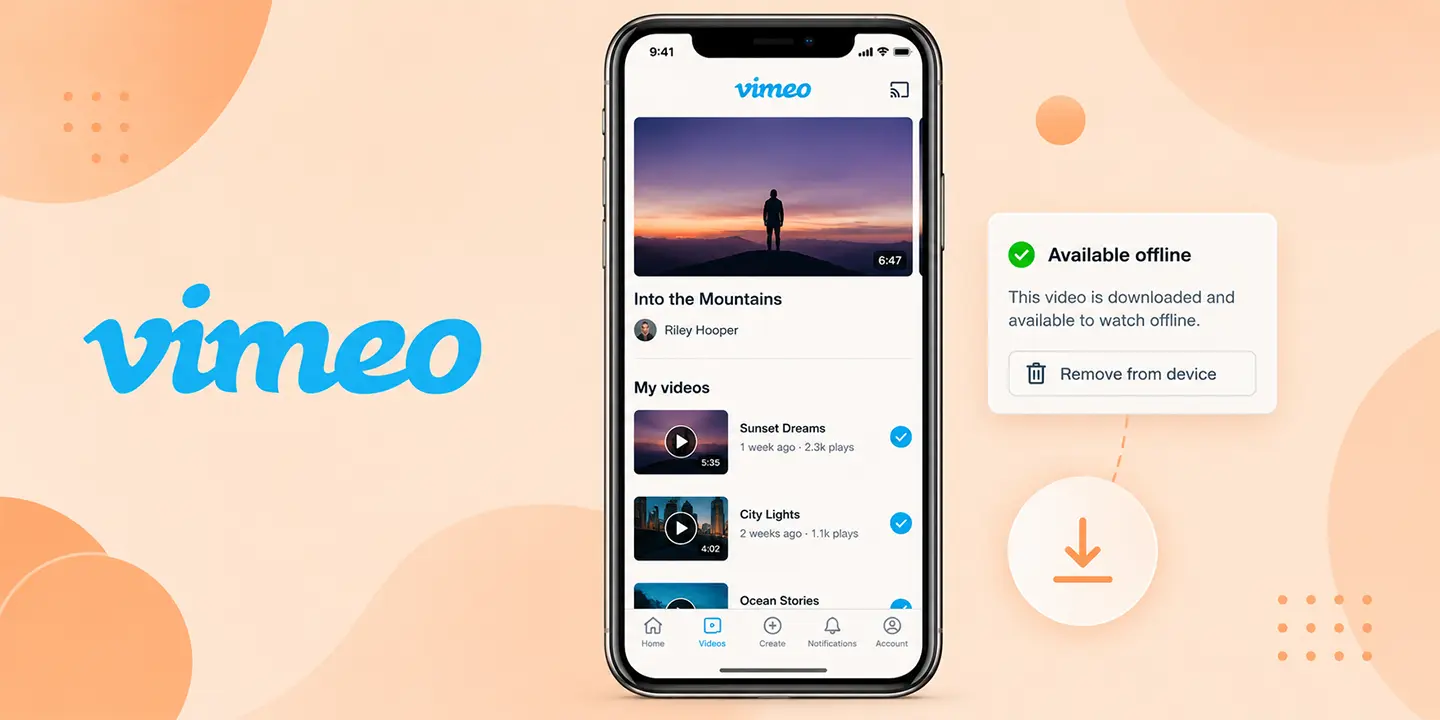
You should understand the difference between downloading a video file and saving a video for offline viewing. The mobile app of Vimeo offers an offline viewing feature for supported content. You can watch it without an internet connection. The offline Vimeo videos do not generally behave like a normal file which you can edit or move to another folder. The videos remain within the Vimeo application. This saving option is preferred when you want to watch the video later offline.
You need a downloader if your goal is to save a video file on your device. A legitimate online downloader like VideoSaver provides a fast downloading process.
Save Your Own Vimeo Videos
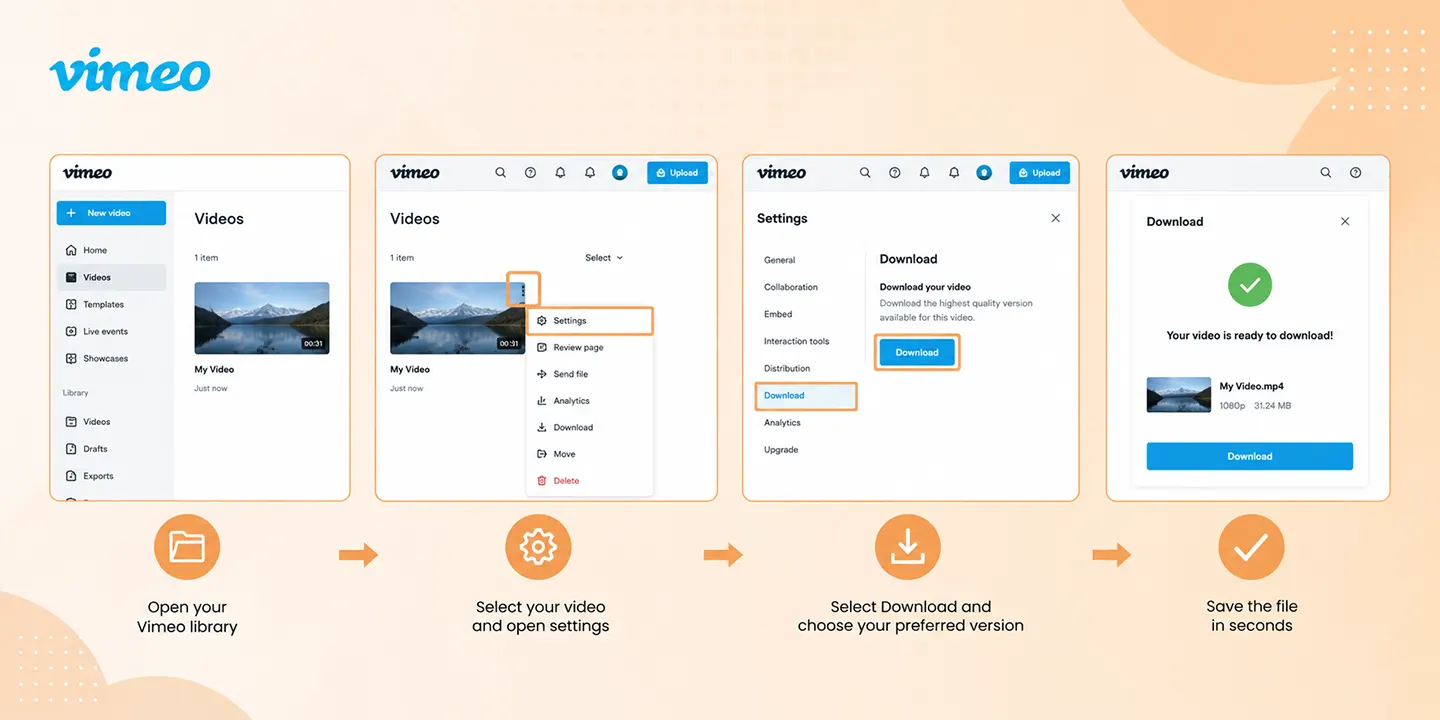
If you have a Vimeo account and you upload the content there yourself, Vimeo gives an official way to save it. It is applicable on eligible accounts. The process is generally as follows.
- First, open your Vimeo library.
- Select your video and open the video settings.
- Now select Download and choose your preferred version
- Save the file in seconds.
This is the best way if you are saving your own content. Because here you are working directly with your own Vimeo account.
Which Vimeo Download Method You Should Choose
There is no single method best for everyone. Every user has different needs and chooses according to that. Here is a quick comparison.
| Method | Best For | Software Requirement |
|---|---|---|
| Vimeo Download | Videos where the owner enabled downloads. | No |
| VideoSaver | For frequent downloads across all devices. | No |
| Desktop Downloader | Frequent downloads and advanced options. | Yes |
| Vimeo Offline | Watching videos without internet. | Vimeo App |
| Vimeo Library | Downloading your own content. | No |
What Video Quality and Format Should You Choose?
The right video quality and format depends on what purpose you are saving it for. Check the available resolutions and save the content
360p
Best when file size matters more than image quality.
480p
A reasonable choice for basic viewing and smaller size.
720p
A good all-purpose option for phones, tablets and everyday viewing.
1080p
A better choice for larger screens, presentations and situations where image quality matters.
4K or Higher
Choose it when the original video genuinely provides that resolution and you need the additional detail.
MP4
This format is best for you if you want to save a complete Vimeo file with both audio and video.
MP3
It is useful when you want only the audio, not the video. Use the audio later for the ringtone or upgrade your music collection.
M4A
This is another audio-only option. IT can provide good audio quality while keeping the file relatively efficient. Remember that higher resolution means larger files. Vimeo itself suggests choosing higher quality resolution for presentation and smaller files when quick playback or sharing is the priority.
How to Download Vimeo Videos on Windows?
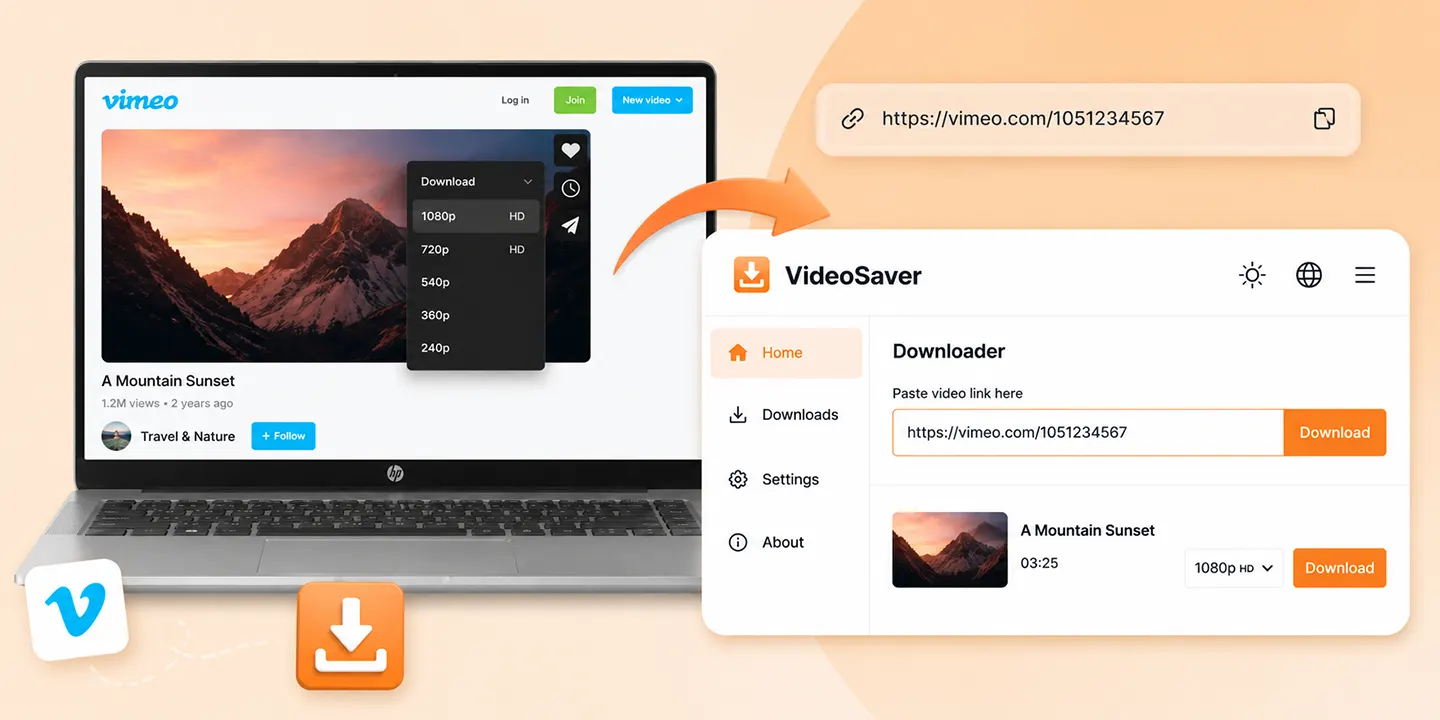
Windows users can use some of the methods given above.
Vimeo’s Download Button
On Windows open the video on Vimeo, then select Download and choose the version and save it.
VideoSaver Downloader
VideoSaver is the easiest and most reliable way to save your Vimeo content. Use the Web or the Google Extension.
- To save the video copy the Vimeo URL.
- Open VideoSaver and paste the URL in the box.
- Now let the tool process the link and then press the download button after you choose the quality.
How to Save Vimeo Videos on Mac
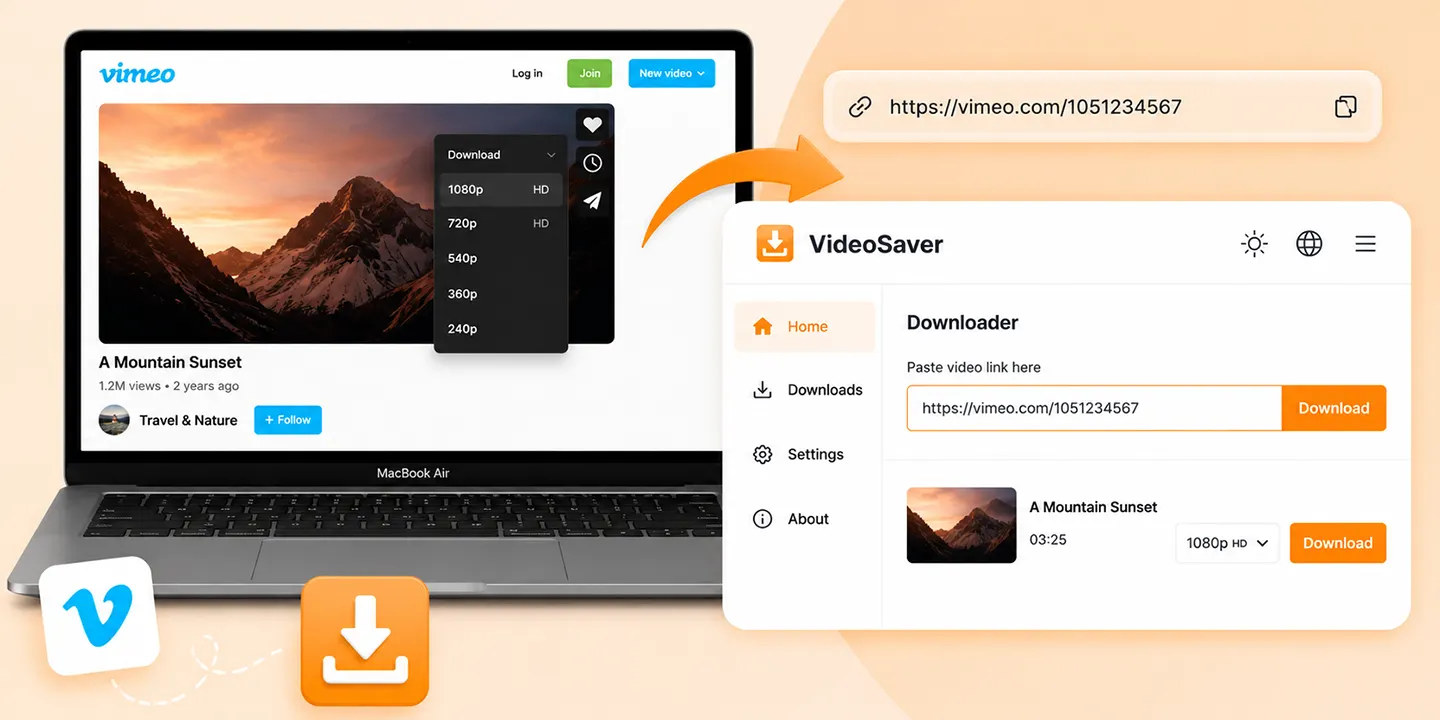
Mac users can follow almost the same methods as Windows users.
Using Vimeo
Just open the Vimeo page and use Download if the option is available.
Using Videosaver
Copy the URL ⇨ open VideoSaver ⇨ paste the link ⇨ choose the quality ⇨ press the button.
How to Download Vimeo Videos on Android?
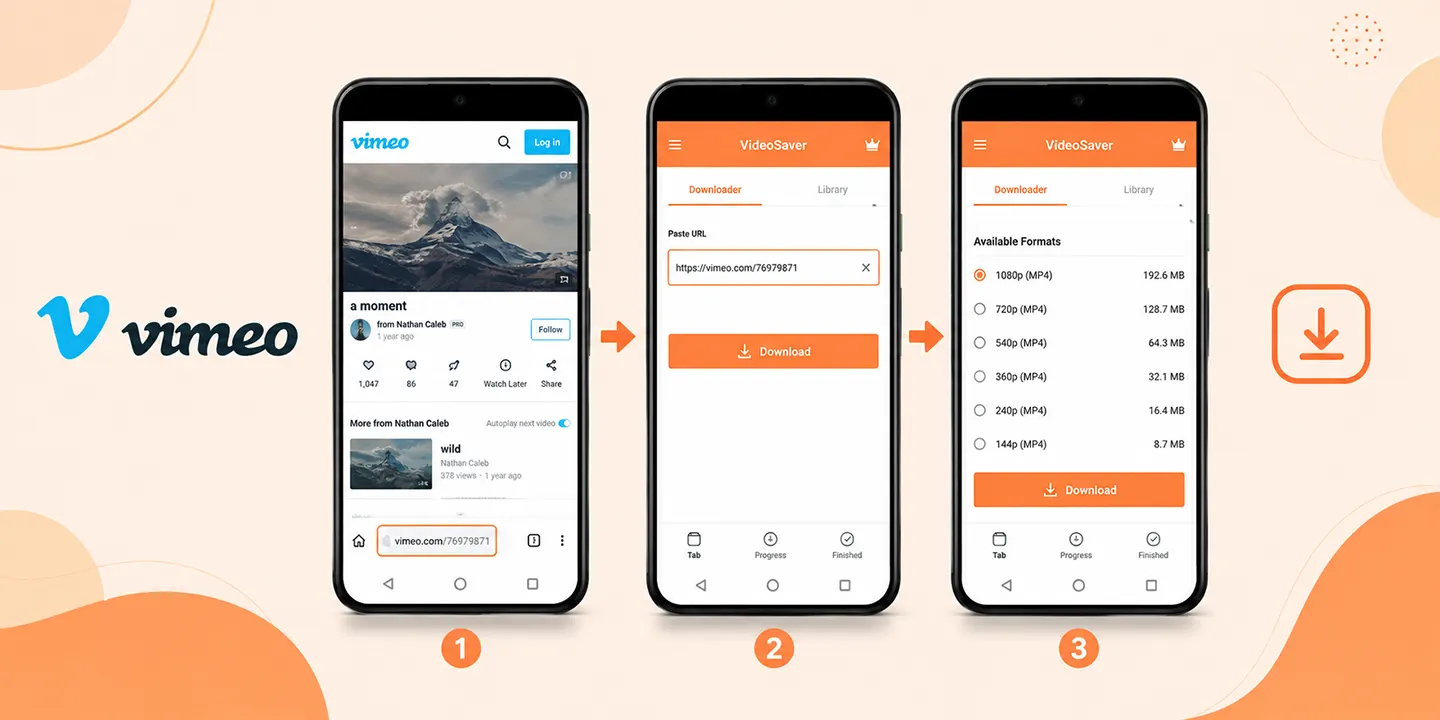
Your Android phone gives you ways to save your content online. You need to choose according to your comfort.
Use Vimeo’s Offline Feature
If you only want to save the videos to watch them later or for offline viewing
VideoSaver Vimeo Video Downloader
If you want to save the file on your Android phone then use the VideoSaver app.
- First, copy the link of the Vimeo video you want to save.
- Then go to VideoSaver and paste the link in the input field.
- Now choose the quality and hit the button to download the file.
How to save Vimeo Content on iPhone?
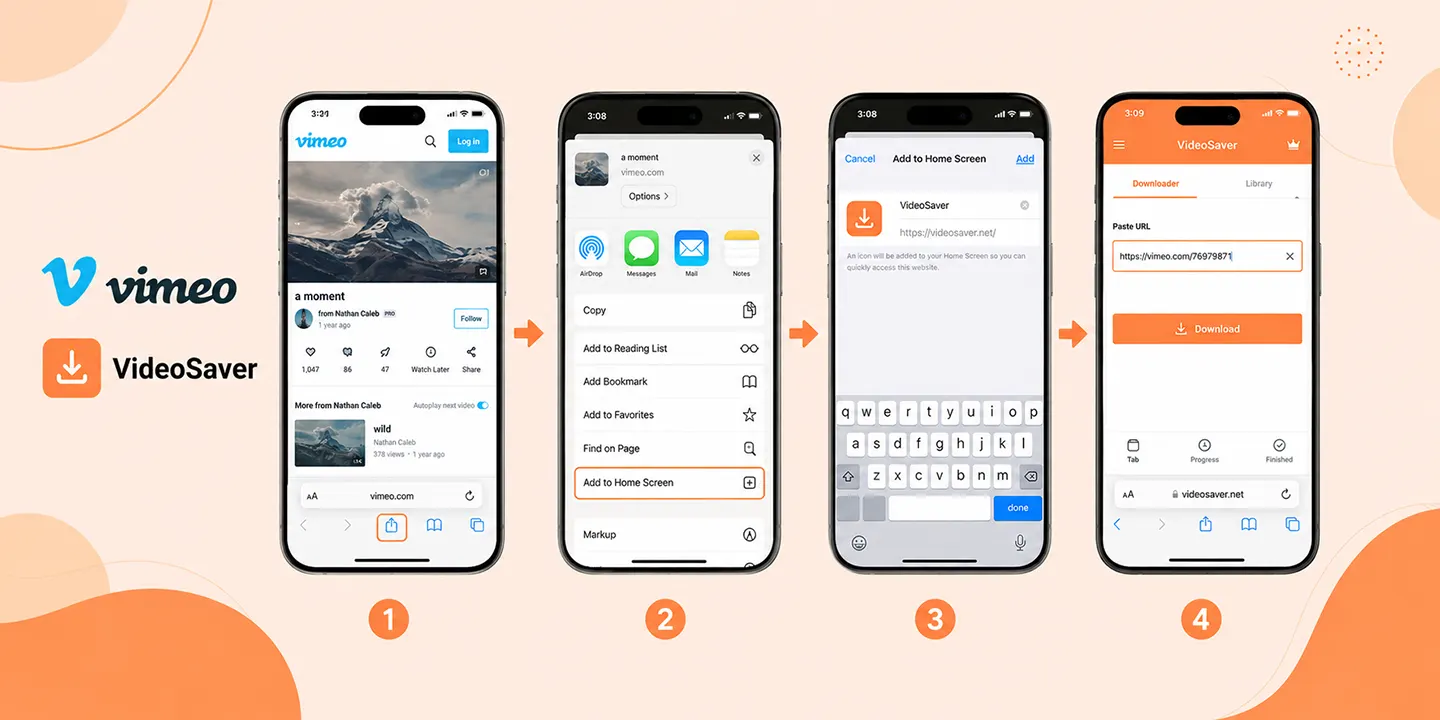
On iPhone, you can use Vimeo's built-in download option or use a dedicated browser based downloader.
Using Vimeo Offline
Use the Vimeo already present download option to save the content on your iPhone. It is suitable if you want to enjoy content offline.
Using VideoSaver
On iPhone you can use VideoSaver in your browser.
- First copy the link to the video from Vimeo.
- Now open VideoSaver in your browser and insert the link in the box.
- Then select the quality from the given options and press the download button.
Device Comparison Table
If you are still confused about which method suits your device best, here is the quick comparison. See and choose according to the device you are using.
| Device | Recommended Method | Why |
|---|---|---|
| Windows PC | Web / Extension | Easy browser-based downloading |
| Mac | Web / Extension | No desktop software required |
| Android | Android App / Web | Convenient mobile workflow |
| iPhone | Web | Works through the browser where supported |
| Chromebook | Web / Extension | Browser based |
| Tablet | Web / App where supported | Convenient for mobile users |
What If the Vimeo Video is Embedded on Another Website?
This is probably a very common situation. You might find a Vimeo Video embedded in:
- A Blog
- A News Website
- A Portfolio
- An Online Course
- A Business Website
- A Forum
The video may play normally but you won’t see a Vimeo Download button. That is because Vimeo does not give a download option for the embedded player.
What Should You Do?
If you can not see the button, first try to locate the original Vimeo video page. If the owner has enabled downloading and it is publicly available, the official Download button will be there. If you have access to the URL then paste it into VideoSaver and save the video.
What If There Is No Download Button?
Before going for a third-party tool to save the content just check the following facts.
- Make sure you are on Vimeo. com. The Download option is available from the video's Vimeo page, not directly from the embedded player.
- If the owner disabled downloading, there won't be any button to save the video.
- Make sure you are logged in to download source files from public videos. Vimeo currently pays attention to this.
- If a video is restricted with a password, paywalled or otherwise protected content can have additional restrictions.
Why Is My Vimeo Download so Large?
Video file size not only depends on duration. It depends on other factors like
- Resolution and Bitrate
- Frame Rate and Video Length
- Video Codec and Audio Quality
Why Is My Vimeo Download Taking So Long?
There can be multiple reasons that your video is taking too long to download. The following can be the causes of this.
- The internet is slow
- Large file size
- High resolution
- Network congestion
- Temporary server issue
- Browser problem
Try These Simple Solutions
- Check your internet connection
- Try again to download
- Choose a lower available resolution
- Try another browser
- Make sure the original Vimeo video still plays. Check whether the service is temporarily unavailable.
Is It Safe to Use Vimeo Downloader?
It depends on the downloader and the purpose for which you are downloading the video. This is the area where users should pay attention.
Some outside downloaders may have aggressive advertising or misleading buttons or redirects. When using an online downloader keep these factors in mind.
- Don’t enter your password
- Do not install unwanted extensions just because a site asks you to do so
- Avoid installing unwanted software
- Always check what file you are downloading
- Keep your browser and security updated
- Make sure to use a reputable service
Frequently Asked Questions
What is the easiest way to save a Vimeo video?
If the creator has enabled downloads then saving the file directly will be the best option. If you want a third party tool, VideoSaver is the safest way to save your content in high quality.
Can I download every Vimeo video?
No. You can not download every video. Vimeo gives authority to the creators to decide whether they let users download their content or not.
Why doesn't Vimeo let me download the video?
It may be because the creator has disabled downloads. The video you are watching can be embedded.
Can I download an embedded video?
No. Vimeo does not give its users the option to download in the embedded player.
Can I download a Vimeo video in HD quality?
Yes. You can save the Vimeo content in high quality available in HD and 4k if available.
Is VideoSaver reliable to use?
Yes. VideoSaver is the most reliable tool. It does not track any of your records or search history.
Final Verdict
If we look for ways to download your Vimeo content online, there are plenty of options. But which way you use totally depends on your needs. If you want to watch something without an internet connection, Vimeo gives you the Download option and that is the direct way to save content.
If you want a browser based or an app tool to download content VideoSaver is a plus. It downloads your content in seconds without any watermark. For frequent downloads VideoSaver Google extension.
Whichever method you choose, remember that download access and copyright permission are separate things. Download vimeo videos which you have permission to save, are legally allowed to use and always respect creators privacy and download settings.
Ready to Download a Vimeo Video?
If you have a Vimeo video you are authorised to save, try the method that fits your needs.
For a quick browser-based and Android app download, copy the Vimeo video URL and paste in VideoSaver to process the link and download an available version.