We were all there when we found an interesting video on TikTok and wanted to download it. It may be a funny video or your own content. But downloading is not always easy. We did the homework for you and discovered all possible ways for you to save TikTok videos in seconds. This guide breaks down every real and working way to save your videos on your device.
Why Download TikTok Videos?
People download TikTok videos for a few different reasons. Sometimes the creator removes or mutes the original audio, so having the copy ensures you do not lose your favourite clips.
Another big reason is building a collection of creative inspiration. Marketing and social media teams pull clips into a library to keep up with trending styles and analyse competitors.
Users also save content for easy repurposing on other platforms. They take a successful TikTok video and post it on Instagram or Facebook. Offline access is a huge plus.
Quick answer: Download a TikTok Video
Grab the Link: The first way to download your video is to tap the Share button on any TikTok video and hit Copy Link.
Open a Free Tool: The other way to save it is using any trusted online video downloader.
Save It: Paste the link and press download. Choose without Watermark to save a clean MP4 file.
Can You Download TikTok Videos
Yes, absolutely. But it depends on the creator's privacy settings. If the account is public and allows you to download the video then you are able to save it in seconds. But if the account is private or has some privacy then the best choice will be to ask the person to share it with you.
How to Download TikTok Videos Directly From TikTok
There are different ways to download TikTok videos. For your convenience this article enlightens all the available methods to save content. Read and Choose!
On iPhone
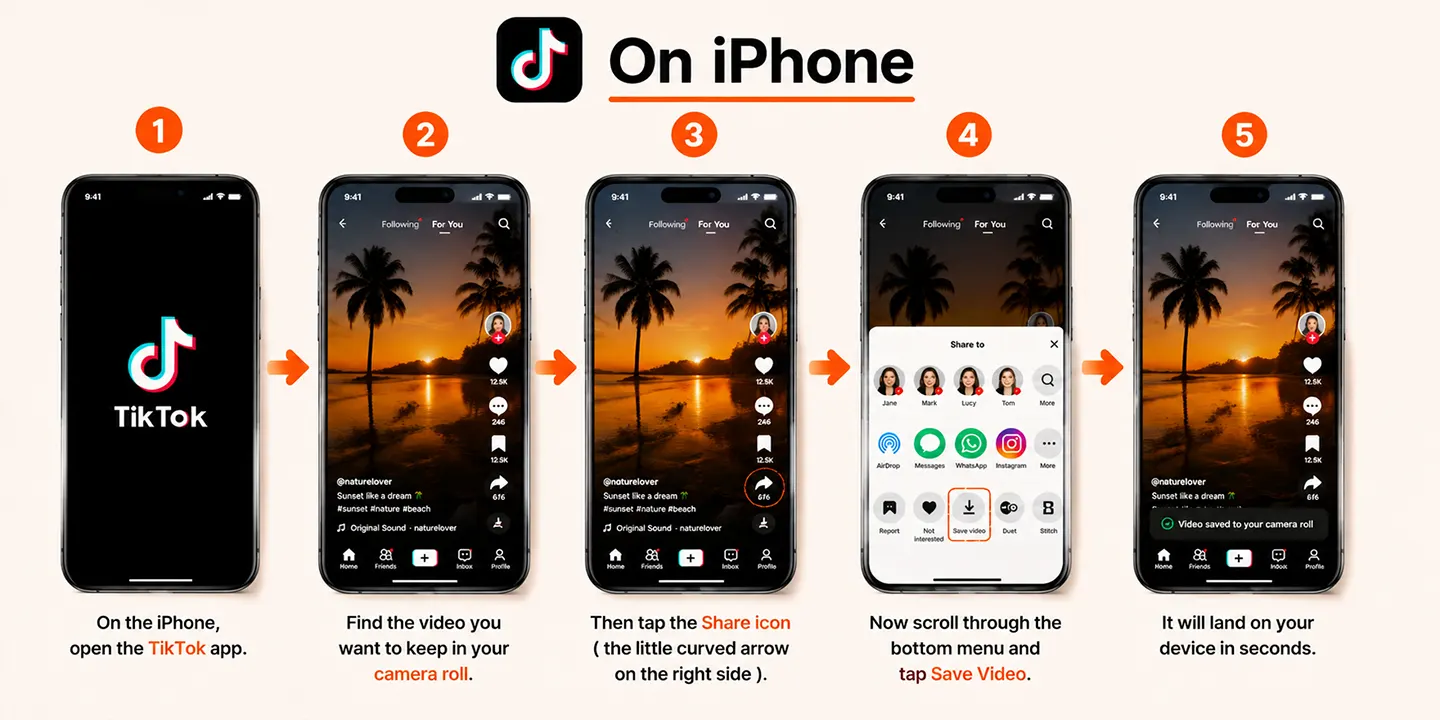
- On the iPhone, open the TikTok app.
- Find the video you want to keep in your camera roll.
- Then tap the Share icon ( the little curved arrow on the right side)
- Now scroll through the bottom menu and tap Save Video. It will land on your device in seconds.
On Android
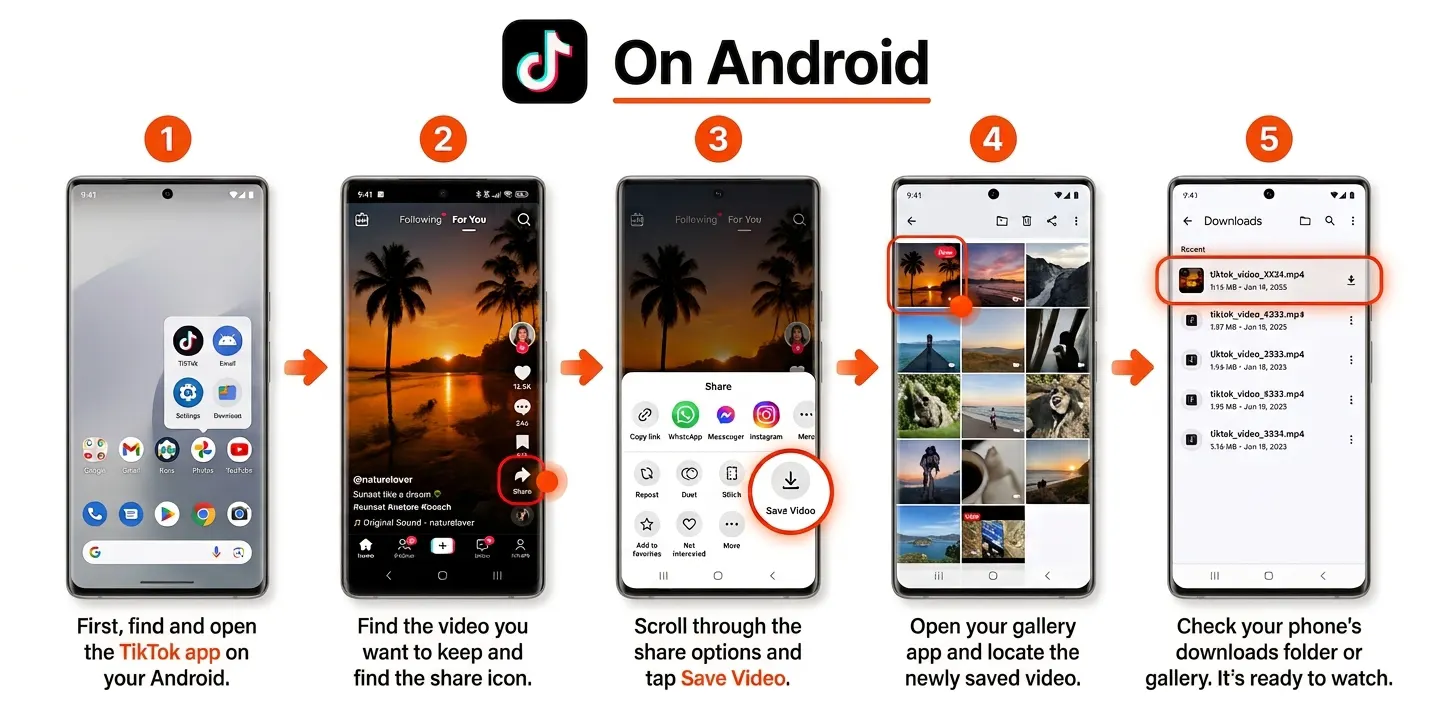
- Open up TikTok.
- Now pull up the video you want to save.
- Press the Share icon on the right side of the screen.
- To download it on your phone hit the Save button. The file will land directly in your gallery or local downloads.
Download TikTok Videos With VideoSaver App
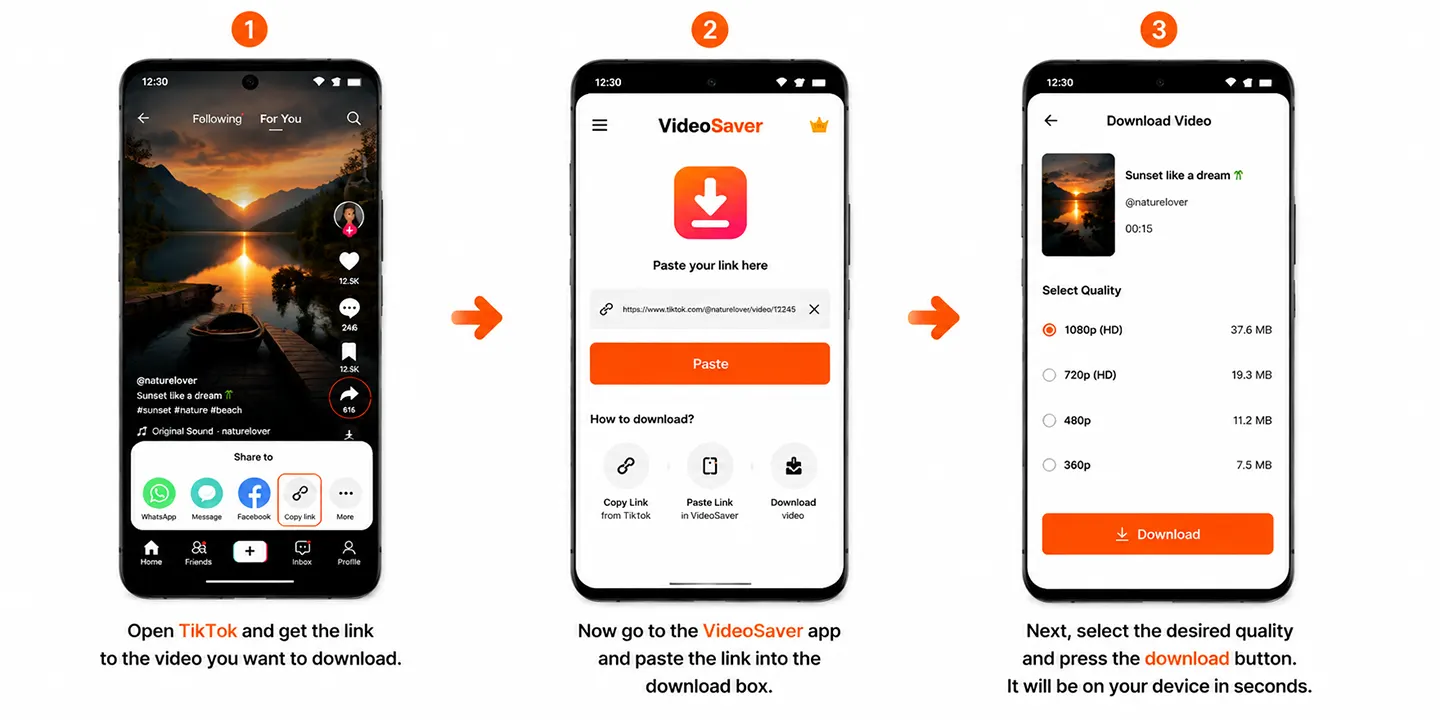
For your best downloading experience, the VideoSaver app is available on the Play Store. If you want to save content from TikTok in seconds, make sure to get the app on Android. After you install the app follow the steps.
- Open TikTok and get the link to the video you want to download.
- Now go to the
- Next, select the desired quality and press the download button. It will be on your device in seconds.
Way to Download Videos Without the App
Using TikTok on Web
To save things, you do not actually need to open an app. If you have not installed the TikTok app on your device and are browsing it on your laptop or mobile browser, you can easily download the video. All you have to do is just grab the URL of any public video and pop it into the url input field. It will be downloaded in the highest available quality without any watermark.
Without a TikTok Account
Don’t have the app installed on your phone? No problem at all. You can completely avoid downloading or registering for an account. Just open TikTok and get the publicly available link to the video and paste it here in this online video downloader.
How to Download TikTok Videos on a Computer
Windows
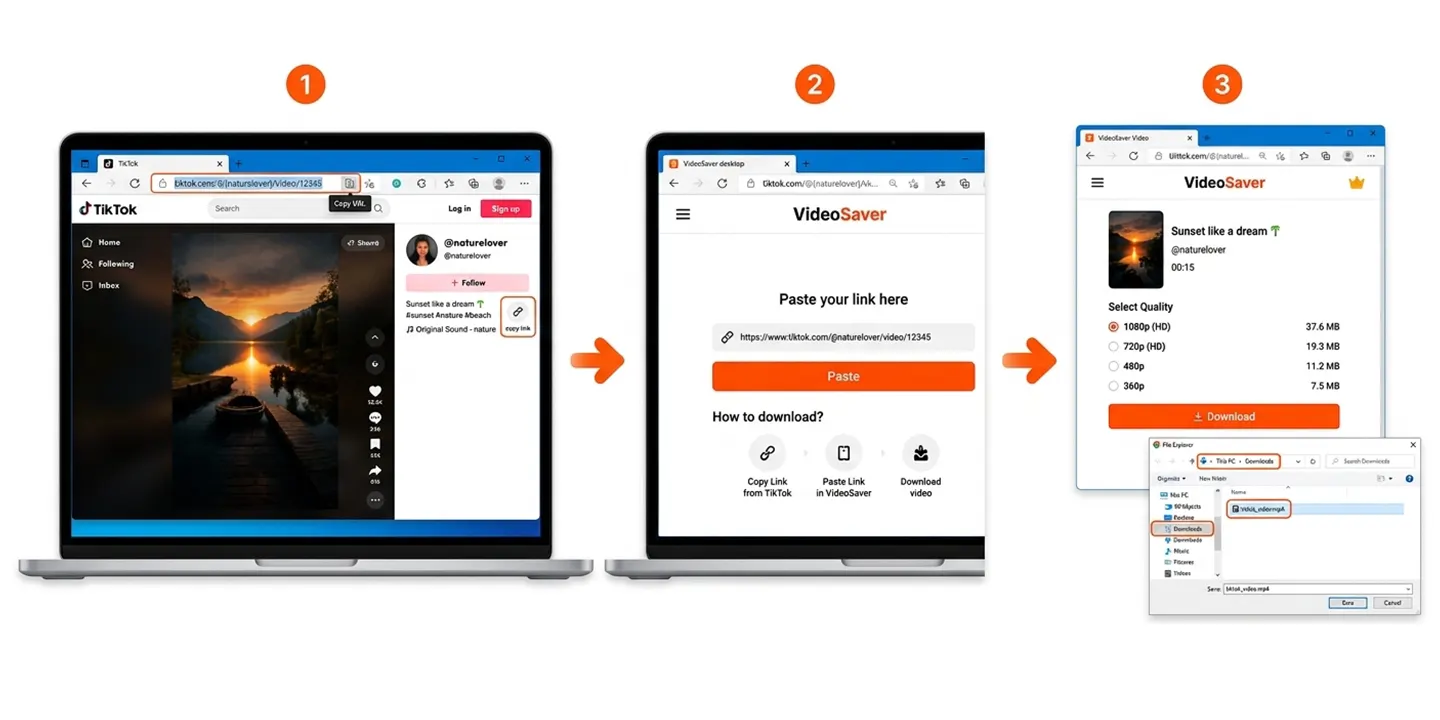
- Fire up your browser and go to TikTok’sdesktop site.
- Now copy the URL of the video straight from your address bar.
- Open the tab of Videosaver.
- Then paste the link and click the download button. Save the MP4 file into your Downloads folder.
Mac
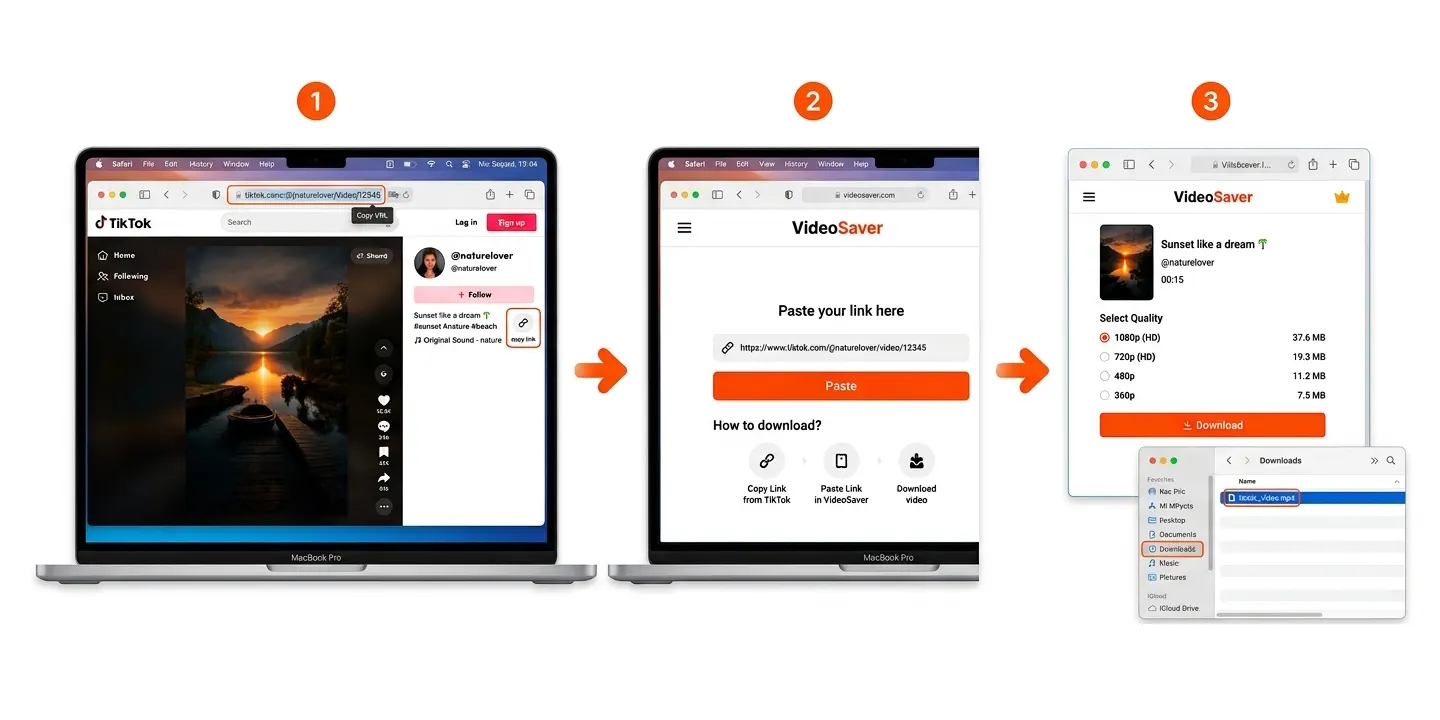
- Open Safari or Chrome and go to TikTok.
- Copy the video link from the top address bar.
- Open
Watermark on Videos And How to Remove
What is the TikTok Watermark?
Every TikTok video has a logo and the username of the creator. This logo floats on the video saved natively. This is great for giving credit to the creator but things get annoying if you want to download a clean video. You can save it without the watermark with an outside downloader.
How Watermark-Free Downloads Work
Online downloaders are useful for you for this purpose. When you drop a link into them, they grab the original and watermark free video from the TikTok server.
Does Removing the Watermark Affect Quality?
Absolutely not! If you use a good and reliable downloader. An adequate tool gives you the same quality as it was uploaded by the creator. The removal of the watermark does not affect the quality.
How to Screen Record a TikTok Video
When you see a creator completely blocks downloads, your best way to save the video is screen recording. It is the fastest and simplest way to keep it in your gallery.
iPhone
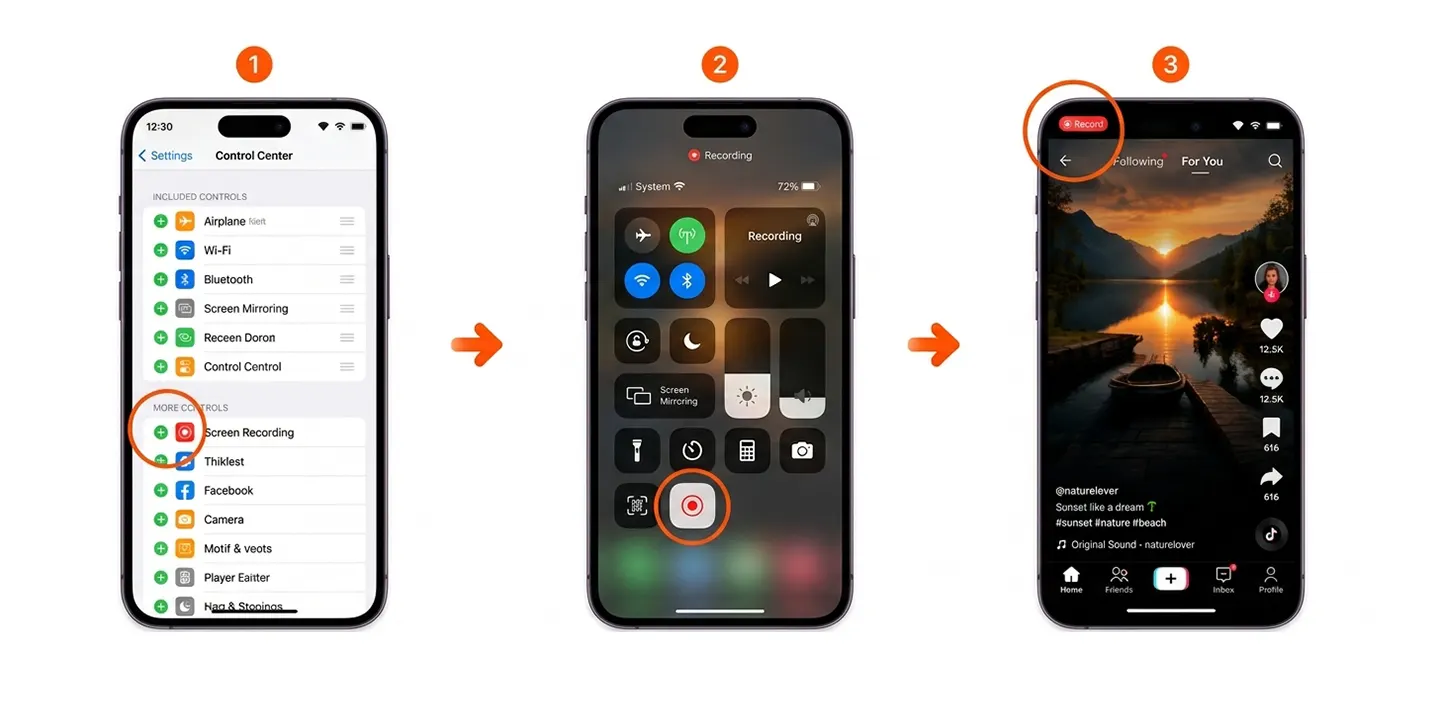
If you are using an iPhone, as a first step go to Settings then open Control Center and make sure Screen Recording is turned on. Swipe down from the top right of your screen and tap the record dot. Now play the full video on TikTok and then stop the recording at the top of your screen.
Android
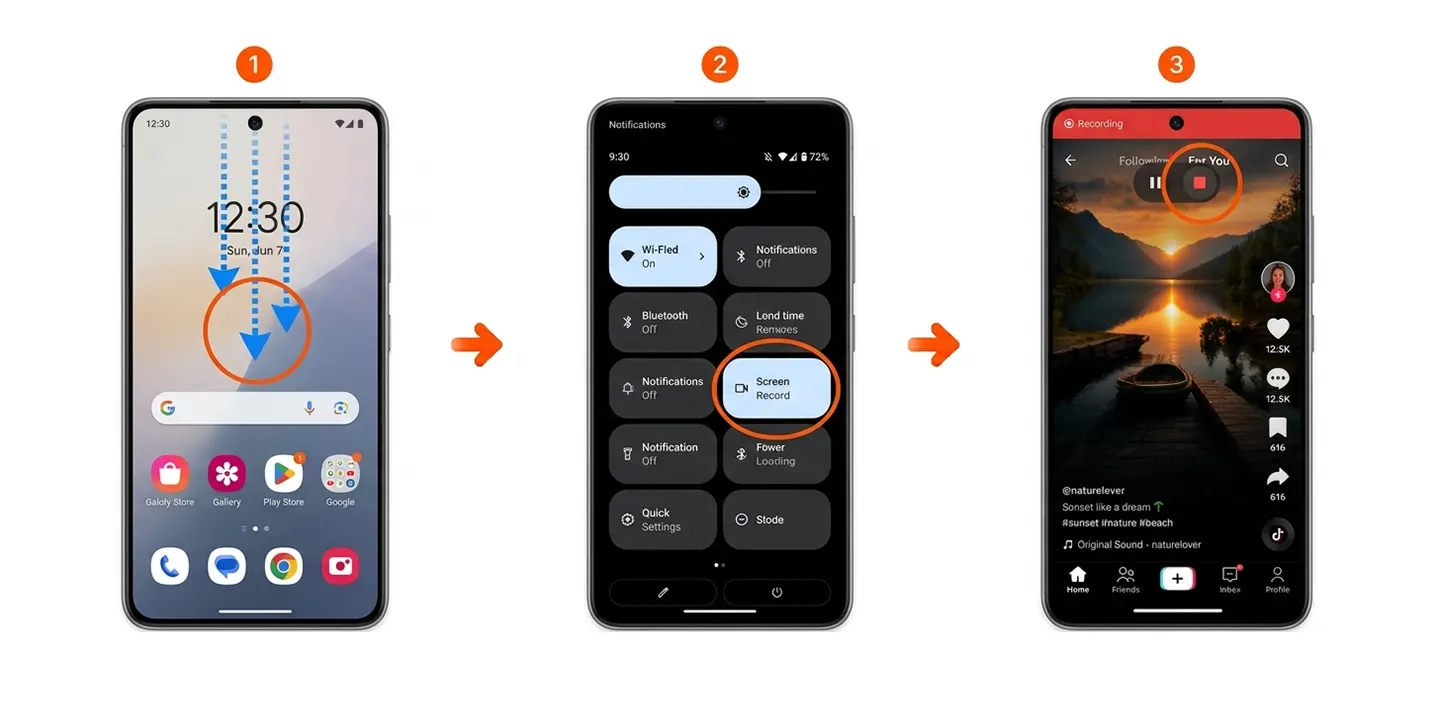
To open the Quick Settings, you need to swipe down twice from your home screen.
Now tap the Screen Recorder file from there. Play the video and when you finish, stop the recording. Find it waiting in your Gallery.
Windows
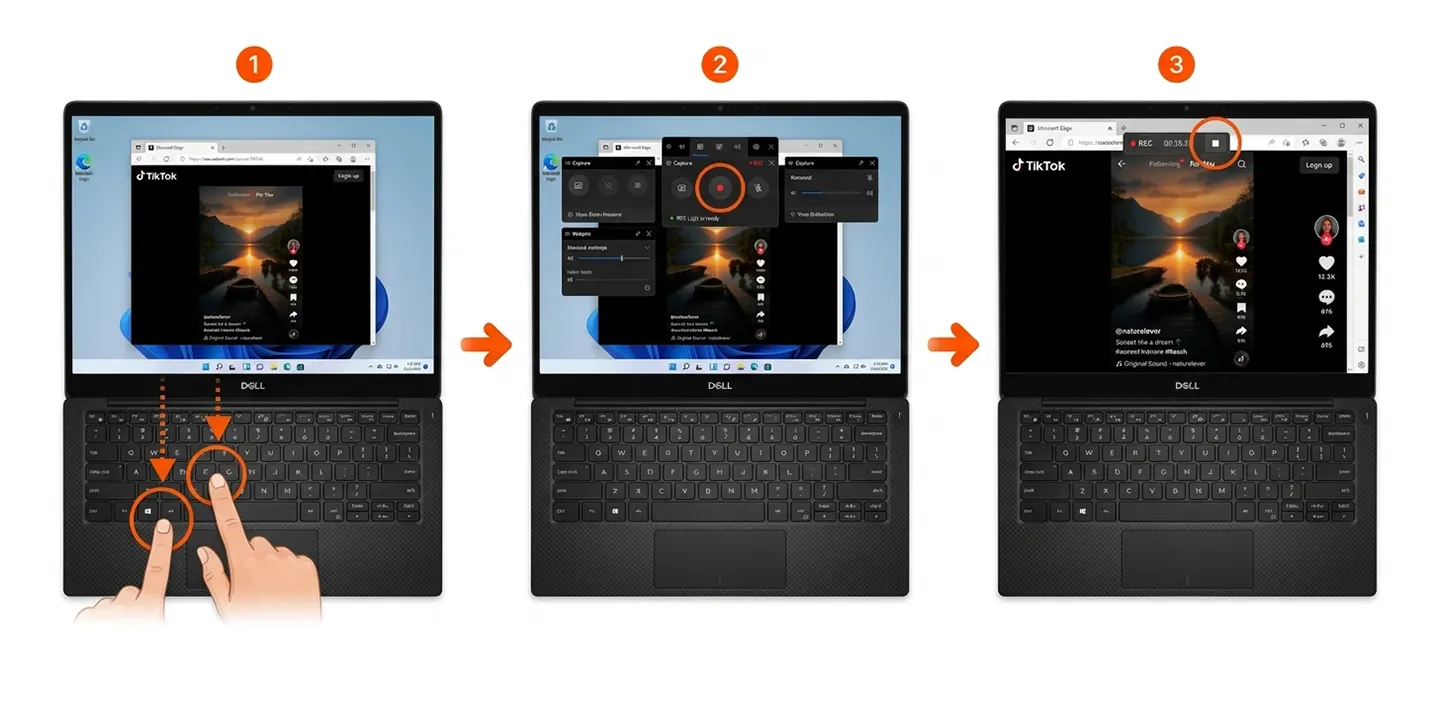
When you are using Windows, hit Windows + G to open the already installed Game Bar.
Then click the record button while your browser window plays the video.
Mac
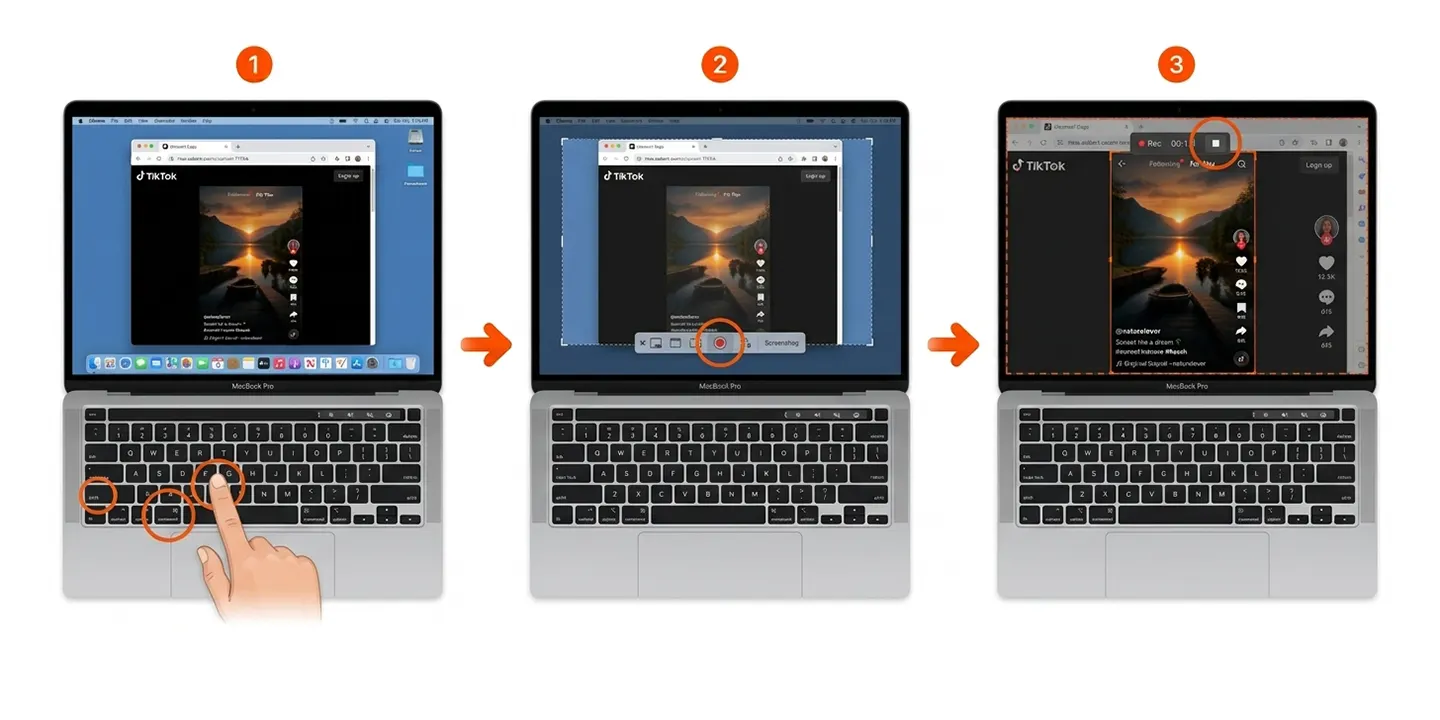
For Mac recording, press Command + Shift + 5 to bring up the screenshot and recording of Apple. Now select the specific area playing the video and start the recording.
Download Multiple Videos at Once
If you are someone who wants to archive a bunch of videos for a project. Doing it one by one gets exhausting. Instead of that grab desktop software that gives the highest video quality. You can paste an entire profile or hashtag link and let it download everything automatically.
If You Want to Download Your Own TikTok Videos
You want a clean backup of a video you edited before posting it publicly? Follow the process to make it fast.
- First, go to your Profile in the app.
- Then tap on the video you want to download.
- Now hit the three dots menu and select Save.
Pro Tip: Always save your draft to your camera roll before hitting publish so you never have to deal with the public watermark later.
Download TikTok Videos From Private Accounts
No, you can not. Private accounts lock down direct downloads completely. If you really need a video from a private account where you follow the creator, just ask them directly for the file.
Reasons You Cannot Download Your TikTok Videos
These can be the reasons if you are unable to download TikTok videos. Make sure you check all the given details.
There is No Video Button
The creator removed the download option on the video in their privacy settings. Or their account is private.
Download Fails
If you can not download the video, it may be because you do not have a stable internet connection. Or the third-party site is lacking. You should try switching to a different tool.
No Sound
The older media players sometimes struggle with TikTok audio codecs. Try to play the file using VLC or the native gallery app of your phone.
Low Quality
If you see the quality of the video you downloaded is not up to the mark, it may be because the creator uploaded it in a compressed form. The tool cannot magically bring the quality that was not there in the video.
Video Won’t Play
Is your video not playing? The reason can be that the file probably did not finish downloading fully. You need to delete it and grab it again.
Where You Can Find Your Saved TikTok Videos
iPhone
On iPhone, the video usually lands in your Photos app or the Files app.
Android
Your saved video on Android goes straight into your Gallery, Google Photos or local Downloads folder.
Windows
If you want to find your downloaded video in Windows, go check your standard Downloads folder in the File Explorer.
Mac
You can find your saved videos in your Downloads folder in Finder on your Mac.
TikTok Video Formats: MP4 vs MOV
MP4 is the king of all the available formats. It plays smoothly on every device, whether a phone, tablet or computer.
MOV is the native format of Apple and works great on Macs and iPhones, but it can have massive file sizes and can be annoying to open without converting it first.
How To Choose a Safe TikTok Video Downloader
Avoid Pop-Ups and Suspicious Redirects
If your downloader site gives you sketchy ads and weird mystery links, you need to close the tab at once.
Avoid Unknown Apps and Extensions
Avoid downloading mystery apps from outside app stores. If an app looks suspicious, always stick to the web tools.
Never Share Your TikTok Password
Legit downloaders never ask for your TikTok passwords or logins. If a site asks you to sign in, move back.
Check Privacy and Security Policies
To ensure privacy, make sure the link starts with https:// so your connection stays encrypted.
Check Video Quality
For best video quality, get the tools that give you high quality download options like MP4.
TikTok Download Methods Compared
As we did the whole homework for you, here is the quick comparison of different download methods. See all the ways and choose according to your needs and available devices.
| Video Download Methods Comparison | ||||
|---|---|---|---|---|
| Method | Watermark Status | Best For | Speed | Best Use Case |
| In-App Save | Yes (Watermarked) | Mobile (iOS / Android) | Instant | Fast and casual saves if the watermark does not matter. |
| Web Downloader | No (Clean MP4) | Any (Mobile / Desktop) | Fast (< 10 sec) | Clean offline viewing, editing or repurposing. |
| Screen Record | Yes (Obstructed) | All Devices | Slow (Real time) | Emergency backup when downloads are blocked. |
| Desktop Software | No (HD / Batch) | Windows / Mac | Variable | Bulk archiving and professional creator workflows. |
Is It Legal to Download TikTok Videos?
Personal Use
If you want to save the videos for personal use or for offline viewing, then it is acceptable.
Copyright
Many TikTok clips contain copyrighted material, such as music tracks that are licensed for the TikTok platform.
For Commercial Use
You should be aware that if you download content for commercial gain or publishing it on monetised channels without permission violates copyright laws. It can lead to platform strikes.
Giving Credit and Getting Permission From Creators
Always give credit to the creators when you use their content. Make sure to ask for permission before you upload the content on other platforms.
If you are looking to save content from more than just TikTok, we can help you with that too. Check out our guides on how to download videos from Facebook and how to download videos from Twitter (X).
Answers to Your Questions
Without the app can I download TikTok videos?
Yes. You can surely download videos without the TikTok app. Use web links and online browser tools.
Can I download TikTok videos without an account?
Yeah, public downloader sites do not ask you to log into anything. You can download the video without any account.
Am I able to download videos without a watermark?
Yes. The online video downloader like VideosSaver removes the watermark and gives you a clean video.
Why can’t I save a TikTok video?
There can be multiple reasons why you can not download the video. Maybe the creator turned off downloads or their profile is private.
Can I download private TikTok videos?
No. Direct downloads on private accounts are blocked by design. You can not download videos from a private account.
Does TikTok tell creators about the downloads?
Never. Creators only see total aggregate download numbers. They do not see who specifically saved their video.
What are the formats of TikTok videos?
Mostly universal MP4 files. The audio of the video is saved in MP3 or M4A files.
Is downloading TikTok videos legal?
For personal offline use? Yes. For commercial uploading without permission? No.