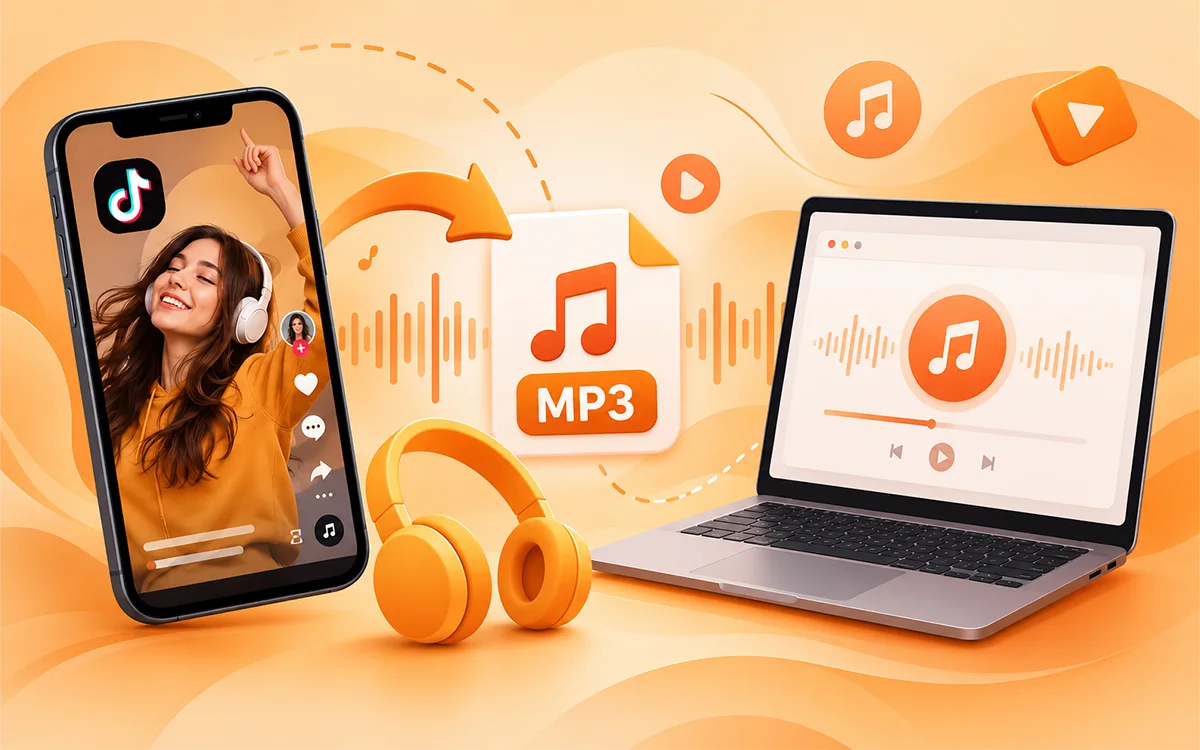
TikTok is full of funny sound effects and useful tracks. You may want to listen to those soundtracks outside the app on your device. But the question that arises here is if it is possible to convert the videos into audio tracks only and download them on your device. The answer is "Yes." It is possible for you to convert the video and save the audio in an MP3 file with the help of an online video downloader. VideoSaver TikTok Video Downloader lets you do that in seconds. You do not need any extra software or apps except this tool to convert the file.
How to Convert TikTok to MP3 Online
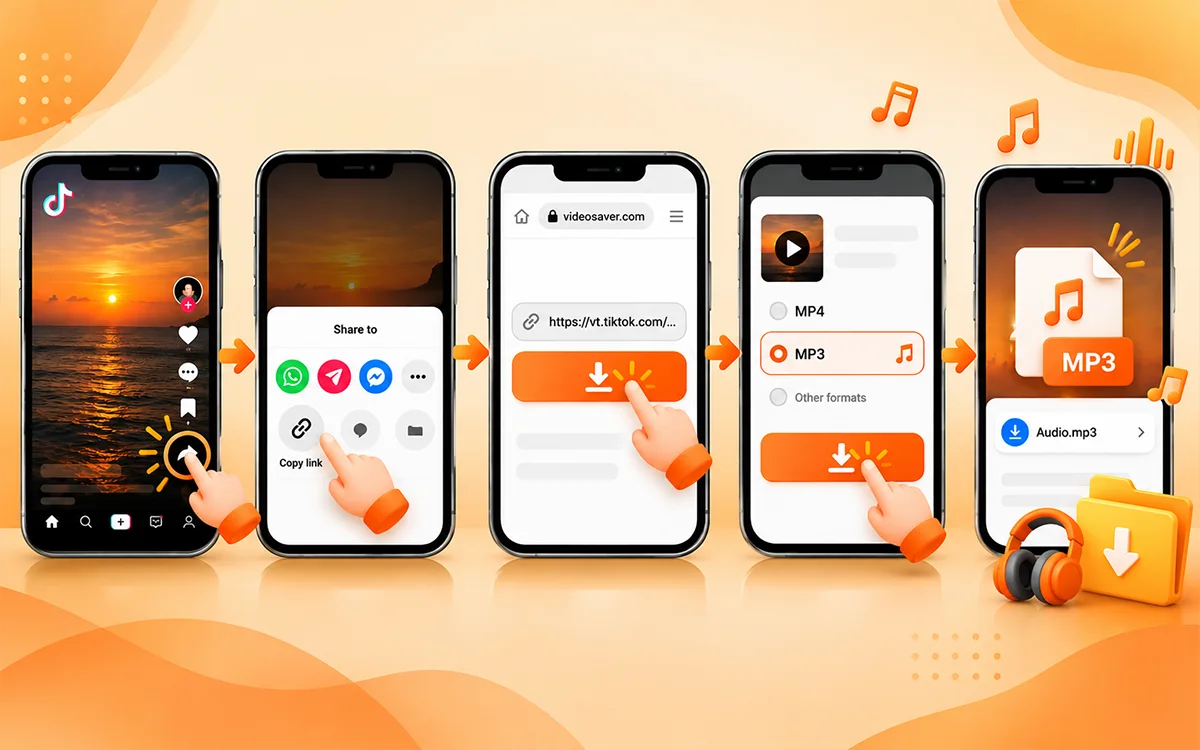
To start with, it is worth mentioning that converting TikTok to MP3 is as easy as downloading the video. VideoSaver lets you access supported media through your browser and choose from available download options. Follow the steps given below.
- First of all, open TikTok and find the video whose audio you want to save.
- Now tap the Share button and copy the link to the file.
- Go to VideoSaver and paste the link into the input field and let the downloader process the URL and fetch the data.
- Next, select the MP3 format from the available options and press the download button.
The audio will be saved in the Downloads folder of your browser’s download history. Play the audio to confirm that it is saved the way you wanted it to be.
How to Convert TikTok to MP3 on Android
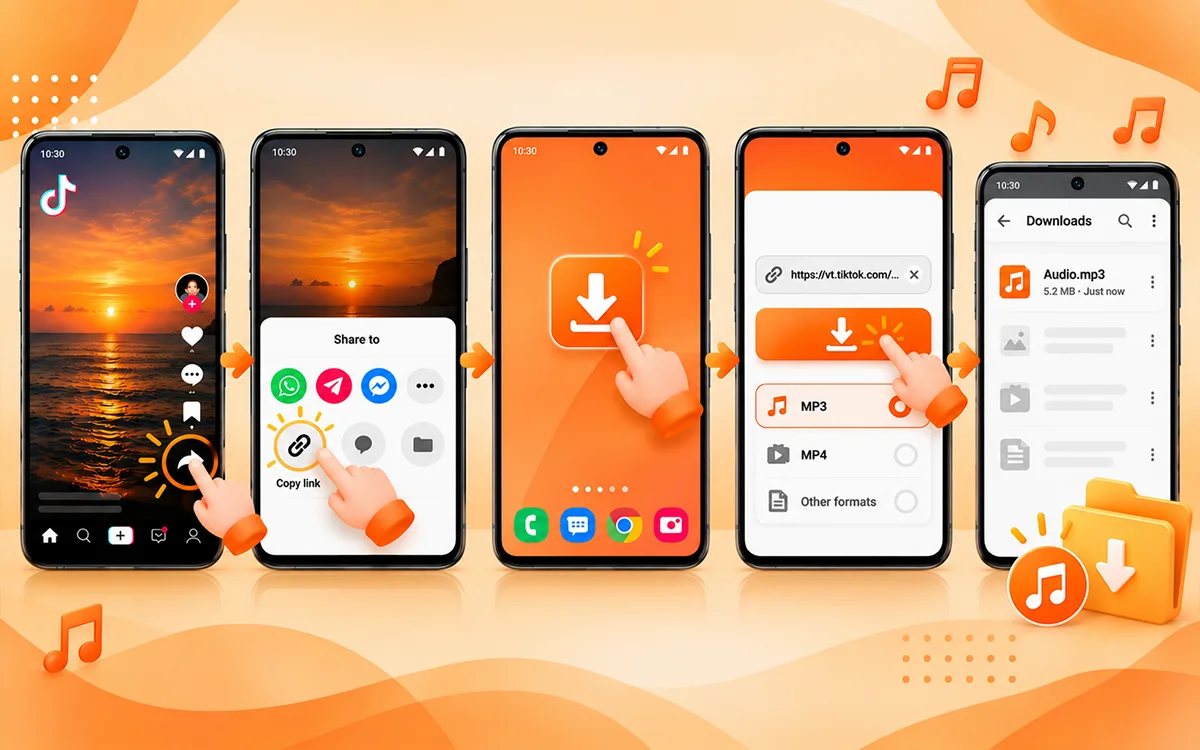
To save the MP3 file on your Android phone, you can install the VideoSaver Android app from the Play Store for seamless and fast downloads. First open TikTok and navigate to the video to extract the audio. Then tap Share and Copy link. As the next step, open the VideoSaver app and paste the link there. Select the available MP3 audio option and start the download.
You will find the saved video in the Files app or the file manager of your phone and look in the Downloads folder. The exact location varies on your browser and device settings. If the file does not appear, then check the download history of your browser before you try again.
How to Convert TikTok to MP3 on iPhone
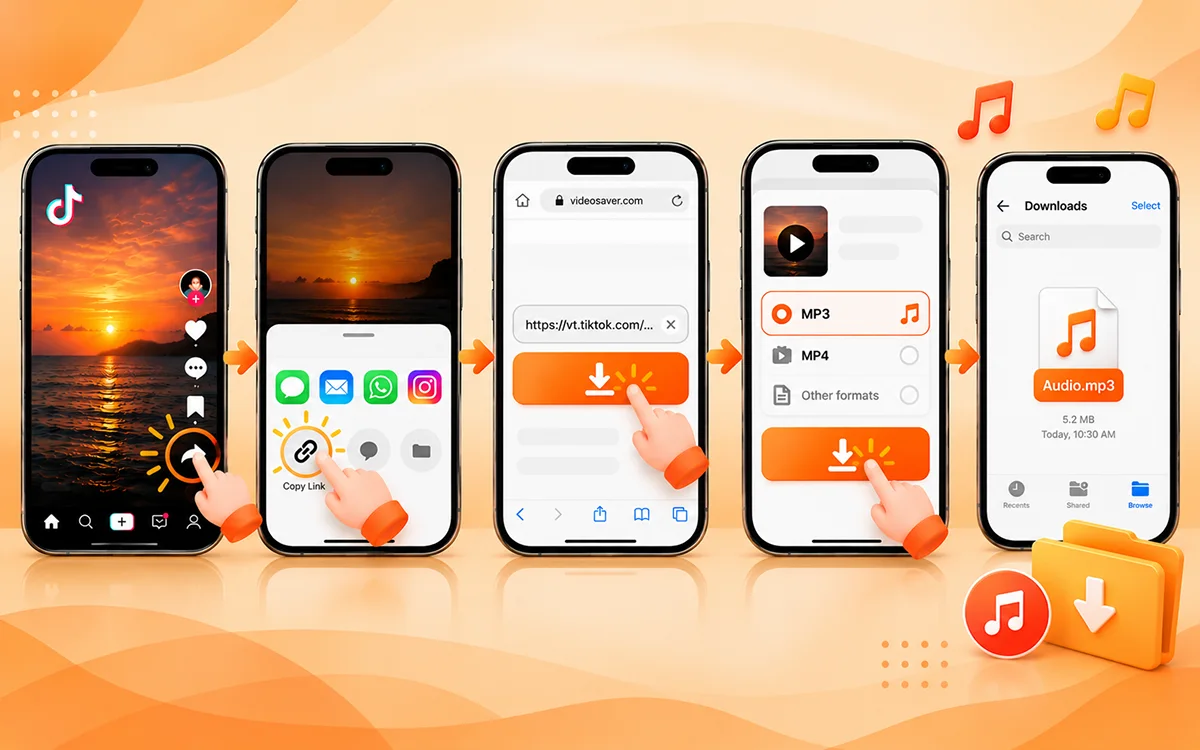
Use VideoSaver in Safari or another working browser on your iPhone and follow the given instructions.
- Start by opening TikTok and finding the video you want to extract the audio from.
- Now press the Share button and choose Copy Link.
- Then visit VideoSaver and paste the URL in the box.
- To save the audio, select the MP3 option and hit the download button.
To find the video, open the File app and check Downloads under iCloud Drive or on my iPhone. It depends on your browser settings.
How to Convert TikTok to MP3 on a Computer
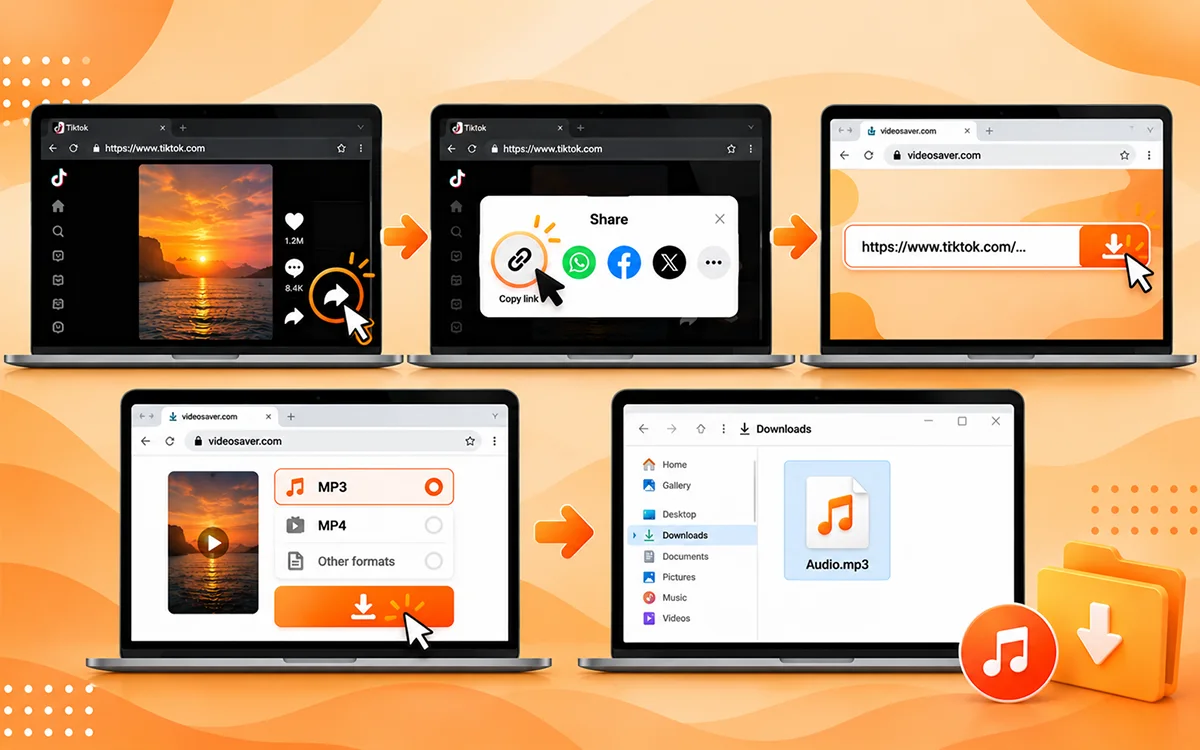
A computer can be convenient when you want to organize several audio files or use them in an editing project. The process is as simple as on other devices.
- Open TikTok in your browser and find the video.
- Now copy its URL from the address bar or use the Share button to copy the link.
- Next, visit VideoSaver in another tab and paste the link.
- As the last step, choose the MP3 audio option and download the file.
On Windows, check the Downloads folder in File Explorer. Open Finder and select Downloads on macOS. You can then rename the file or move it into a folder to keep your audio collection organized.
Why Convert TikTok to MP3?
Extracting sound is useful when you do not want to keep the video but a separate audio file. Here are a few common reasons that people choose this format.
Listen Without Watching the Video
An MP3 file contains audio instead of the complete video. This can be useful for listening to a speech or a spoken explanation. It is also the best choice for audio content without the need to keep the video open.
Keep Useful Voiceovers and Explanations
Some TikTok videos contain tutorials and interviews. There is other content like language learning examples or short explanations. Saving an audio file can make it easier to revisit material you have permission to keep.
Use Audio in Your Own Creative Projects
If you are a creator, then you may want to work with sound effects or audio you own or have permission to use. An audio file is easier to import into a compatible editing application than a full video. Always check the applicable rights and licensing conditions before reusing others' sound in your own content.
Save Storage When You Only Need Audio
A file that has only audio may take up less space than a video. But keep in mind that the actual size depends on the duration, encoding, and bitrate. If you do not need the visuals, then MP3 can be a convenient format.
How to Get Better Audio Quality
The quality of your MP3 depends on the original TikTok audio and the conversion settings. Start with a video that has clear sound and minimal background noise for the best results. If VideoSaver offers different audio quality options, then choose one that meets your needs. Always keep in mind that a higher bitrate may increase file size but cannot restore details missing from the original recording. Avoid converting the same audio multiple times, as repeated compression can reduce quality. Play the MP3 to check that the sound is clear and free from unexpected distortion before using it in your projects once the download is completed.
Common TikTok to MP3 Conversion Problems and Their Fixes
Sometimes it happens that the conversion does not work on the first step. These steps will help you to figure out the problem and the solution.
The TikTok Link Isn’t Working
Make sure you copied the complete link from the video. After that, return to TikTok and use the Share menu to copy the link again. If the video has been deleted or made inaccessible, then the downloader may not be able to process it.
I Can’t See Any MP3 Option
Available formats can vary on the source and current support of the downloader. Check all displayed audio options first. If no audio option is available, you can download an accessible video file that you have permission to use and extract its audio with a compatible conversion tool.
The Download Does Not Start
Check your internet connection and make sure your browser allows downloads. Confirm that your device has sufficient free storage and check the download history of the browser for a blocked or failed file. Reload the page and try the link again if the problem continues.
The Downloaded Audio Has No Sound
Play the original TikTok video to confirm that it contains audible sound. If the original is silent or its audio track is damaged, then conversion will not create missing sound. You can also try opening the downloaded file in another working media player to rule out a playback issue.
The Audio Quality Is Lower Than I Expected
The original recording may already be compressed or noisy. Try a clearer source or select a high-quality option if one is available. Remember that changing an MP3 bitrate after conversion does not recover audio details that were already lost.
Frequently Asked Questions
Can I convert TikTok into an MP3 file?
Yes. You can use an online converter such as VideoSaver to check available audio options. Features and access may vary depending on the source, so confirm the options shown for your video.
Can I convert TikTok to MP3 without the need to install any software?
Yes. A browser-based converter can work without a separate desktop installation when the TikTok link and requested format are supported. VideoSaver lets you extract the audio alone in seconds.
Can I extract TikTok on my phone?
Yes. On a compatible phone and open an online video downloader in your browser. Now copy the video and paste the URL there. The downloaded file will appear in your browser download location.
Does converting TikTok to MP3 increase the quality?
No. The conversion changes the file format but does not improve the source recording. The original audio and the conversion settings decide the quality of the resulting file.
Why am I unable to extract audio from some TikTok videos?
There can be multiple reasons, including a video may be unavailable or restricted. Other reasons may be that the video is deleted or unsupported by the converter. Some links may also fail because of temporary network or processing issues. Try copying the link again and check whether the original video remains accessible.
Can I use extracted TikTok audio in my own content?
Yes. Only when you have permission to reuse that track. If you want to do so, then make sure to get the consent of the original creator before reusing it.
Where can I find my downloaded MP3 file?
On Android and computers, check the Downloads folder or the download history of your browser. Open Files and check the download location selected by your browser on iPhone.
Does an MP3 file contain video?
No. When you extract the audio and save, the file does not contain any video. A downloader saves an MP3 file after it extracts the sound from the video.
Do I need a TikTok account to save the MP3 file?
No. You do not need your account because VideoSaver lets you extract the audio from any supported video without the login requirements.
Final Conclusion
It is a straightforward way to convert TikTok to MP3 if you want to keep audio separate from a video when the options are supported. The basic process is the same as copying the TikTok link and pasting it into the downloader. VideoSaver brings these steps together in a browser-based and app workflow. Makes it a convenient starting point for extracting supported TikTok audio on a phone or computer.
Remember to respect creators' rights and use downloaded audio only in ways you are permitted to.
Want to try it? Visit the VideoSaver TikTok Downloader and check the available audio options for your link.