All Facebook users know that it is easy to watch its content online, but the real problem arises when you want to save your favorite video to watch offline. It is not always easy to do so. The method you choose depends on whether the content is yours or whether Facebook gives an option to download the public videos.
The good news? There are various ways for you to save the content. You can use its own downloading option or the VideoSaver downloader.
Before we dive into the guide, go and check our other platforms to download content like Instagram Video Downloader or Pinterest Video Downloader. It will help you to know the quality, device compatibility, and features you can avail using this tool.
Quick Overview: Ways to Download Facebook Videos
Before you start the download, here is a quick comparison of each method. To ensure your process is seamless, check the table below and make a decision.
| Methods | Windows / Mac | Android | iPhone | Best For |
|---|---|---|---|---|
| Facebook built-in option | Yes | Yes | Yes | Your own videos or for those for whom the download option is available. |
| Facebook data download | Yes | Yes | Yes | Getting a copy of your own Facebook information and content. |
| VideoSaver Web | Yes | Yes | Yes | Quick downloads without installing an app. |
| VideoSaver Android app | No | Yes | No | Frequent downloads on Android. |
| VideoSaver Chrome extension | Yes | No | No | Convenient downloads while browsing on Chrome. |
Online Facebook Video Download
For you, the Facebook Video Downloader is the simplest way to download the videos because you do not need to install any software. It works directly from a web browser. It supports videos, reels, stories, and other available content. Follow the process given and get your video on your device.
- Open Facebook and find the video you want to save.
- Use the Share option and select Copy Link.
- Then open the VideoSaver website and paste the URL into the box.
- Now select the quality you want and press the download button.
- Within seconds, your video will be on your device.
Learn to Save Your Own Facebook Uploaded Video
You know if the video belongs to you, then there is no need to use any third-party online tool. Facebook gives a tool that allows users to access and download copies of their account information. Its current help documentation points users to Account Center → your information and permission → Download your information.
This method is especially useful for users who want to recover a large amount of their content instead of saving individual videos. The exact settings and available options can vary, so make sure to check the current download of your information on your device.
Download Facebook Video on Desktop: Changing the URL
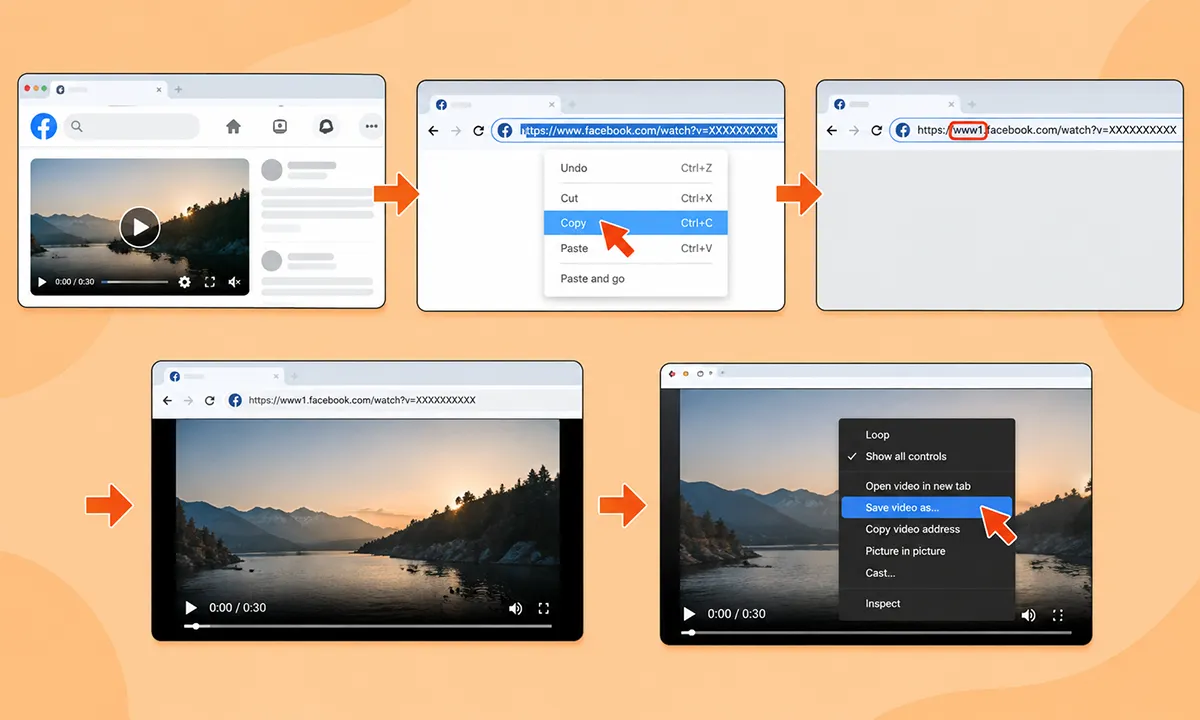
If you do not want to use a downloader or Google extension, you can try Facebook’s older URL trick that opens a video directly in your browser. This method works by changing the URL before opening it.
- Open the video you want to save.
- Copy the video URL from your browser address bar. It may look something like facebook.com/watch?v=XXXXXXXXXX.
- Change the Facebook domain in the address to www1.facebook.com instead of www.facebook.com.
- Now press Enter and see if it opens the video in a simpler video player or direct media view.
- If it opens as a direct playable file, right-click the video and choose Save as to download it on your computer.
This method is worth mentioning because it was in use for years, but for now it is not a guaranteed method anymore. Facebook frequently changes its URL and website structure, so the same URL method may work for one video but fail for another.
Download Facebook Video on PC and Mac
Use VideoSaver in Your Browser
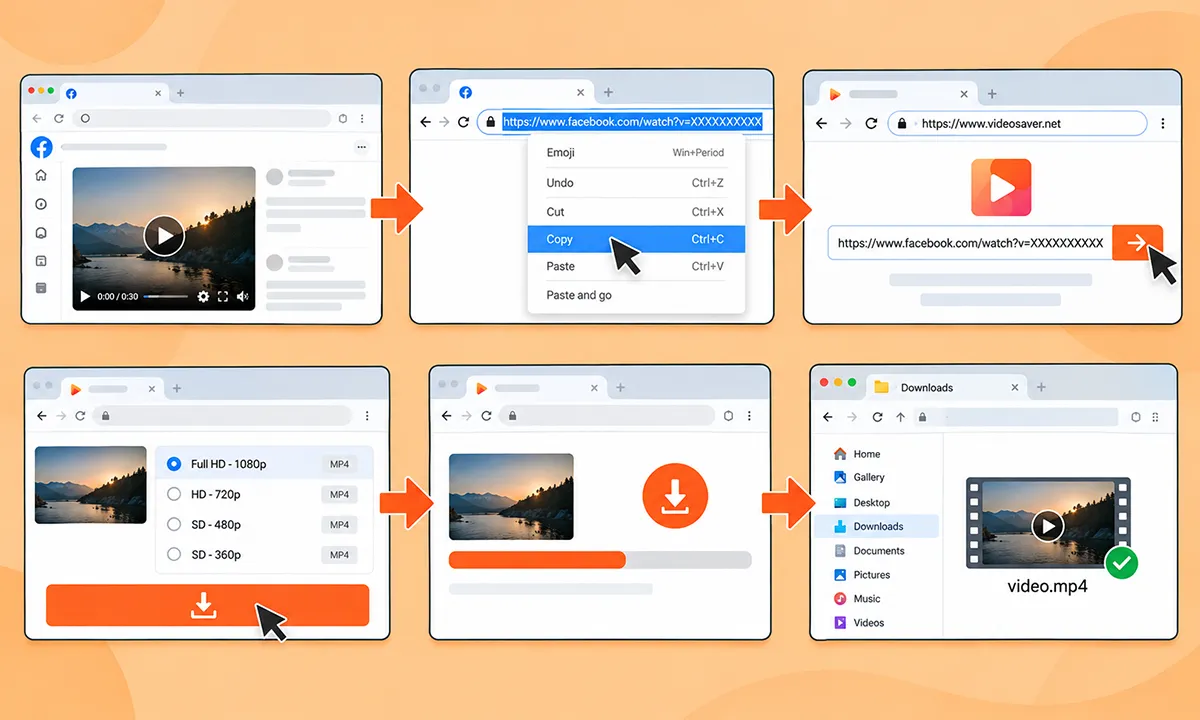
This is the easiest way to save your favorite videos. Open Facebook in Chrome, Safari, Firefox, or another modern browser.
Copy the link → VideoSaver → Paste the URL → Select quality → Download.
You can use the web version on Windows, Mac, and other desktop systems.
Use the VideoSaver Google Extension
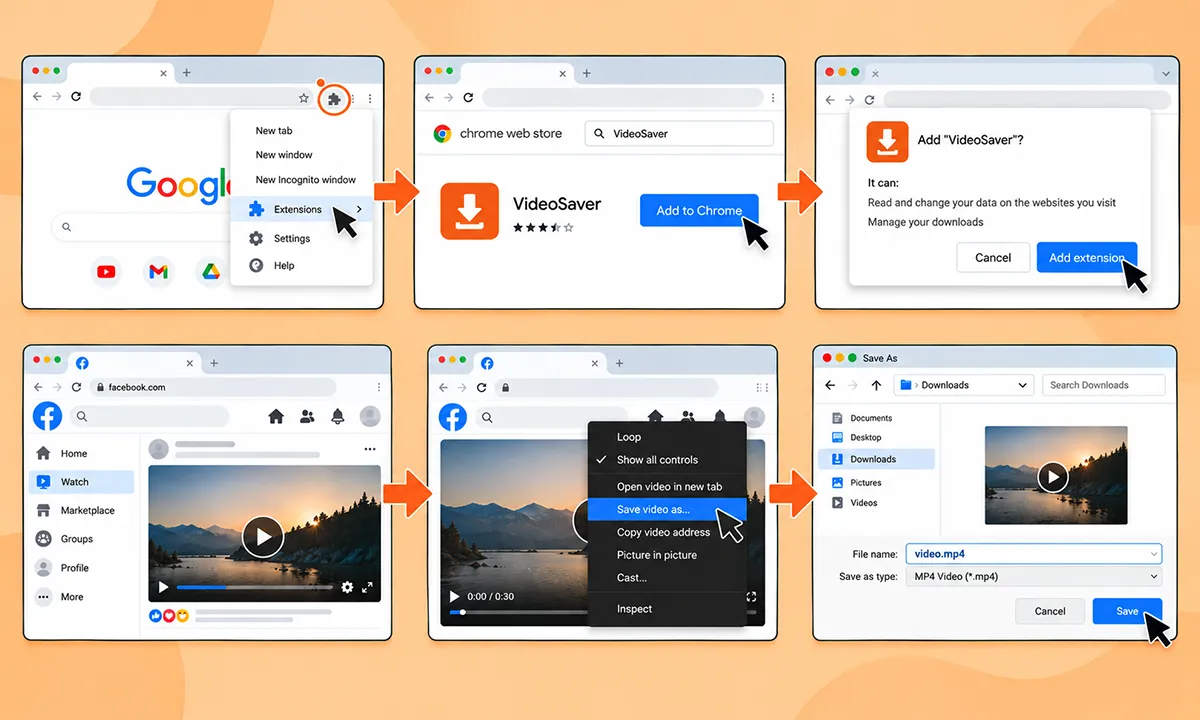
If you are someone who saves content often while browsing Facebook on Chrome, an extension is the best option. You do not need to open a separate website every time.
VideoSaver, with its versatility, provides this method too. Our Google extension helps you download supported media conveniently from the browser.
This way makes sense for people who regularly save videos instead of downloading one video sometimes.
- Install the extension.
- Open the Facebook web and sign in.
- Now open the video and right-click it.
- Now select Save video as…
How to Download Facebook Content on an Android Phone
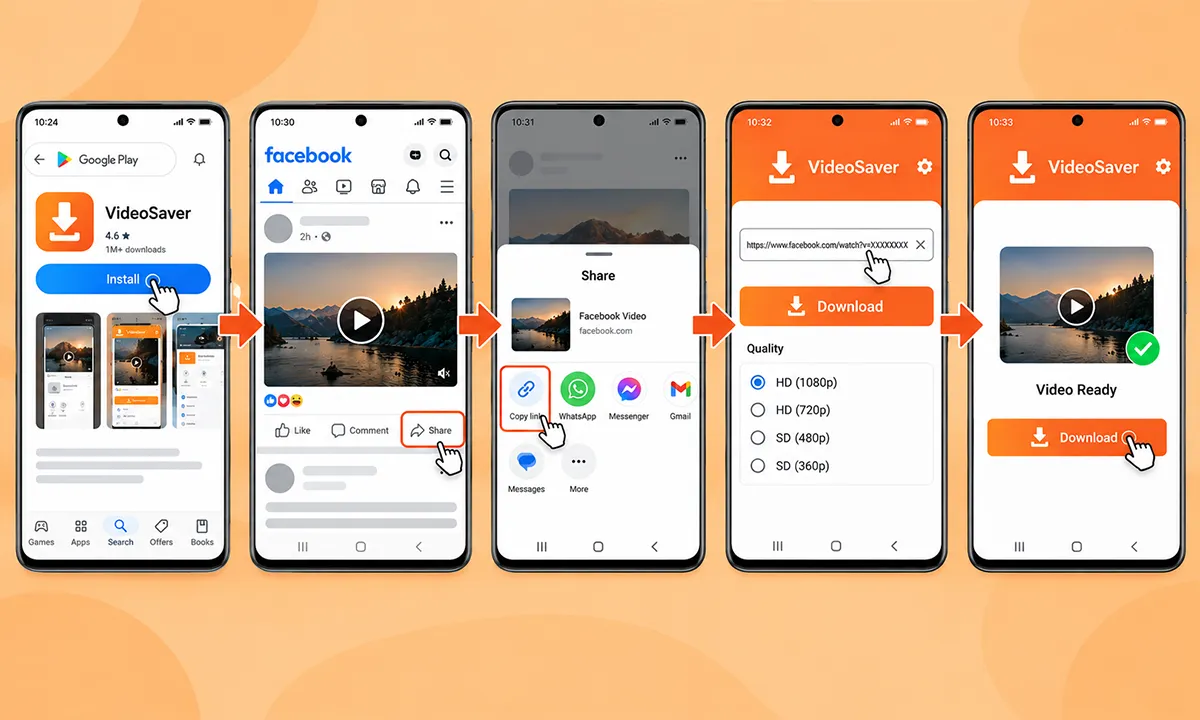
Android users have another easy method, which is the VideoSaver Android app. The process is straightforward.
- First install the app from the Play Store.
- Then open Facebook and find the video you want to save.
- Use the share button to get the URL to the video.
- Now open VideoSaver and put the link there in the box.
- As a last step, choose your preferred quality and hit the download button.
This app is useful for those who save videos regularly because you can manage it right from your Android device.
Save Facebook Video on iPhone
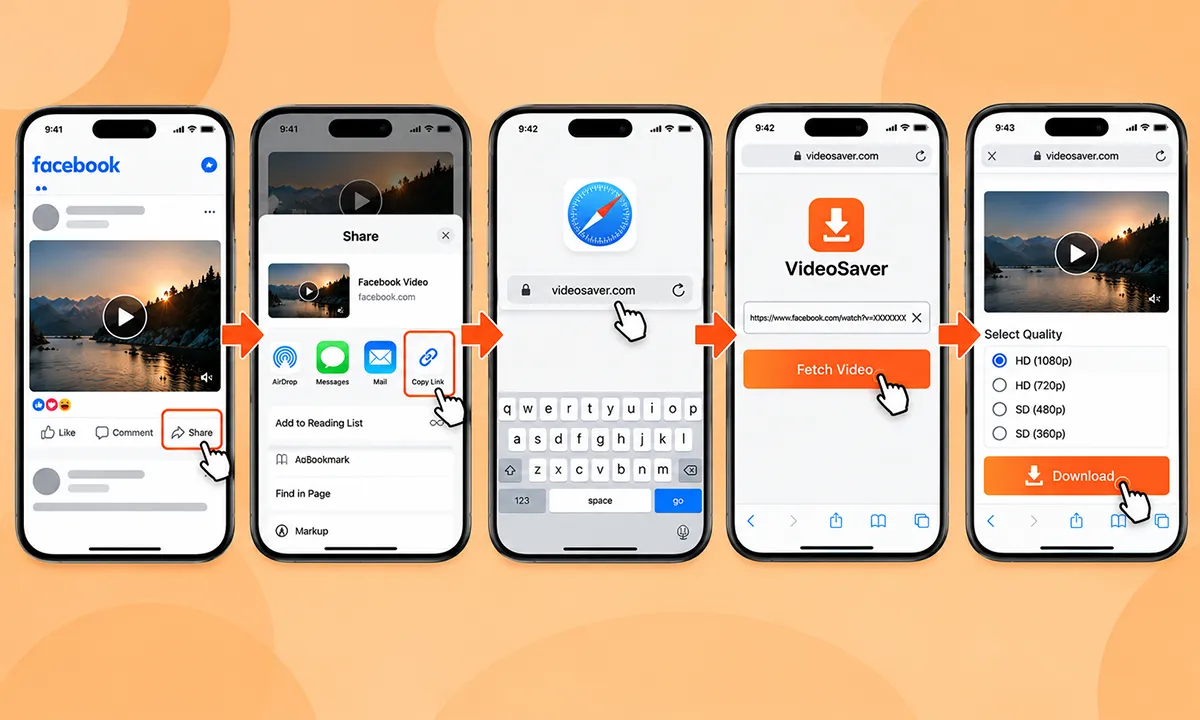
For iPhone users, the simplest way is to use a browser-based method instead of installing any app or software.
- First of all, open Facebook in the app or your browser and copy the link after you find your video.
- Then open Safari or another browser and go to VideoSaver.
- Now paste the URL in the input field and let it fetch the details.
- Further, select the quality option available to you and press the download button.
Download Facebook Videos using MBasic
This method is good if you do not want to use any external downloader. MBASIC was Facebook’s lightweight version for slower connections. The traditional process was to open the video, copy its link and replace the regular domain with mbasic.facebook.com. After opening the address, the video could sometimes be accessed through the simpler Facebook interface. If a video opened as a direct media file, then you could use your browser’s normal save or download function to save it on your device.
Is the MBASIC Method Still Working?
It depends on the current Facebook infrastructure, the video, and your account. A method that was working previously may not give the same result. This is also why the older articles may suggest this method even though their instructions do not work today.
How to Download Facebook Reels and Live Videos?
Facebook Reels are short-form videos that you can find throughout the feed. The platform has increasingly moved video content to the Reels section. If you want to download the reel, start by copying its link. You can then paste the link into the VideoSaver downloader and check whether the download is available. Keep in mind not every video is available for download. Many factors like privacy settings, regional restrictions, and many others can affect what a downloader can access.
Live videos are a little bit different from ordinary posts. If you own the live video, then Facebook may give the option to access your own content. The availability depends on the video's status or permission for other videos. VideoSaver allows you to download the live video once the online streaming is over. If the video is removed or private, a downloader may not be able to save the content.
Facebook’s Own Download Option vs. Online Downloader
All users need to understand the difference between downloading content directly through Facebook and a third-party tool. The external downloader helps you save publicly available videos. Facebook's own option is best when you need to save your own account information or content.
| Situation | Recommended Approach |
|---|---|
| Download your own Facebook information | Facebook’s Download Your Information tool |
| Save one public Facebook video | Browser-based Downloader |
| Frequently download videos on Android | VideoSaver Android App |
| Frequently download while using Chrome | VideoSaver Chrome Extension |
| Save occasionally on iPhone | Browser-Based Downloader |
| Save a video that Facebook already provides a download option for | Use Facebook’s own Option |
Video Quality You Should Choose
You may see plenty of options while you download your Facebook content online. Which option you select depends on your needs. Not every video is available with every resolution. For a downloader to save a video in 4K, it must be uploaded originally in that resolution.
| Quality | Best For | Storage |
|---|---|---|
| 144p-360p | Basic viewing or very limited storage | Low |
| 480p | Casual viewing | Moderate |
| 720p HD | Everyday viewing | Moderate |
| 1080p Full HD | Better quality and larger screens | Higher |
| 1080p | High-resolution source videos and large displays | High Full HD |
How to Save Facebook Content Without Losing Quality
Always keep in mind that the original Facebook video determines the maximum quality available. If someone uploads low-resolution content, then a downloader will not be able to save the video in high quality.
VideoSaver allows users to select from the quality options of the source video. It helps you choose between a smaller file and a higher-quality version.
Are There Any Legal Restrictions on Downloading Facebook Content?
There is no single answer for all Facebook videos. Downloading a video and having the right to reuse, upload, or monetize it are different things. If a video belongs to any other creator, it may be protected by copyright, privacy rights, or other restrictions. Keep in mind that you do not have the right to reuse the video if you can download it. If the video is yours, then you have the right to do whatever you want with it. But check if you have permission or other legal rights if it belongs to someone else.
Facebook also provides privacy controls to see the content. The safest approach is to download the content you own or have permission to use.
Final Thoughts
There are several ways to download Facebook videos. But which method you go for depends on the purpose you save the file for or your device. If Facebook provides its own download option, it is the best choice for you. A browser-based downloader is more convenient if you want to download an individual video. Android users can use the VideoSaver app to easily save the content in seconds. Always respect the creator's rights while you save or reuse the video.
Answers to Your Questions
Without installing an app, can I download Facebook videos?
Yes. You can download the videos without installing any app if you do not want to. You can use the VideoSaver web to save content to watch offline.
Can I download Facebook Reels?
Yes. You can save a reel by copying its link and pasting it into a reliable video downloader. The download depends on availability and permissions.
Can I save a Facebook Live video?
Yes. You can download the live video once the live streaming is completed.
Where are downloaded Facebook videos saved?
On a computer, the downloads usually appear in the browser’s Downloads folder. They can be found in the device Downloads folder or in file management on Android phones. On iPhone, the downloads can be found in the Files app.
Can I download Facebook videos in HD?
Yes, you can if the HD version is available from the original source. VideoSaver allows you to download your video in HD quality.
Is VideoSaver safe to use?
Absolutely yes. VideoSaver is a reliable and secure tool to save your content on any device. All the content you download is without any watermark and in 4K quality if available.
Why can’t I download Facebook videos?
There can be multiple reasons you cannot save the video. It can be because the video is removed, your internet is not stable, or the URL is incorrect.
Can you download a private video?
Yes. VideoSaver video downloader allows you to save private Facebook videos only if you follow the account.