Did you find an entertaining video on Reddit and want to watch it later? Or maybe it's a cooking tutorial or gaming video? You decide to download the video, but there's no option to do that. Not only that, but sometimes the video gets downloaded without sound.
If you want to know how to download Reddit videos, here's how you can do it. Just copy the Reddit post URL and use an online downloader like VideoSaver. The process occurs right from your browser and doesn't require any additional software installation. But downloading a video is not the only thing you need. You also need the original audio, decent video quality, and a file you can find.
This article provides instructions on how to download videos from Reddit on iPhone, Android, and PC. It will also inform you why certain videos can get muted and what to do if something goes wrong during download.
How to Download Reddit Videos Online
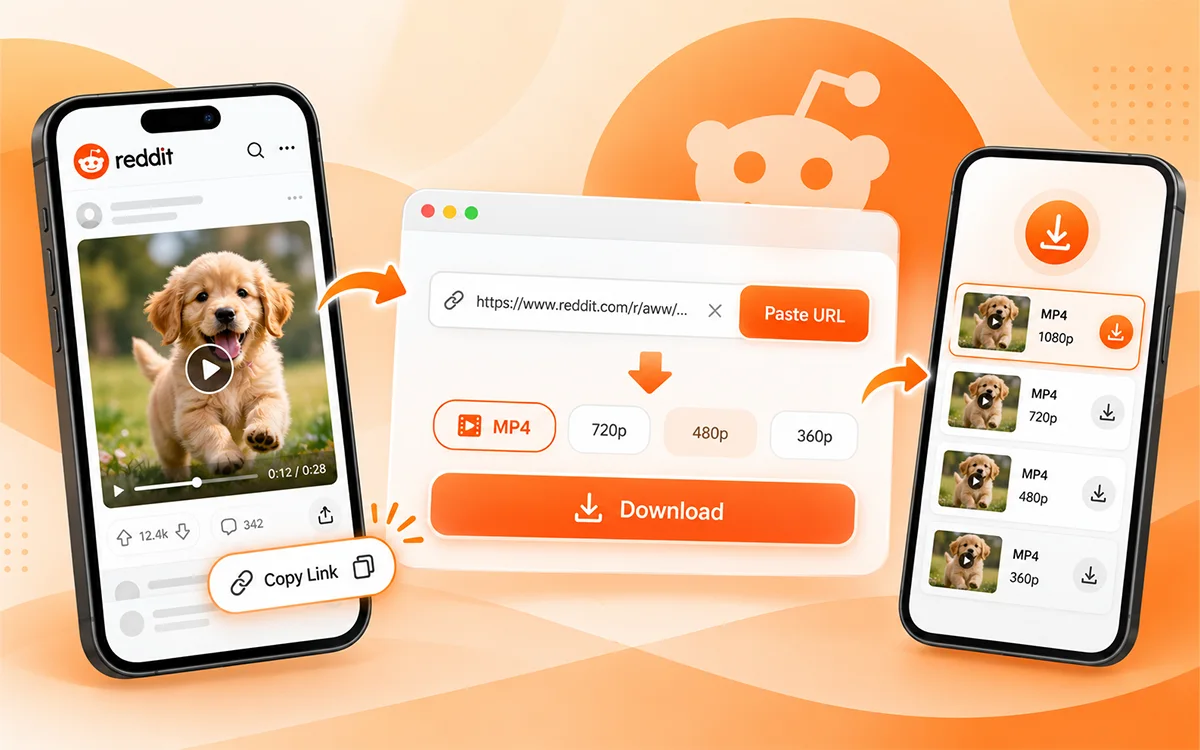
There is no software needed to download the videos supported on Reddit. A web-based application will do the job using the original post link. VideoSaver Reddit Video Downloader allows users to download the supported Reddit videos in various formats and resolutions.
Here is how to do it.
Step 1: Find the Reddit Video
Go to Reddit and locate the video you want to download. Ensure that you are in the post itself, not the subreddit homepage.
Step 2: Copy the Post Link
Click on Share below the post and select Copy Link. This will give you the URL to the Reddit post.
Step 3: Open VideoSaver
Open the VideoSaver Reddit Video Downloader webpage. There is a box where you can paste the link.
Step 4: Paste the Video URL
Copy and paste the Reddit link into the box that says "Paste your link here." Then choose Download and select the features offered by the site for that particular post.
Step 5: Select the Quality of Your Video
Choose any of the available MP4 formats and the resolution as per your choice. Free VideoSaver allows downloading videos up to 480p; however, other resolutions are included in its paid versions.
Do note that you cannot achieve a clearer image than that of the actual uploaded video. No matter what resolution you choose, if the original video was not clear, it will still not be clear after that.
Step 6: Download Your Video and Test It
After choosing the video quality, press the Download button to download the file to your computer. Go to your Downloads folder and test the video to see if it is in good condition. If the audio is not there, check whether the Reddit video has audio.
How to Download Reddit Videos on Different Devices
The downloading procedure remains the same across all devices; what is different is where the downloaded file ends up being saved.
Download Reddit Videos to iPhone
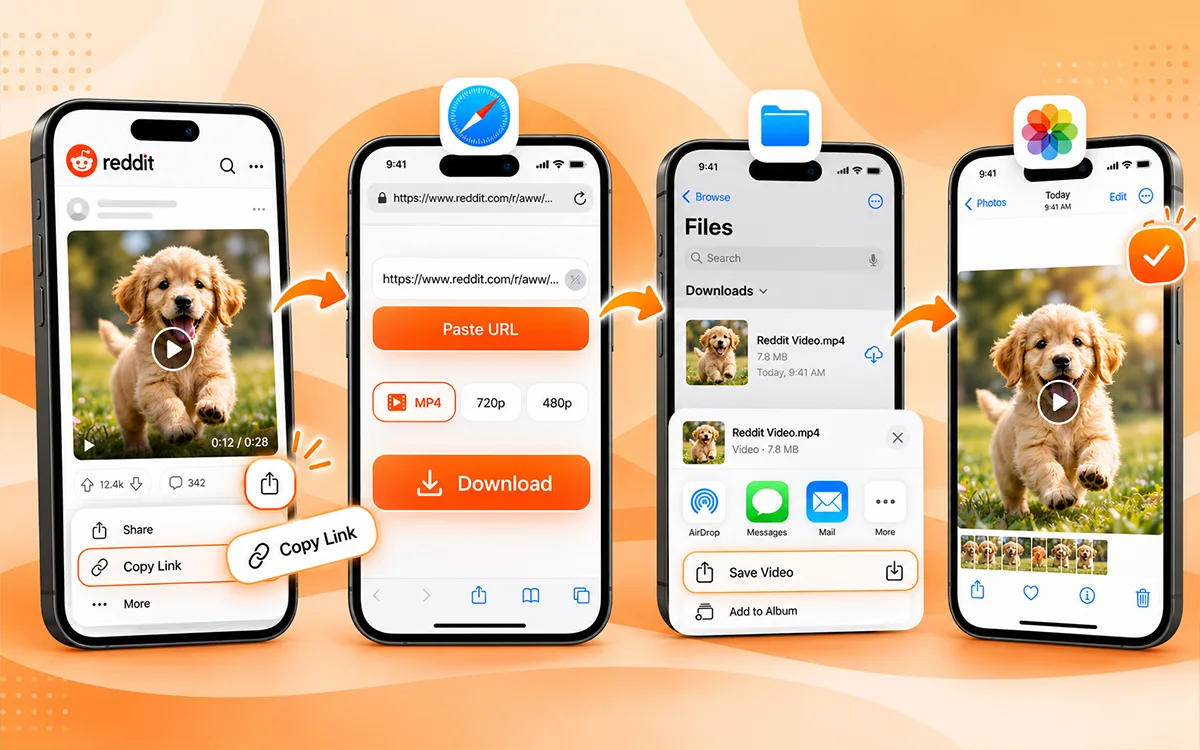
If you have an iPhone, the Safari browser is quite helpful for downloading Reddit videos. Go to the Reddit post, copy its URL and use the online downloader to download one of the available MP4 files.
Once downloaded, follow these steps to save the video to Photos:
-
Open the Files app on your iPhone.
-
Go to the Downloads folder.
-
Tap the downloaded video to open it.
-
Tap the Share icon.
-
Select Save Video to add it to your Photos app.
For instance, let’s say you’ve downloaded a workout tutorial for your gym routine. In case you cannot find it in the Photos application, look for it in the Files app. Apple also has an official guide to finding downloaded files on an iPhone.
Download Reddit Videos on Android
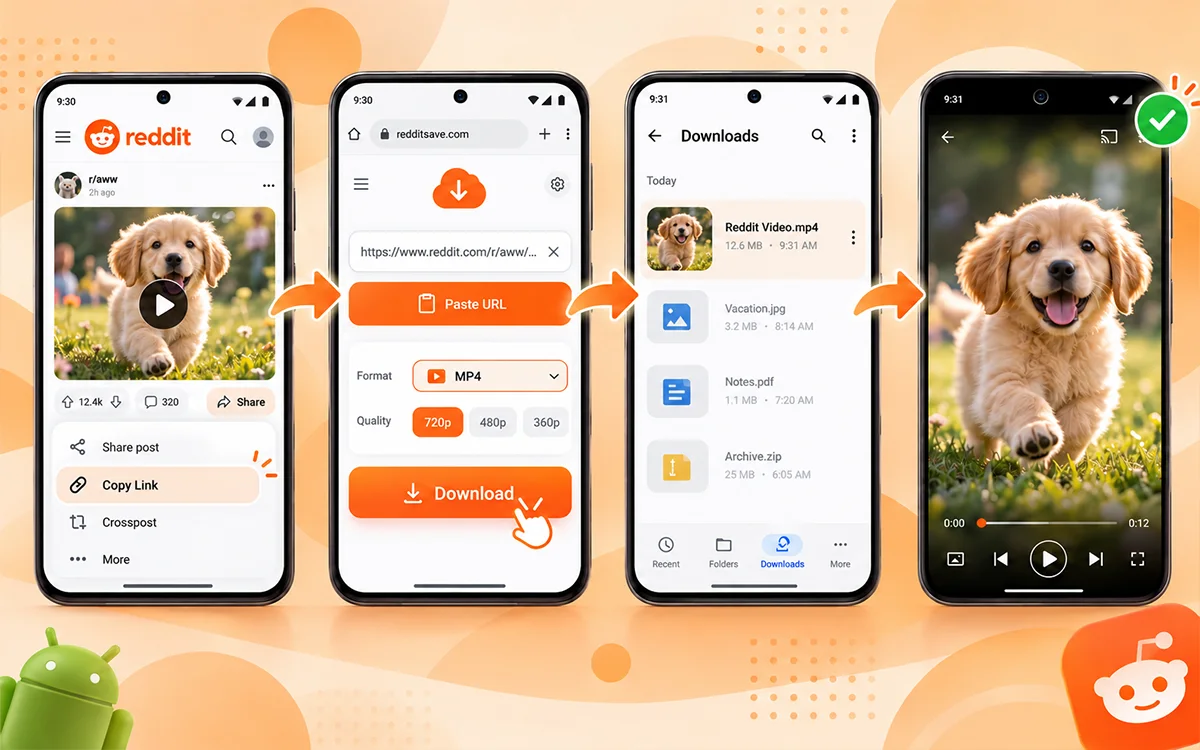
You can download videos through Chrome or another compatible browser, just like on an iPhone. Once you have downloaded your video, use the Files application or any other file manager on your phone.
Look in the Downloads folder first. Not all Android phones automatically show downloaded videos in the Gallery application. It does not necessarily mean that everything went wrong.
Try to open your video right from your file manager. You can also transfer the file into another folder to organize your saved clips.
Download Reddit Videos on PC or Mac
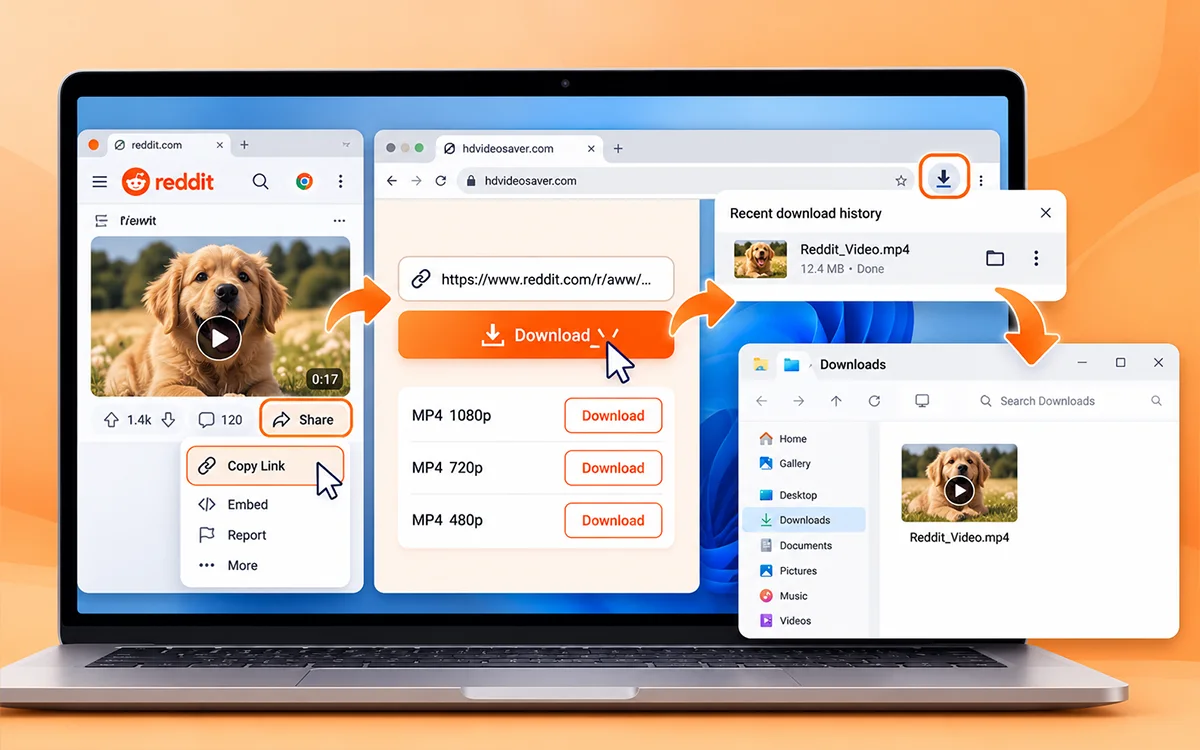
Downloading Reddit videos on a computer is not complicated at all. Just use Chrome, Edge, Safari, or any other browser to use the downloader. Once you save your video, look for it in the Downloads folder on your computer. You can also check your browser's download history if you cannot find the file.
If you want to save several tutorials on your computer, give them understandable names. For example, "Kitchen Tap Repair" will be easier to remember than some random file name.
Can You Download Videos Directly From Reddit?
On some occasions, you might be able to save the Reddit video without the help of another website. Depending on the video and the version of the application, you might find an option for downloading in the sharing menu of Reddit.
Open the video and check for the available options. If you have an option to download the video file, you should follow the instructions on your screen. However, do not confuse this method with Reddit’s Save function. The Save function simply saves the post in your Reddit account. Saved posts may be located via your account’s Saved menu. Reddit explains this in its official guide to saving posts.
So what should you choose?
In case you only want to find the post later, choose Reddit’s Save function. For a video file needed for offline viewing in accordance with Reddit's policies, look for the possibility of its download or employ the appropriate downloading utility.
How to Save Reddit GIFs and Audio Files
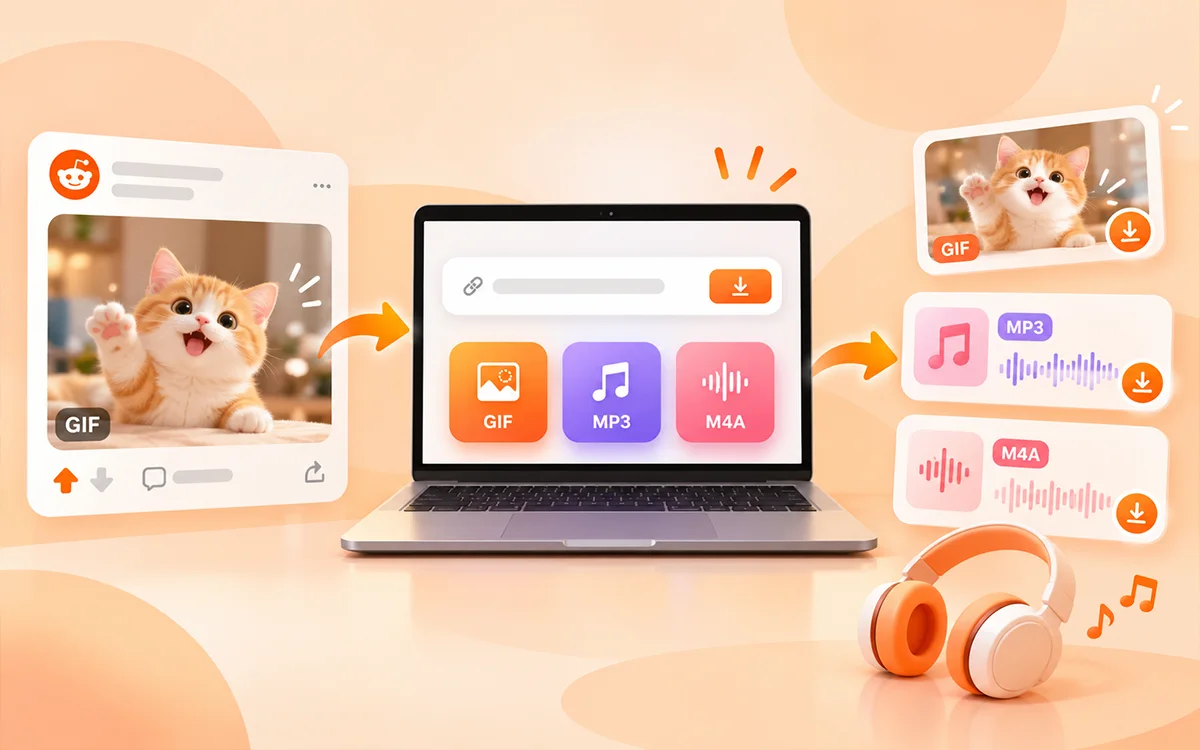
Not all Reddit posts have a standard video. Sometimes the post may include some kind of animation, a short looping video clip, or a video where audio is more important than the visual part. VideoSaver offers a list of GIF downloads and audio files such as MP3 and M4A as part of Reddit tools.
Let us take the case of some funny animated reaction that you want to save. Simply copy the post link and see if there is any MP4 or GIF download available. It depends upon the original file and the current capability of the downloader.
In the same way, you may also look for an audio-only download if the original post contains sound. For example, imagine if you found an audio-based tutorial that you have the right to save. In such a case, an MP3 file would be more practical, as it involves listening to the instructions. MP3 format can easily work on most devices and audio players. M4A is another popular audio format. However, a silent GIF file would not give you any useful audio file.
Why Use VideoSaver for Reddit Videos?
If you wish to download Reddit videos without having to go through difficult procedures, then VideoSaver is your answer. The VideoSaver page includes many formats of media that it supports, along with various resolutions and compatible audio downloads.
You can reach this website through your phone and computer as well. This means that you won’t have to install any browser extensions in order to carry out the procedure. They offer free downloads at standard quality up to 480p and even premium downloads with higher resolutions depending on source quality. In a computer, go to the Downloads part of the browser.
480p might be just fine for some funny videos, but in the case of tutorials where there is some text on the screen, you might wish to get something of higher resolution.
Why Won't My Reddit Video Download?
In some cases, the video will not download despite the fact that all necessary actions were taken. It might come as some comfort that some issues are easily solvable.
The video URL is Incorrect
If you do not know how to download a Reddit video, it might be the case that you have an incorrect URL.
There Is No Audio in the Video
First, play the original video on Reddit. If there is audio in the original video, see if your choice of download option has it. Alternatively, you can use another media player to see if the problem is with playing the video.
The Video Quality Is Bad
The downloaded video may appear blurry because the original video had poor quality. Upgrading the resolution will not add quality that is not there in the original video.
The Downloaded Video Is Not There
In some cases, the video may be downloaded, but it does not appear in the location where it should be. On the iPhone, check the Files application. Android users should check their file manager. In a computer, go to the Downloads part of the browser. Remember to ensure that you have enough free space on the device.
The Reddit Post Is Not Available
There are certain Reddit posts that may be removed, restricted, or not available to the public. It could be impossible for you to download media from these posts. Try downloading another available video to see if it's just one particular link.
Other Ways to Download Reddit Videos
Using an online utility is not the only way. Depending on the type of your device, there might be alternatives to it.
Browser Extensions
There are some extensions that were created for downloading videos from the web. They may be used if you tend to download many videos and would like to have this ability directly in your browser.
However, check the app permissions before installing it, as some apps may ask for access they don't need.
Use a Mobile Downloader App
There are mobile downloader apps that have additional functions like saved file history and offline viewing. Such functions may come handy if you often have to handle your downloads.
However, if you only need this function once in a while, then a browser downloader will probably work better, since there are no other programs to install on top of that.
Record Your Screen
Screen recording is another possibility that might help if a regular download fails and you're allowed to make one.
All the newest iOS and Android allow you to record screens. Though screen recordings are likely to include playback buttons or notifications displayed somewhere else on your screen, as well as some differences in audio recordings depending on the app used. Still, if you can get your needed video in MP4 format, it's generally easier.
Things to Remember Before Downloading Reddit Videos
Before downloading any video, think about how you plan to use it. The fact that a certain video appears in a public Reddit post does not mean that you have the right to duplicate, repost or use someone else's content for commercial purposes.
For instance, having an authorized tutorial for further reference is one thing, while downloading a video and posting it on your business account is another. In case you are going to post someone else's material publicly, make sure that you have the necessary permission and rights for the material. Additionally, you can read Reddit's User Agreement for more details.
Another aspect to keep in mind is choosing a reliable way to download the video. Do not use suspicious websites that ask you for your Reddit password or any software that you do not know just to download a video. Moreover, there is no need to download a video at all if you simply want to view it later.
Frequently Asked Questions
Is It Possible to Download Videos from Reddit for Free?
Yes, VideoSaver allows free downloading up to 480p without signing in.
How to Download Reddit Videos With Audio?
Copy the link, paste it into a video downloader, choose an option in MP4 format with sound.
Is There Any Reddit Video Downloader Without An App?
Yes, one can use an online video downloader without using any application.
How Do I Download Reddit Videos to My iPhone?
One needs to open a video downloader via Safari, download the video file and save it to Files or Photos.
Why Can’t I Download Reddit Videos in HD Quality?
Because the initial video is of poor quality or due to subscription to a premium package.
Conclusion
Now you understand how to download Reddit videos with audio from iPhone, Android, and PC. You can use an online downloader, Reddit’s available download options, or another possible way. What is crucial is copying the right post URL, choosing the appropriate video format, and then making sure that the audio is intact. In case of any issues, make sure first that the original video and your Downloads folder are fine.
Need to download a Reddit video for offline viewing? Use the VideoSaver Reddit Video Downloader. Enter your link, browse the available formats, and pick the one you like. Start with the free version with standard quality or check the premium versions if you need a better video quality. Not only does VideoSaver support downloading content from Reddit. The same program is capable of downloading content from social networks like Facebook, Instagram, and Twitter via Instagram Video Downloader, Facebook Video Downloader, and Twitter Video Downloader, respectively.
These pages have different options, as the platforms offer different content types with their own requirements. Make sure you check the available options for the particular video that you would like to download. For a broader look at the supported platforms, visit the VideoSaver. Download videos that you are allowed to download and have your favorite videos at hand anytime you want.