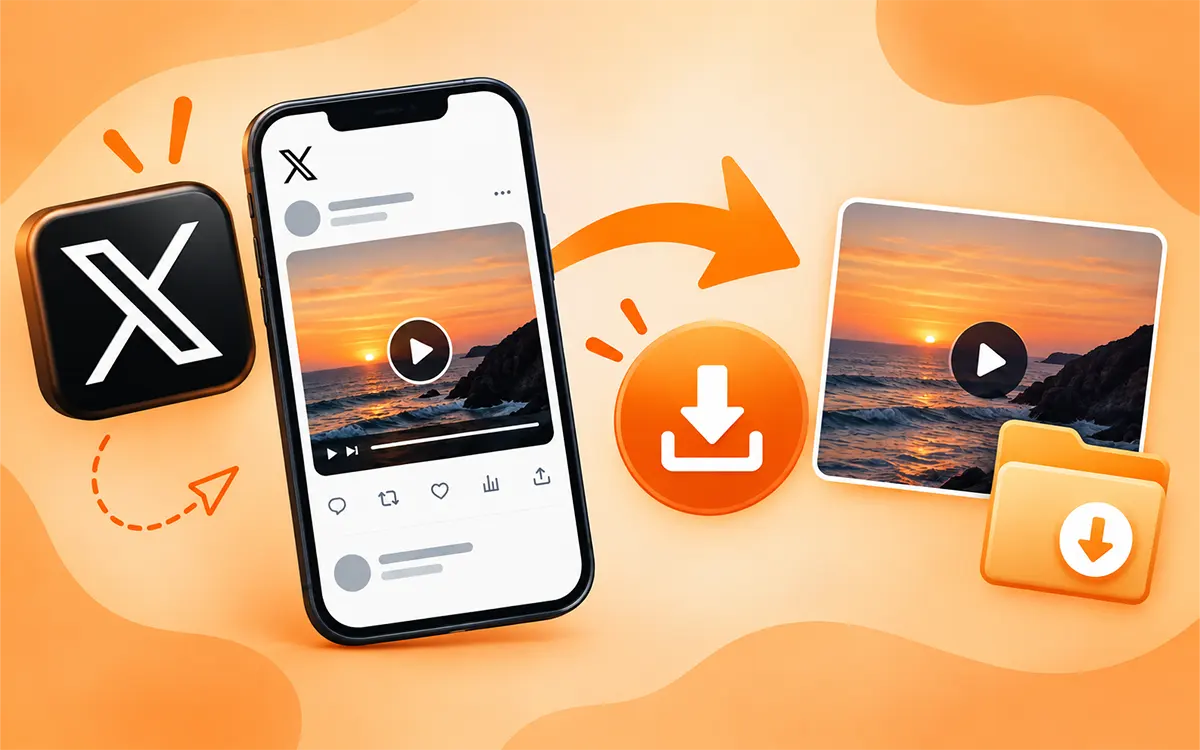
Twitter, which is now known as X, makes it easy for users to watch a post and save it for the future. As you are familiar with the fact that the use of Twitter has drastically increased over the past few years. Maybe there are times you see a video you want to keep so you can watch it later.
The catch is that saving a video is not as simple as right-clicking an image or copying text. X does not always give you a direct download button, it depends on the post or the device you use.
But there is nothing to worry about. You can use our Twitter (X) Video Downloader to save public content. This breakthrough will answer all your questions and everything you need to know to save videos and GIFs from X.
How to Download Twitter (X) Videos Online
To download the videos the easiest way for most people is an online Twitter downloader. You do not need to install any app or Google extension. All you need is the link to the public post with the video. Here is the process that needs to be followed.
- To begin with, open Twitter(X) and find the video.
- Now tap the Share button and press Copy Link.
- Open the VideoSaver Twitter video downloader.
- Then paste the URL in the download box.
- The last step is to select the quality you want to save and press the download icon.
This is how you save a file on your device. VideoSaver is built for easy downloads. It works on any platform and supports up to 4K quality if available.
Download with X Internal Option
Twitter gives you a built in feature to save some posts and it does not support every video. The download option relies on the post, the creator’s settings and current Twitter download elements. If X provides you with the download option, then use it. If it does not, then an online downloader is the best option.
Save Twitter (X) Videos with VideoSaver

VideoSaver is an all-in-one online video downloader. Not only Twitter (X), but you can also save content from other platforms with TikTok Video Downloader, Snapchat Video Downloader, or many others. The process to download the video across all platforms is usually the same.
- Find the Twitter video and copy the link.
- Open any version of VideoSaver and paste the link there.
- Select the quality you want and hit the download button.
No technical skills are needed, and the interface of this tool is very easy to use. The steps are basic and clear to follow. You can save your content in HD quality, and it is suitable for all devices.
Download Twitter (X) Videos on an Android Phone
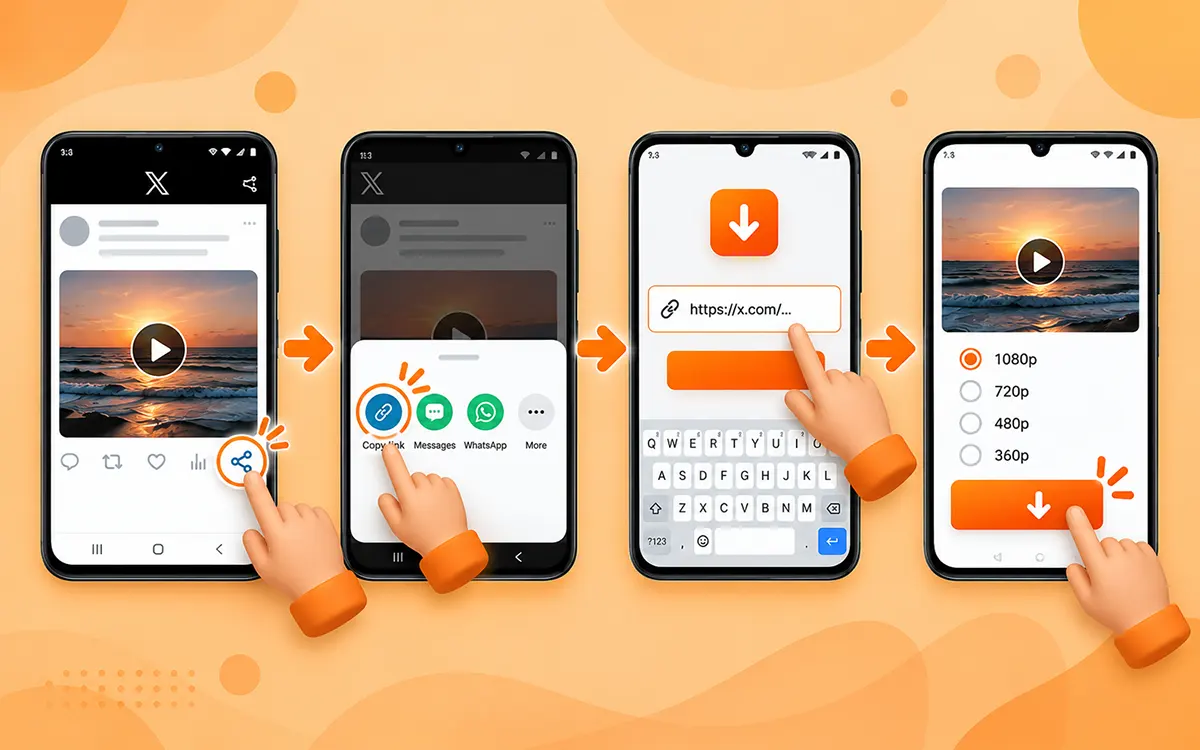
If you are someone who downloads Twitter/X content on a regular basis, use VideoSaver's dedicated Android app. It is the most convenient and fastest way to get your content on your device in seconds. Just follow the steps given below.
- Open the Twitter (X) app on your phone and find the video you want to save.
- Now click the Share icon to get the URL of the video.
- Then go to the app and paste the link into the box.
You will see the quality options; select from them and hit the Download icon.
How to Download Twitter (X) Videos on iPhone
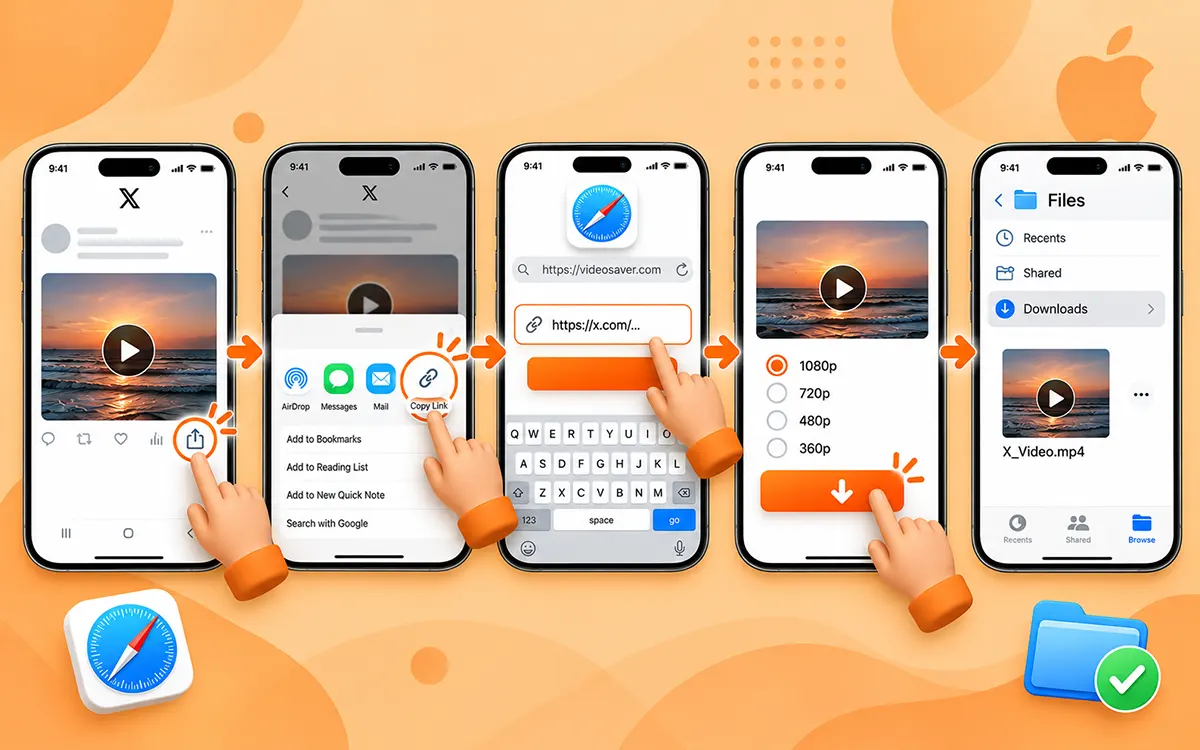
The process on iPhone to save online Twitter/X videos is almost the same.
Use Safari
- First of all open the Twitter/X app and locate the video you want to save.
- Tap the share button and copy the link to the file.
- Next, open Safari and visit VideoSaver and paste the link into the downloader.
- Now after you select the quality, press the download icon.
Once you save the video, check your Files app or your download location to access the content. It may depend on your browser settings or iPhone.
Why Use a Browser on an iPhone?
For your occasional downloads, a browser-based method may be the best and fastest way to save the videos from Twitter/X. It is uncomplicated instead of you installing any software or app. Some external tools or apps may not work when X changes its program.
Capture Your iPhone Screen as Video
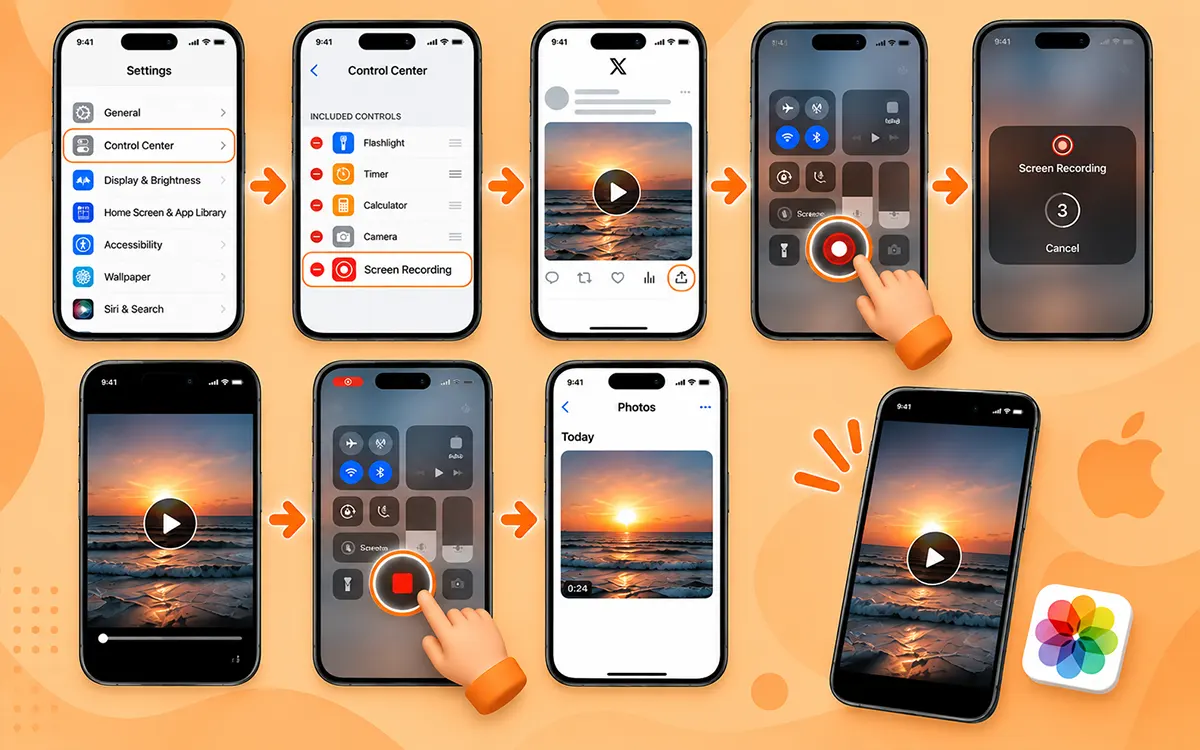
Open Settings and make sure that in Control Center, screen recording is available. This is iPhone’s internal feature to save the content on the device.
- As the first step, open Twitter/X.
- Go to the video you wish to save.
- Now open Control Center on your iPhone.
- Tap the Screen Recording button.
- Wait for the countdown.
- Play the video.
- Stop recording when the video finishes.
- Open the recording in the Photos app.
This method is easy to follow, but the resolution quality may not be as good as the original video on Twitter (X).
Save Twitter (X) Videos on PC and Mac
It is kind of easy to download Twitter (X) videos online on a computer. You can copy the URL of the post from your browser.
Use a Google Extension of VideoSaver
If you are the person who saves content often, an extension is the best option. You are not bound to open a separate website every time.
As VideoSaver is an all-in-one tool, it provides this medium too. The VideoSaver Google extension helps you download supported media conveniently from the browser.
This way makes sense for people who on a regular basis save videos instead of downloading one video sometimes.
- Get the extension on your device.
- Then sign in after you open the Twitter website.
- Now open the video and right-click it.
- Now select Save video as…
Use VideoSaver in Your Browser
This is the easiest way to save your favorite videos. Open Twitter in Chrome, Safari, or another modern browser. You can use the web version on Windows, Mac, and other desktop systems.
- Copy the link to the video.
- Go to VideoSaver and paste the URL in the box.
- Now select quality and click the download icon.
Twitter Videos with Links: Why It Works
It works because most of the online downloaders use a URL linked to the video to save the content. It is the easiest and fastest process to download the content within a few seconds. This link helps the tool to find the video associated with it. This means that you do not have to manually search for a video file. The procedure is simple copy the link and paste it into the input field of the Twitter downloader. This is why you should be careful when you copy the link.
Download Twitter (X) Videos Maturely
Just because you can download a video does not mean that you have permission to use it again. The content posted on Twitter may be protected by copyrights and belong to the original creator. If you save the video for personal use or reference, then it is a different thing from reposting it on other social media platforms. If you want to republish or use the content for business, make sure to ask the creator for permission. When possible give credit to the creator, but it does not give you the permission to reuse the copyrighted content. If you want to use the content in the safest way then make sure to respect the creator's copyrights and legality.
Your Privacy and Security When Downloading
Your privacy also matters most when using an external downloader. You should always be cautious when using other websites or software. Unintall or close the online Twitter/X downloader if they ask for your password or credentials. To avoid any malware always stay alert of unexpected pop ups. Do not give unnecessary permissions to any online downloader to save the videos because it can be phishy and can invade your personal data.
Final Conclusion
To wrap up, it is best to say that which method you choose depends on the device you use and how often you download content. There are various ways for different devices. If you want to save content on an Android phone then install the VideoSaver Android app from the Play Store. You can use its web version on your iPhone. And use the Google extension or web version on your PC or macOS.
Always consider your needs and device, then choose accordingly. Keep in mind to follow all the copyright protocols.
Frequently Asked Questions
How do I download a video from Twitter?
Copy the link to the video you want to download. Now open an online Twitter video downloader such as hdvideosaver.com and paste the link there. Press the download button and get your content on your device in seconds.
Can I download an X video on my phone?
Yes. Whether you are an Android user or an iPhone user. You can use the VideoSaver Android app and use its web version on iPhone.
How to save Twitter videos on PC?
To save on PC, open Twitter/X in your browser and get the link to the video. Go to VideoSaver and put the link in the input field and press the download icon.
Can I download a Twitter GIF?
Yes. Using VideoSaver, you can download GIFs as an MP4 file. Simply copy the link and paste it into the box.
Do I need my X password?
No. A reliable online tool does not ask for your Twitter/X password or your other personal information.
Is it free to download Twitter video?
Yes. You may find plenty of online downloaders free. But these tools may show unnecessary ads or redirects, which can sometimes be harmful.
Is it safe to use VideoSaver?
Yes, it is. VideoSaver is a secure third-party Twitter video downloader. It keeps all of your details and history hidden and follows all the security protocols.
What quality can I download videos in?
With VideoSaver, you can download your content in the highest quality available, up to 4K when supported.
Are downloaded videos free of watermarks?
Yes. VideoSaver helps you to download the videos without any watermark or logo. You get a clean video on your device without the need to use any other software to remove the watermark.
Why won’t my Twitter/X download?
There can be multiple reasons that you are unable to download the video. The video may be removed, your internet may not be stable, or the file may be private.