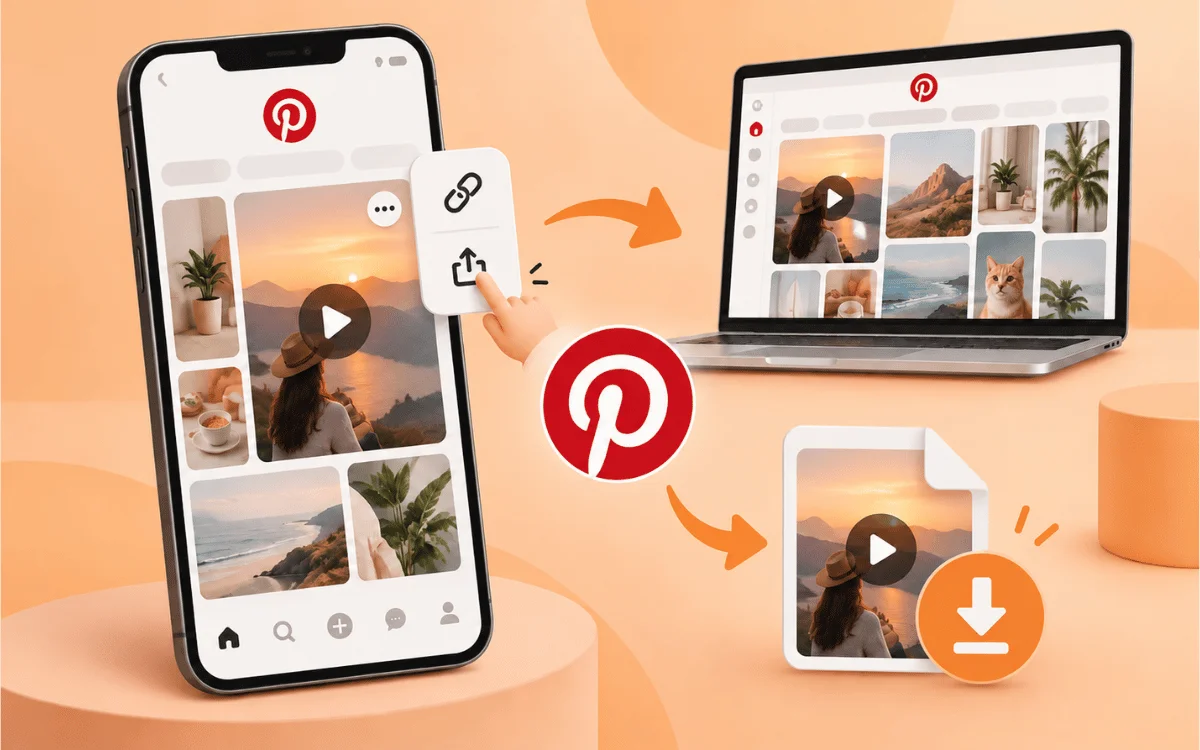
Pinterest has a wide range of content including recipes and decor ideas as well as styles and much more. People really enjoy sharing videos on the network since they are convenient to watch and share. Downloading videos from Pinterest has become a trending process as people desire to save their videos.
There are thousands of videos that Pinterest shares through its users and people have a possibility to save videos to Pinterest itself but not to their computer or cell phone. People would like to save those videos just like on other social media platforms.
Pinterest offers lots of things that you can look at and save but downloading videos isn't one of them. The one thing that Pinterest doesn't provide is downloading video files to your computer, which you can do using VideoSaver.
Here you will find out how to download videos from Pinterest to your computer and cell phone. Besides you will learn about the quality, kinds of videos that you can save, as well as solutions to some possible issues.
Note: Please only download videos from Pinterest for personal use and with permission from the creator. Anyone who pins a public pin still owns it.
Why Download Videos from Pinterest
There are some very specific reasons why people choose to save videos on Pinterest. For instance, watching an instruction video may be much more convenient without a stable Internet connection.
The content creator tends to keep such files as an example for an upcoming editing, mood boards, or a client's presentation. And others just keep such videos because pins may be lost anytime or deleted by their creators. And whatever your reason is, owning a file is much more than just using the application
Why Can You Not Just Save a Pinterest Video
There is no video file hosted by Pinterest. Rather, it streams videos using its unique distribution mechanism. This explains why the right click on a video hosted on Pinterest will rarely show you an option for downloading the video.
The Save button in Pinterest merely enables you to save the video in your Pinterest boards and not save it as a file on your computer.
You will need software that can extract the video file from the given link.
Does Pinterest Offer Its Own Download Option
Some videos on Pinterest allow users to download the content directly. This feature becomes available only when the owner of the pin allows it to become available, and in any case, the video will contain the watermark of the creator.
You can find out whether this is possible for a particular video by opening it, tapping "Share," and looking for the "Download" button. If there isn't any, you won't be able to use this feature.
What Else Makes Video Saver a Good Choice
All downloads are provided to you watermark-free and without any logos attached. There are no popups, ads, or anything else distracting that you have to watch during downloading. VideoSaver behaves in the same way on all devices, so you can run the service either in a browser on Android, iPhone, Mac, Linux, or PC or in the native Android application.
When downloading frequently, you may need the Chrome Extension, which allows you to save videos from Pinterest right from the page you visit. VideoSaver provides downloads at no cost and never tracks your download history.
Before You Start: Find the Correct Pinterest Link
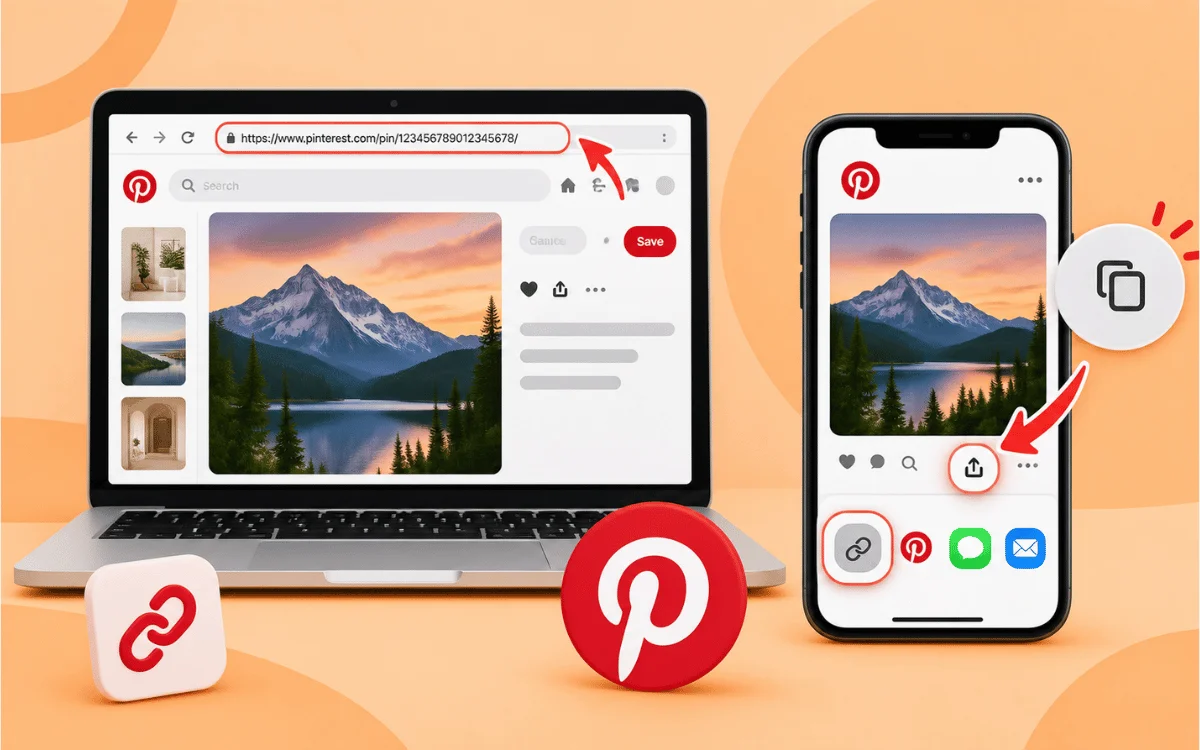
Each video on Pinterest comes with a link beginning either pinterest.com/pin/ with a string of numbers after it or pin.it/, which both are compatible with almost all of the downloaders you will use.
How to Download Videos from Pinterest (Step by Step)
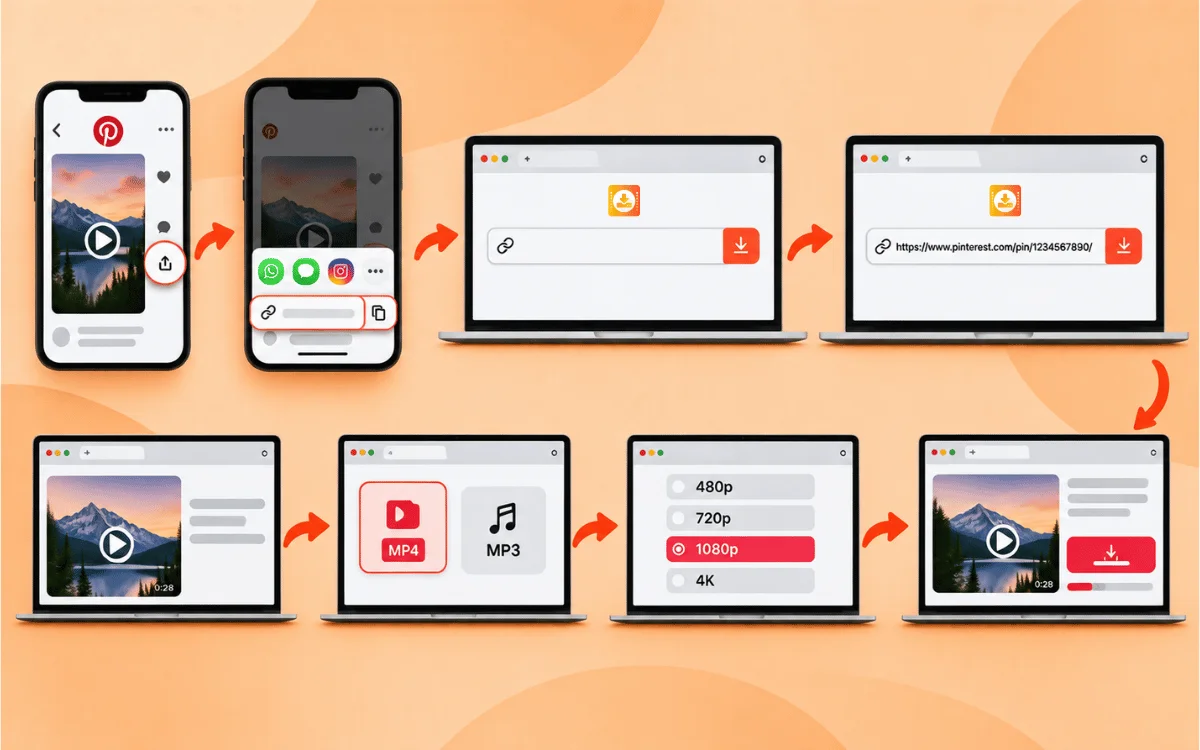
Downloading videos from Pinterest is easiest if you use a website tool such as VideoSaver. No installation is required, as the software operates via your browser and the process takes less than 15 seconds.
-
Copy the video link on Pinterest. Click on the Pinterest video you want to download and then click the Share button and Copy Link.
-
Open VideoSaver Pinterest Downloader. Visit VideoSaver through your browser.
-
Paste the video link into the search bar. As the website recognizes the link automatically, there is no need to select the platform.
-
Wait for the preview to load. When the video appears in the preview pane, its thumbnail will be shown along with the video length.
-
Select the format. To download the whole video choose MP4 and MP3 for only audio part.
-
Select the resolution. Pick the one that suits you the most; the maximum available is 480p in case of free registration or 4K when registered.
-
Start downloading. The file downloads directly to your computer without a watermark and additional steps.
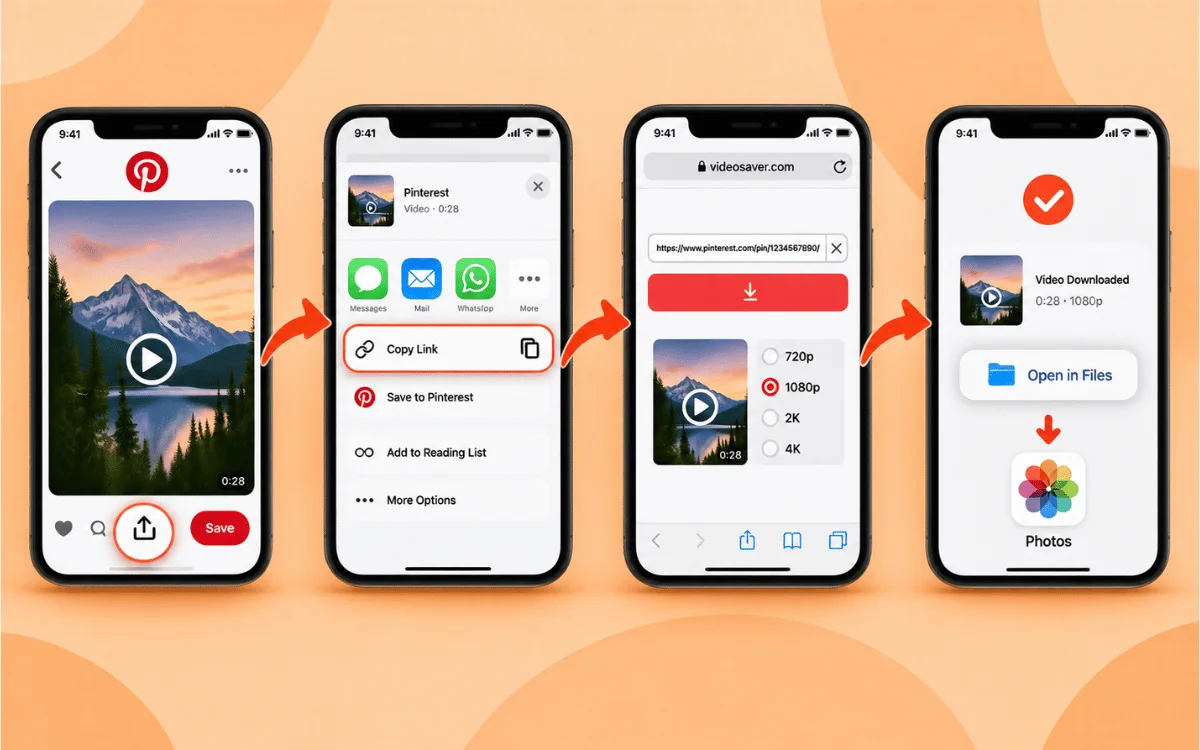
For iPhone or iPad
-
Open the Pinterest app and locate the video you want to download.
-
Tap Share and then Copy Link.
-
Paste the link into the downloader of your choice and pick your quality.
-
Tap on download. The file will be stored in the Files app and can be moved to Photos.
For Android
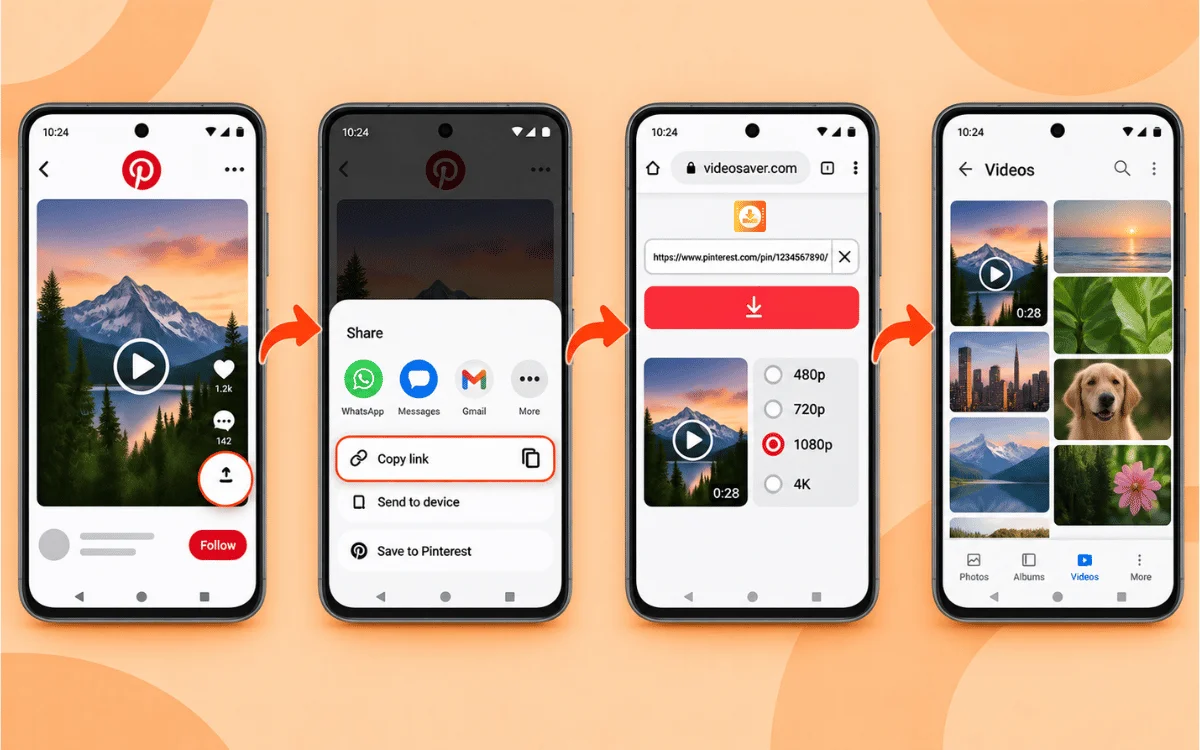
-
Open Pinterest and navigate to the video or GIF that you wish to download.
-
Tap Share and copy the link.
-
Paste the link in the VideoSaver downloader in your browser or use the VideoSaver Android app for a fast in-app download.
-
Select the quality and click on download. The video will appear in your gallery in a matter of minutes.
Windows, Mac, and Linux
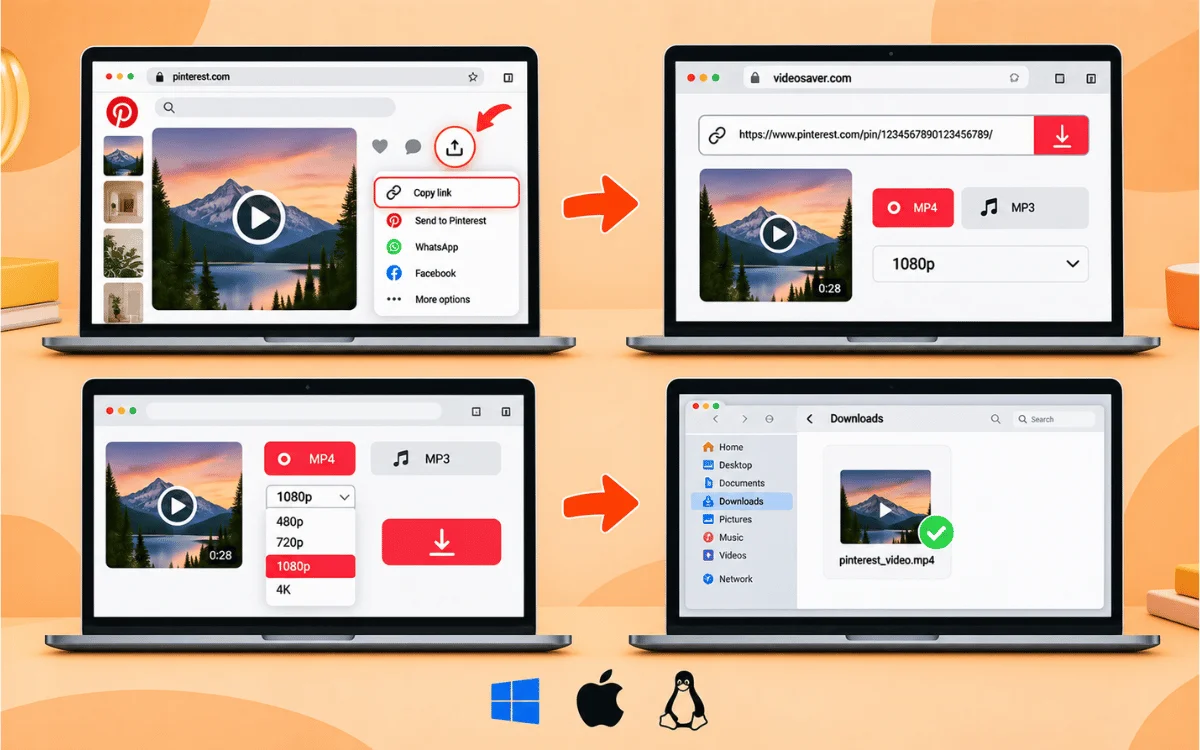
-
Open the Pinterest website in your web browser.
-
Navigate to the video that you wish to download and tap on Share and copy the link.
-
Paste it in the downloader of your choice and select the desired format and quality.
-
Click on download, and the file will save in your Downloads folder.
Screen Recording as a Last Resort
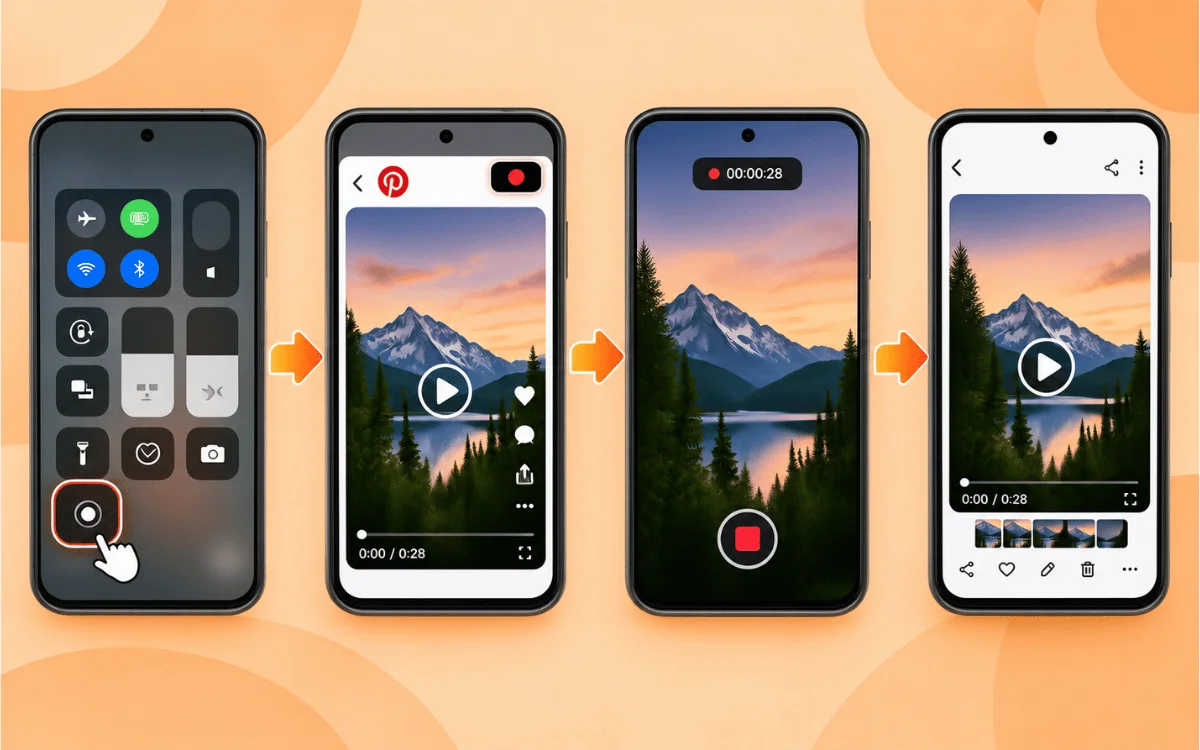
Where there is no app that allows you to download the video, you can turn to your device’s native screen recorder for help. Just begin recording, play the video in full-screen mode, and then stop recording right after the video stops. The quality will always be inferior to the original, and post-recording editing might be required.
What You Can Download From Pinterest
Apart from regular videos, Pinterest also has tutorial clips, DIY videos, and multi-page Idea Pins, which you may also download in their MP4 form. Short looping clips will be saved as MP4 files, which you can reuse as a reaction or meme video.
In case you only need the audio track of a certain clip voiceover or background music, you can save it as an MP3 file instead of the whole video.
What Quality Is Provided
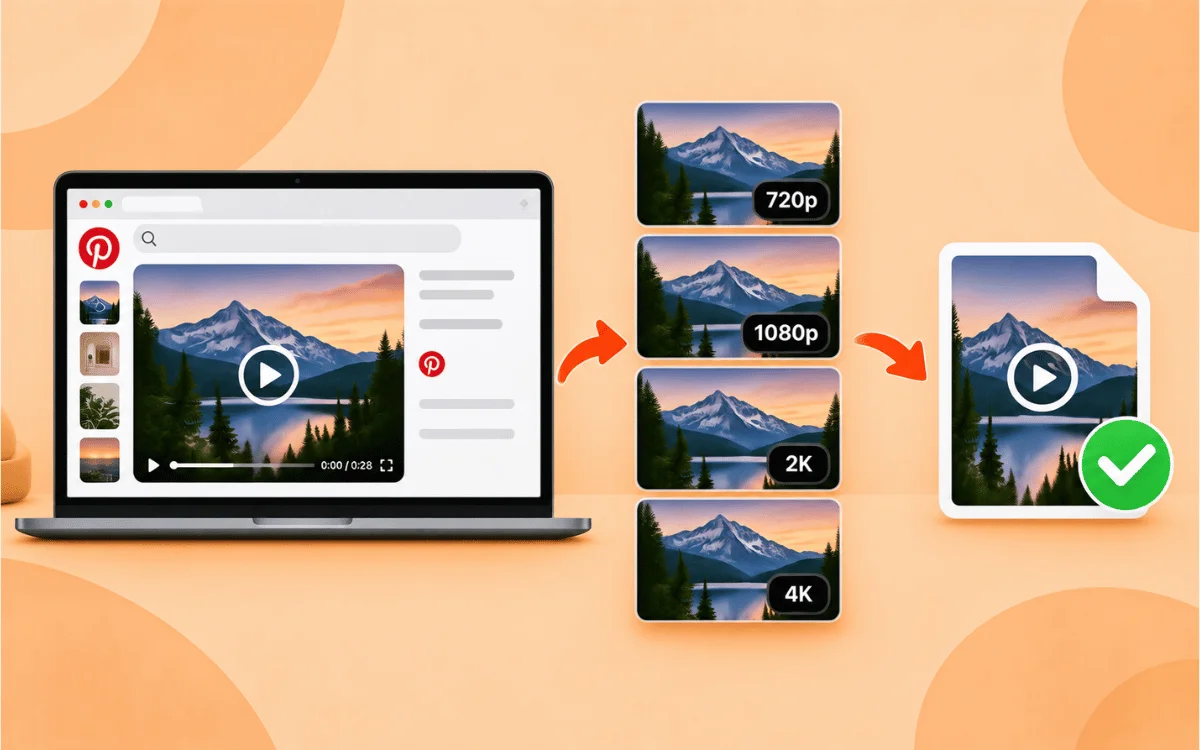
The videos downloaded from Pinterest have a standard resolution of 720p or 1080p. The quality, obviously, depends on the format of the original video uploaded by its author. Old or rare clips may have only standard quality.
Do not expect any magic from a tool promising to download 4K quality videos from any pin. Most likely, it will be an upscale of a lower-quality file rather than a genuine 4K video, as not all videos on Pinterest are uploaded in 4K.
VideoSaver downloads videos in their best possible quality that Pinterest offers: up to 4K resolution.
What Cannot Be Downloaded
Some information found on Pinterest cannot be downloaded under any circumstances by any tool. These include links to invite collaboration to boards or access private, deleted, or password-protected pins. There is no possibility of downloading a higher resolution of a pin than Pinterest initially offered. Static images or multi-image carousels should be downloaded using an image saving tool rather than a video downloader.
Can a Whole Pinterest Board Be Downloaded at Once
The procedure discussed above works just fine for 1-2 videos. However, downloading all videos from an entire board manually one-by-one is rather tedious. To download all videos, visit individual video pins and use copy and paste procedure or the VideoSaver Chrome extension to save videos without leaving the board in the new tab.
Common Problems and How to Fix Them
-
The pin won't download or is showing an error message. Try to ensure that the pin isn't locked to particular accounts only. If you can view it using the Pinterest website while logged in, follow the above procedure while using the same session.
-
The video is still being processed. Since it has been posted a couple of minutes back, it may require some time for full encoding. Wait for about 5 to 10 minutes and then attempt to proceed.
-
The file won't play. Some pins by the name of Pinterest videos are encoded using the HEVC (H.265) format, which may not play on all phones and even basic media players. Try opening it in VLC or any other media player that supports the H.264 format.
-
You have entered the link, but nothing happens. Ensure that you have entered a valid pin or pin.it link and not a board or search results link.
Is It Legal to Download Videos from Pinterest
This is not really about whether you can download the video at all, but rather about your intentions with the video.
It is fine if you intend to save it to use for yourself later, for example, for viewing the tutorial without an Internet connection or saving a video you liked. Pinterest rules do not allow you to download videos posted by other people and use them again in your account. Posting the work of another creator, using it in your monetized video, or putting in your commercial project is something else and could be considered a copyright infringement.
If you are planning to use a certain creator's video in a public way, it is better to find its original source and contact the creator for permission.
Conclusion
In conclusion, this article helps you learn how to download videos from Pinterest depending on your preference, whether the clip is in a standard format, Idea Pins, GIF, or only the audio. Copy the pin URL, input it in a reliable program, choose the desired quality, and save the video to your computer.
Start Saving Your Favorite Pinterest Videos Now
Pinterest may lack a direct downloading option, but that should not be an obstacle to saving a video. Copy the URL, paste it into VideoSaver, and download the file to your computer in seconds with no registration and payment required. Download Your Pinterest Video Now!