YouTube Shorts are a popular way to watch quick tutorials, music videos and creative content. Sometimes, you may want to save a short for offline viewing or keep a copy of your own content. But how do you download YouTube Shorts on your phone or computer? If you do not know the answer, then probably you hit the sweet spot.
In this guide, we will explain how to download YouTube Shorts, explore the available download options, and answer the most common questions about video quality, devices and troubleshooting. If you're looking for all content then visit our How to Download YouTube Videos to explore more.
What Are YouTube Shorts?
YouTube Shorts are short form videos designed for quick and mobile friendly viewing. Like other YouTube videos, Shorts can be watched through the YouTube app or website. Just know that saving a Short as a separate video file is different from bookmarking it or using the internal offline viewing feature of YouTube.
There are several ways to keep a short accessible, and that depends on your needs.
- Save it to a playlist
- Keep the Short in your YouTube account so you can find it later
- Use the offline feature of YouTube
- Download eligible content within the YouTube app where the feature is available
- Download your own video
- You can retrieve your uploaded content through YouTube Studio
- Use an authorized download tool
Save content when you own it or have the necessary permission, and the service supports the video to do so. Understanding these options helps you choose a method that suits your device and intended use.
How to Download YouTube Shorts With VideoSaver
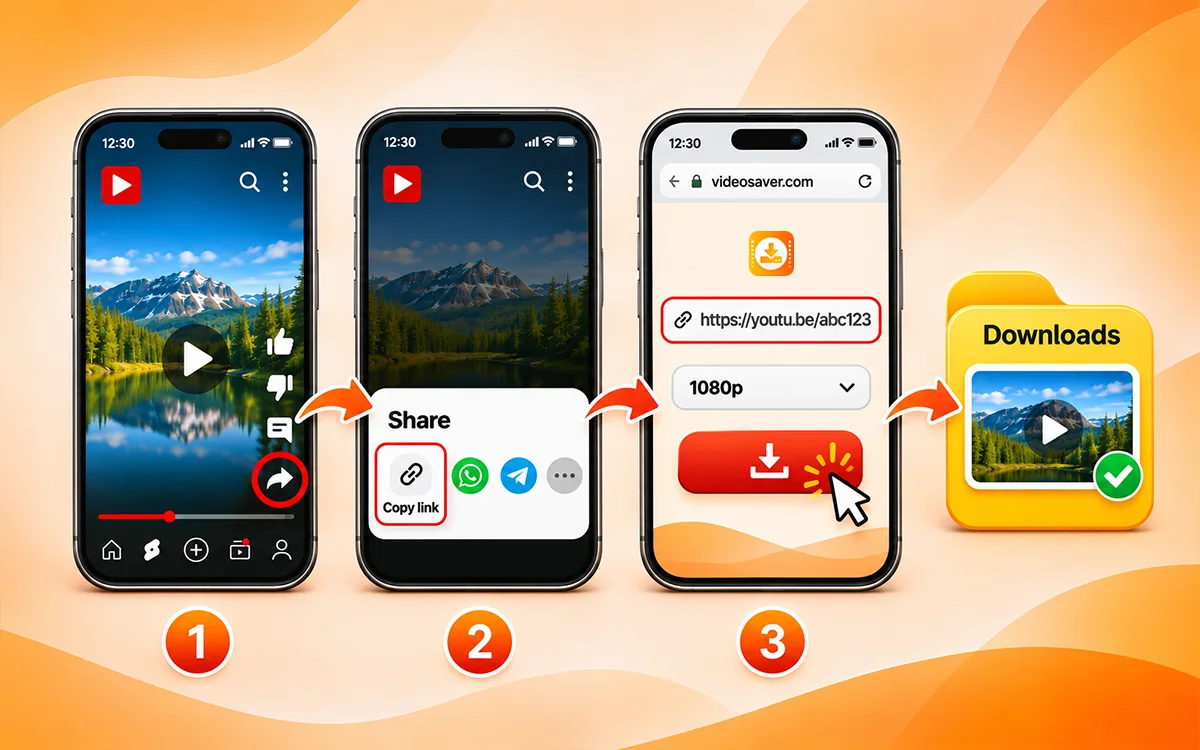
If you have permission to download a short, a compatible videosaver online downloader provides a convenient way to save it without installing desktop software.
-
Follow these steps when using a supported service.
-
Open the YouTube app or visit the website in your browser and find the short you want to save.
-
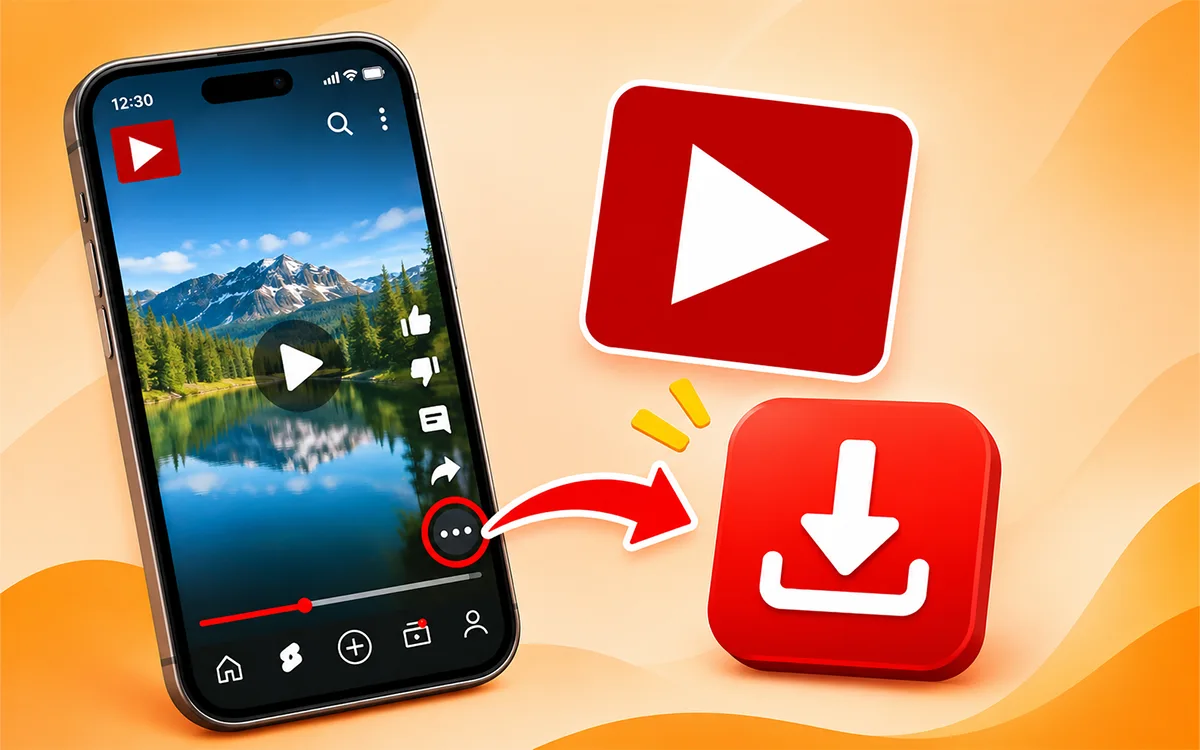
Now open the Short and tap the Share button to copy its URL.
-
On a computer, you can usually copy the URL from the browser's address bar.
-
Then visit the VideoSaver YouTube Video Downloader page in your browser.
-
Paste the link in the input field and select from the available quality options and press the download icon.
Once the file is saved, then open the Downloads folder or file manager of your device to locate it.
How to Download YouTube Shorts on Android
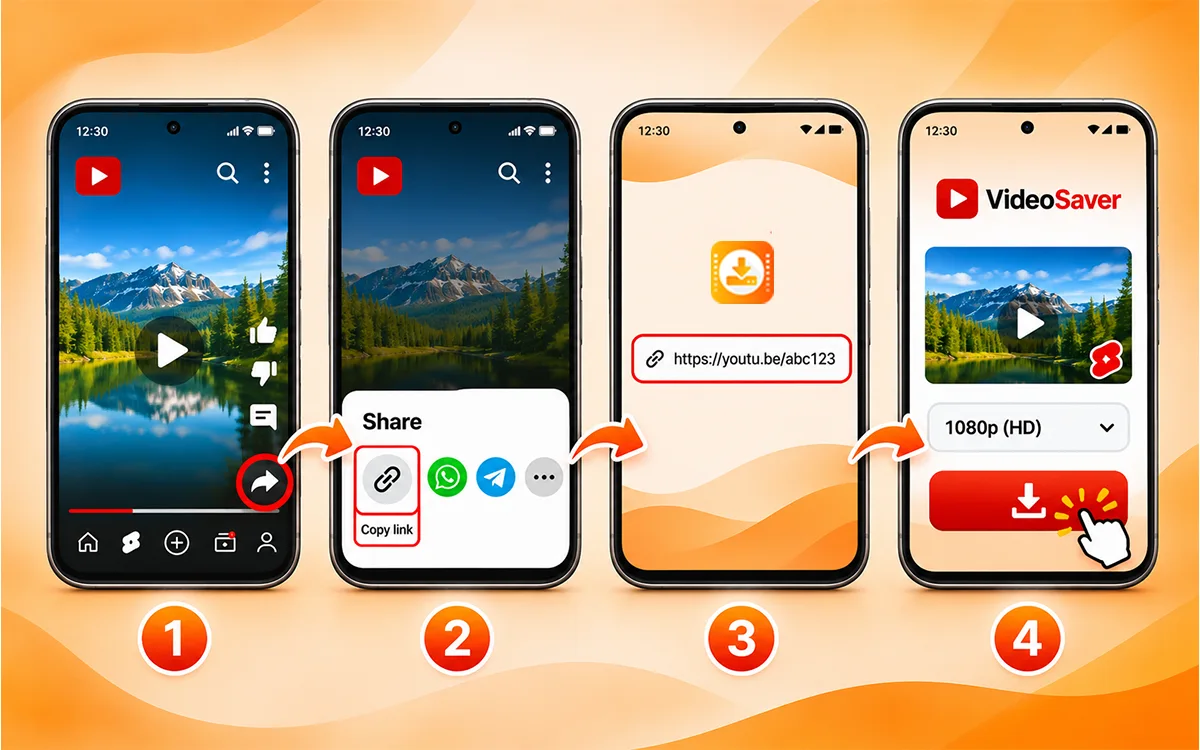
Android phones make it easy to watch Shorts on the go. If you want to keep a video to access it when you do not have an internet connection available offline then first check if YouTube offers a built in download option for that content. Otherwise, the VideoSaver tool is an effortless and fast way to download the content on Android. Follow these steps for a video you own or are allowed to download.
-
To start with open YouTube on your Android phone and find the short you want.
-
Then tap Share and select Copy link of that specific Short.
-
Open the VideoSaver tool and paste the link into the box.
-
Finally select an available format and quality and press the download button.
How to Download YouTube Shorts on iPhone
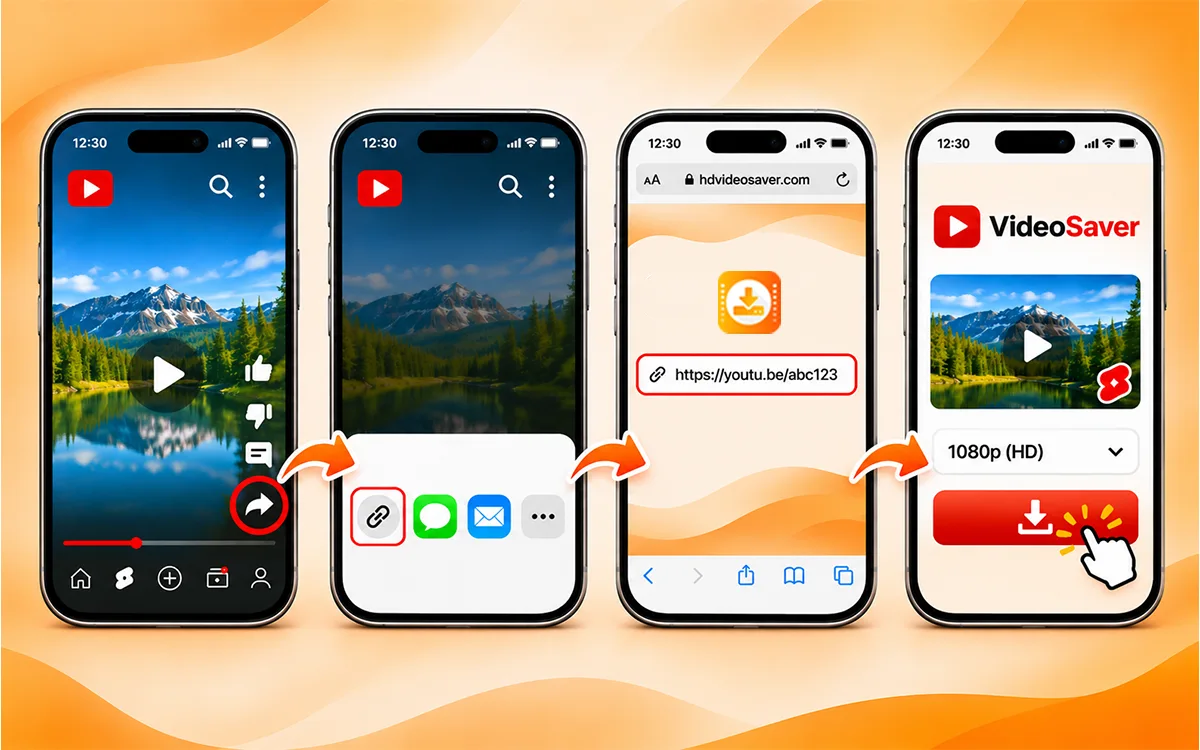
You can access YouTube Shorts on an iPhone through the VideoSaver web browser. The available saving options depend on the content and the method you use. Follow the simple steps given below to get the content on your device.
-
To begin with, open YouTube and locate the short you need to save.
-
Once you find your preferred Shorts, get the link to the file.
-
Open Safari or another compatible browser and go to VideoSaver.
-
Then paste the copied link into the box and press the download button after reviewing the available options.
Can I save YouTube Shorts directly to the Photos app?
Not necessarily. Browser downloads commonly go to Files instead of Photos. If you have a video file you are permitted to save then you may be able to move it to Photos using the available sharing or saving options.
Remember that through offline downloads of YouTube the content is stored in the app for playback there. They do not become ordinary video files in the gallery of your iPhone.
How to Download YouTube Shorts on Mac or PC
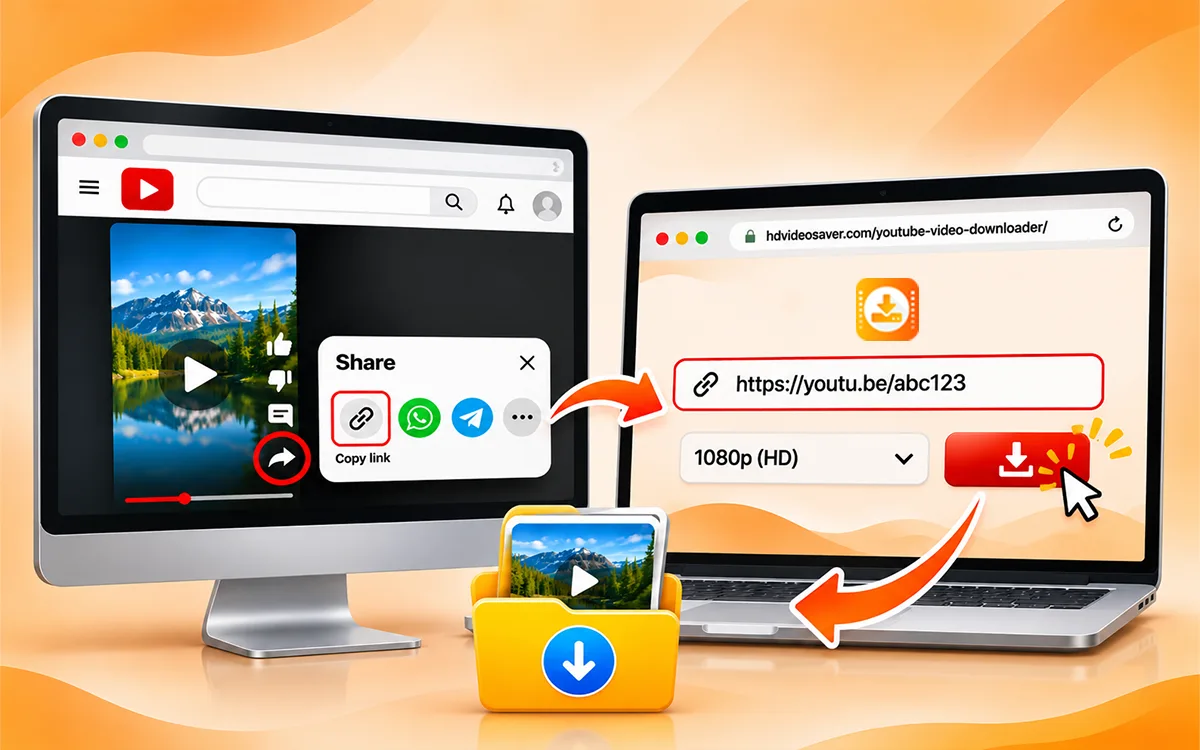
No matter what device you use, downloading YouTube Shorts is a seamless process irrespective of the device. All you have to do is go to VideoSaver in your browser and copy the link of the short to paste it into the downloader.
Download YouTube Shorts Directly in Your Browser with VideoSaver
Prefer not to install an extension? You can visit VideoSaver in your browser to explore its YouTube video downloading options. This approach can be convenient on compatible desktop and mobile browsers.
-
Start by finding the short you want to save in the YouTube app or website.
-
Once you find it, then tap the Share button to copy the link to it.
-
Open the VideoSaver YouTube Video Downloader in your browser.
-
Now enter the copied link into the input box and hit the download button.
Once the download is complete, check your device's Downloads folder or file manager to find the video.
How to Download YouTube Shorts in HD
Video quality is an important factor when saving a short. A higher resolution file can look clearer on a larger screen but it may also take up more storage space. Depending on the original upload and the service, you may see the given options:
-
360p: Suitable for smaller files and basic viewing.
-
480p: A standard-definition option for everyday use.
-
720p: High-definition video with a balance of clarity and file size.
-
1080p: Full HD, when available.
-
Higher resolutions: Available only when supported by the original source and the service.
These are common video resolutions, not a guarantee that every option will be offered for every short.
How to Download Your Own YouTube Shorts
If you created and uploaded a short yourself, then YouTube provides an official way to retrieve permissible uploads.
-
At first open YouTube Studio and sign in to the account through which you uploaded the video.
-
Open Content.
-
Locate the Short you want to download on your device.
-
Open its options menu.
-
Select Download if the option is available.
The availability of downloads on YouTube can depend on the video's status and other restrictions. For a larger collection of your own uploads, Google Takeout may also be useful.
This is a good starting point when you need an original copy of your content for backup, archiving, or further editing.
Common Problems While Downloading YouTube Shorts
Sometimes a download does not work as expected. The issue may be related to the URL you copied from the source video or current limitations of the services. The following can be some of the errors.
The Short Link is Not Working
Check that you copied the complete URL and that the original video still opens on YouTube. Some services may not recognize every link format. If the content is private or restricted, removed or otherwise unsupported then a third party service may not be able to process it.
The download button does nothing
If your download button is not working then check your internet connection and browser download settings. If the page is stuck, refresh it and try again later. Avoid clicking suspicious pop ups or installing unknown software to force a download.
The video quality is lower than expected
The original video may have been uploaded at a lower resolution, or the service may not provide the highest available quality. Check the source and review the options actually offered before saving the file.
The downloaded video has no sound
Check whether the selected format includes audio and whether the media player supports the file. Some formats or processing methods may keep audio separately. If the problem continues then try an official viewing option or another authorized copy of the content.
The video will not play on my phone
Confirm that the file finished downloading and that your device supports its format. Try opening it with a compatible media player. If the file is incomplete or corrupted then remove it and get a valid copy from an authorized source.
Frequently Asked Questions
How do I download YouTube Shorts?
The process is very simple and fast to follow. Copy the link of the short you want to download and paste it into the VideoSaver box and press the download icon. Within seconds the file will be downloaded to your device.
Can I download Shorts without a watermark?
Yes. VideoSaver lets you download the content without any watermark.
Can I download YouTube Shorts in MP4 format?
MP4 is a common video format, and some download services offer it. Check the available options for the specific video before proceeding.
Am I able to download YouTube Shorts in an MP3 file?
Yes. You can download YouTube Shorts in MP3 format with a third party tool. But keep in mind that the internal feature does not give you this format option.
Where are downloaded YouTube Shorts stored?
Official YouTube offline downloads are stored inside the YouTube app. Ordinary video files downloaded through a browser are usually stored in your device's Downloads folder or another location you selected.
Can I download private YouTube Shorts?
Private videos have access restrictions, and you should not try to bypass those. You can use your account's available management or download options if the video belongs to you.
Can I download deleted YouTube Shorts?
If a short has been removed and deleted from the original resource, then a downloader may not be able to retrieve it. If the video was posted by you, then you can check the device backup.
Can I save multiple YouTube Shorts at once?
Yes. There are online downloaders that allow you save multiple Shorts from YouTube at once.
Why does my downloaded Short have lower quality?
The original upload, available source stream and download method can affect the quality. Choosing the highest quality available does not restore details that were absent from the original resource.
Is it legal to download YouTube Shorts?
The answer is not simple because it depends on various factors like the content or source you want to save the Short. It also varies on the permission you have and applicable law.
Can I use YouTube Shorts for commercial use?
Yes. If you have permission and the right from the original creator to reuse it for commercial use. Without the consent of the creator, do not use the content on other social media platforms except for offline personal use.
Do I need to create an account to download the YouTube Shorts?
No. You do not need an account if you want to save the content with third party tool. All you need is the link to the short and paste it into the downloader.
Final Verdict
Downloading YouTube Shorts can be useful when you need offline access to your own videos or other content you are allowed to save. The method you choose depends on your device, the available video quality and the permissions related to the content.